

The strength of HULFT seen in job integration


In this column, Akimichi, a technology writer with extensive knowledge of internet infrastructure, reports from his unique perspective on the benefits of using HULFT, which supports companies' data integration platform, and the technologies that support safety and security. For those who only know the name HULFT, he provides an easy-to-understand overview of the basic functions and file transfer.
Part 4: HULFT 's Strengths Seen in Job Integration
Last time, we provided an overview of how file transfer are performed using HULFT.
This time, we will introduce the job integration mechanism using HULFT.
HULFT jobs are executed on the host that executes the jobs.
With HULFT, you can execute jobs before and after file transfer.
The type of job to be executed for a particular file transfer is configured on each host.
For example, when a specific file transfer is performed, the job that is performed before the file is sent on send side is configured on send side, and the job that is performed after the file is received on receive side is configured on receive side.
At first glance, this may seem like a no-brainer, but it is a very important point when understanding how HULFT works.
The ability to configure jobs individually for each host ensures flexibility for the entire system when using file transfer.
For example, let's consider the case where one send host file transfer to three receive hosts, as shown in Figure 1.
Figure 1
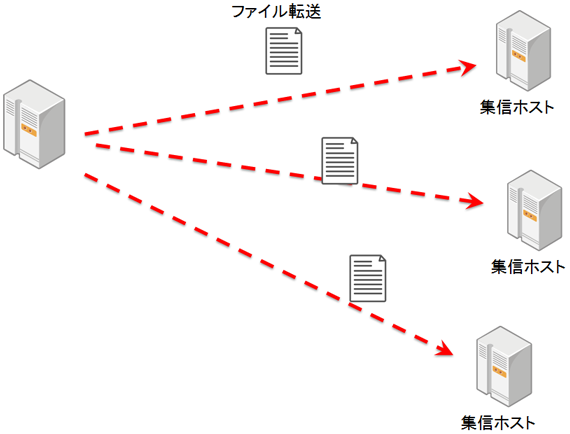
In HULFT, jobs that are executed on receive side are set on receive host.
Therefore, even if the three receive hosts perform different tasks after file transfer, the tasks performed on send host will not change.
Also, even if you change the job settings on one of receive hosts, the other two will not be affected.
This example shows a 1 to 3 file transfer, but this design becomes even more powerful when you have a complex configuration where a large number of hosts file transfer to multiple hosts as needed.
ID used in HULFT
HULFT file transfer are performed using an identifier called an "ID."
This ID is also a major feature of HULFT.
HULFT is software that can file transfer while absorbing the differences between various platforms, including general-purpose computers.
There are many differences between platforms, but the file system in which the files are stored is also an area where ingenuity is required to realize file transfer mechanism that is compatible with multiple platforms.
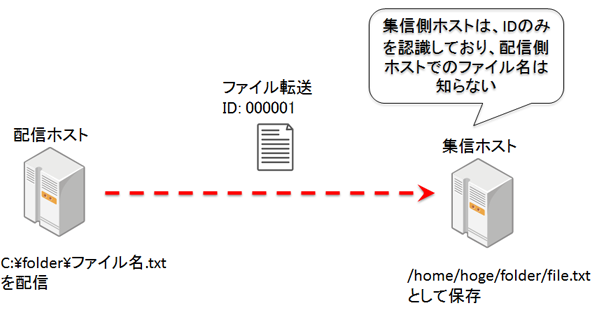
For example, suppose there is a file called "C:\folder\filename.txt" in a Windows file system.
When transferring this file to a mainframe, the issue arises of what file name to give it on the mainframe side.
Older general-purpose computers may not be able to handle Japanese file names, and may not even have the concept of folders.
File names that depend on the file system on send side may not be usable as is on receive side.
file transfer with HULFT are achieved by transferring an ID and the file data indicated by that ID, rather than the file name used in the file system on the send side.
On send and receive sides, settings for a specific ID are configured in advance by the administrator.
When file transfer using that ID is performed by HULFT, the file to be transferred on send side and the file name to save the file on receive side are set individually.
As mentioned earlier, job linking settings are configured individually, but jobs are configured according to ID settings.
The job that will be executed when file transfer occurs using a specific ID is also set for each ID.
file transfer settings are configured separately on send and receive sides using an identifier called an ID, but the ID to be used must be consistent between the administrators who configure send and receive sides.
HULFT job integration and responsibility demarcation points
HULFT 's job linking mechanism may seem unique, but it is extremely useful when file transfer between different organizations.
For example, consider the case where Organization A and Organization B use HULFT to file transfer, as shown in the following figure.
The only thing that organizations need to coordinate with each other is the ID when performing HULFT transfers.
You don't need to know what jobs are running on the other host.
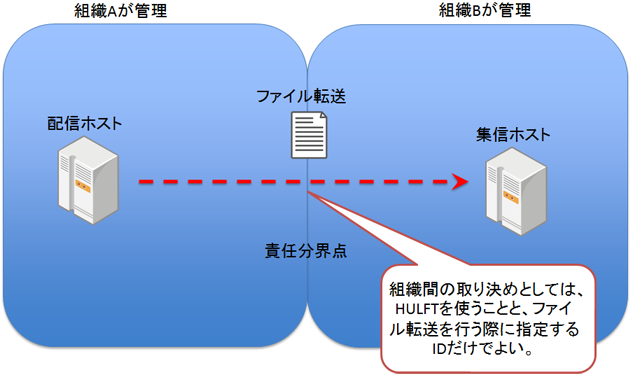
When different organizations collaborate over a network, it is sometimes necessary to clarify the "demarcation point of responsibility" in that collaboration.
The demarcation line is the boundary that determines who is responsible for the cause of a failure when a failure occurs.
When file transfer with HULFT, you only need to be responsible for the job on your own host, without relying on the processing being done on the other side, which clarifies the division of responsibility when file transfer.
The fact that there is no need to request permission to work on the other host when file transfer also makes it easier to clarify the division of responsibility.
Because of this ease of use, the use of HULFT is often listed as HULFT required specification for file transfer between different organizations.
Job linkage without file transfer
HULFT also has a function for job linkage that does not involve file transfer.
In job linkage that does not involve file transfer, a message for job execution containing the job ID is sent from send host to the receive host.
In this way, HULFT is not only file transfer service, but also an RPC (Remote Procedure Call) that connects different systems.
lastly
HULFT has been used in many places to realize a variety of systems, and that experience is being put to good use in the current design.
Job integration is a major feature of HULFT, enabling robust yet flexible processing.
Akimichi asked someone at HULFT. Column list
- [Part 1] HULFT provides file transfer functionality essential for business systems
- [Part 2] What is HULFT? Let's take a look at how file transfer works (send Flow)
- [Part 3] What is HULFT? Let's take a look at how file transfer works (pre- and post-processing file transfer)
- [Part 4] The Strengths of HULFT Seen in Job Integration
- [Part 5] Making job integration more convenient -HULFT Script
- [Part 6] HULFT-WebFileTransfer and HULFT-WebConnect which allow you to use HULFT over the public Internet
- [Part 7] HULFT-HUB provides flexibility and reliability when connecting multiple locations
- [Part 8] Coexistence of HULFT and SFTP/FTP
- [No. 9] HULFT meets the requirements of IoT environments
The person who wrote the article


