

Linking legacy systems with SaaS using HULFT


HULFT is file transfer tool with a proven track record as the No. 1 domestic market share holder for 21 consecutive years*. Beyond simply transferring files, HULFT 's features, file transfer mechanisms, and case studies. Furthermore, we will introduce how to integrate with other solutions to more efficiently connect systems within a company, from legacy systems to SaaS.
*Source: Fuji Chimera Research Institute, Inc. "2004-2010 Package Solution Marketing Handbook"
"New Software Business Market 2011-2024 Edition" < file transfer Tools Package, Value-Based, Vendor Share> FY2003 Results to FY2023 Results (Saison Information Systems Results until FY2022)
What is HULFT?
HULFT is used in a wide range of industries as middleware that safely and efficiently shares files between corporate systems. It supports a variety of platforms and can be used in a consistent manner across everything from legacy systems to modern environments such as cloud and containers, making it easy to implement and operate with low learning costs, regardless of the skill level of the engineer.
First, let's explain what HULFT is, its features, and how it handles file transfer.
▼I want to learn more about legacy systems
⇒ Legacy System / Legacy Integration | Glossary
▼Learn more about containers
⇒ Container | Glossary
▼I want to know more about file transfer.
⇒ file transfer | Glossary

HULFT Features
Rich features
file transfer protocols includeFTP (File Transfer Protocol)and SFTP (SSH File Transfer Protocol). While these provide basic file transfer functionality, simply transferring files is often insufficient when integrating corporate business systems, as various transfer-related processes occur. HULFT, on the other hand, allows you to immediately use the functions you need simply by configuring them from a dedicated management screen, reducing development time.
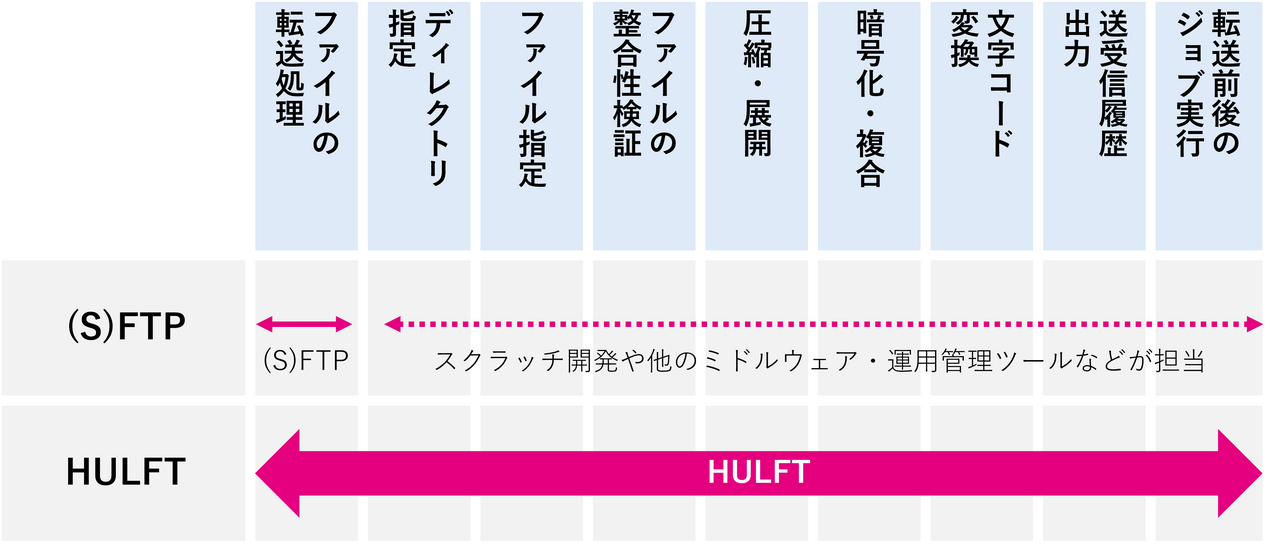
Tracking transfers and handling transfer errors
HULFT can track the results of file transfer and allows you to view and output the transfer history.
If the transfer fails, you can identify the cause by referring to the error code and take appropriate action. Identifying the cause of file transfer between different organizations tends to take time, but HULFT can clarify the demarcation point of responsibility by identifying whether the cause is on the sending or receiving side.
Furthermore, because it offers high reliability, including a recovery function in the event of network failures, ensuring that important data is delivered securely, many companies list the use of HULFT as a requirement for file transfer between different organizations and for mission-critical operations.
Easy expansion of partners
It supports a wide range of platforms, from legacy systems to modern environments such as clouds and containers. Specifically, it supports operating systems such as zOS, IBMi, UNIX, Linux, and Windows, as well ascontainer orchestrationservices provided by public clouds. It can be used with any platform using the same procedures, making it possible to expand the scope of collaboration regardless of the skill level of the engineer. It can also be used on platforms connected via public lines, as well as LANs.
Use of HULFT
This section explains the basic mechanisms and operating environment for using HULFT.
file transfer mechanism
With HULFT, sending a file is called "send" and receiving a file is called "receive." Because transfers are performed peer-to-peer, file transfer can be performed by installing HULFT on both send and receive sides.
Before file transfer, both the send and receive sides define the file names to be transferred, the transfer method, and the recipient's information. In HULFT, a single definition is created from multiple pieces of information and linked by an ID. When using HULFT for file transfer, the only thing that needs to be agreed upon with the sharing destination is a common "file ID." Even when the number of sharing destinations increases, there is no need to know the details of each destination, so smooth sharing is possible without the hassle of adjustments.
Usage environment and lineup
The product lineup (such as "HULFT 10 for zOS," "HULFT 10 for Windows," or "HULFT 10 for Container Services") that best suits the system environment of send and receive sides is selected and implemented.
HULFT is provided as a self-managed package product that users can operate and manage themselves.
▼ I want to know more about HULFT lineup
⇒ HULFT 10 lineup | Product introduction page
HULFT Implementation Case Studies
HULFT has been adopted in a wide variety of industries and business processes, and we will introduce some specific examples by industry.
Banking: Linking mainframes and open systems
In many banks, the "accounting system" that manages account balances and calculates interest is operated on mainframes. On the other hand, information systems related to sales strategies are becoming more open, and HULFT is used to data integration between these systems. HULFT can track the results of file transfer and also performs character code conversion between mainframes and open systems simultaneously with file transfer, thus enabling reliable and efficient file transfer.
Retail: Linking POS registers with mission-critical system, core system
In the retail industry, sales data broken down by day, product, and customer attribute is collected from store POS registers and sent to mission-critical system, core system. Maintenance data is also sent from mission-critical system, core system to the POS registers. HULFT is used for this data integration, and its built-in retry function in the event of a transfer error makes it easy to resend failed files. This eliminates the need for individual development work and shortens development time.
Manufacturing: Standardization of data integration among group companies
In Manufacturing with numerous subsidiaries and affiliates, including production sites and research institutes, HULFT is used to standardize data integration interface between the ERP system shared by the group companies and the different accounting systems used by each branch office and research institute, ensuring secure and reliable integration. Because HULFT is multi-platform compatible, data can be linked using the same procedure across different systems, guaranteeing data consistency. These functions enable reliable file transfer between various systems, leading to increased operational efficiency.
HULFT streamlines on-premise and SaaS integration
In recent years, as part of promoting digital transformation (DX), more and more companies are migrating systems from on-premises environments to the cloud and utilizing SaaS. On the other hand, legacy systems still exist in on-premises environments, and there is a need for flexible and responsive integration between SaaS and legacy systems. Among HULFT customers, there is a growing need for API integration in addition to file transfer with HULFT, as peripheral systems are being migrated to the cloud or made available through SaaS while maintaining legacy systems. In this chapter, we will introduce how to efficiently integrate on-premises systems and SaaS by combining HULFT with other solutions.
▼I want to know more about on-premise
⇒ On-Premises | Glossary
▼I want to know more about SaaS
⇒ SaaS|Glossary
▼I want to know more about the API
⇒ API|Glossary

Integration with HULFT 10 API Gateway
HULFT 10 API Gateway is a system for centrally managing HULFT installed in multiple systems. HULFT 10 API Gateway provides APIs for managing and operating HULFT, and you can manage and operate HULFT from SaaS or external services via HULFT 10 API Gateway.
▼ Want to know more about HULFT 10 API Gateway?
⇒ HULFT 10 API Gateway | Product Introduction Page
Collaboration with HULFT Square
If you have requirements such as "I want to use API to connect data" or "I want to achieve data integration with a managed service," using HULFT Square is effective. HULFT Square is a service provided by Saison Technology, the same company as HULFTiPaaS (Integration Platform as a Service)In addition to the abundant preset connectors and intuitive interface that are common features of iPaaS, it is characterized by having file transfer functionality (HULFT Transfer) equivalent to HULFT. This makes it possible to integrate data from HULFT installed in an on-premises environment into a SaaS system via HULFT Square.
▼I want to know more about managed services
⇒ Managed Services | Glossary
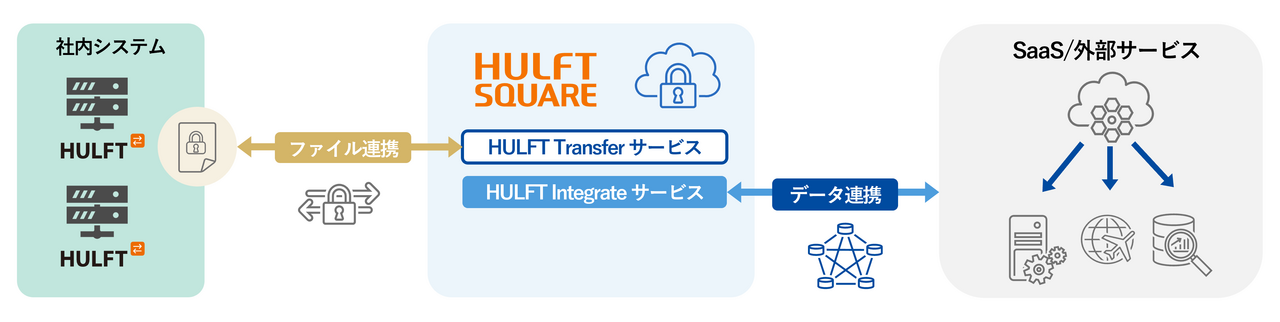
We will introduce some use cases that can be realized by integrating HULFT and HULFT Square.
Reduced management effort for external connection systems
External connectivity systems are mechanisms that link a company's internal systems with external systems (such as other companies or cloud services). Even when using HULFT for file transfer, it is common to build a relay system in-house. However, building an external connectivity system in-house increases the operational burden due to configuration, monitoring, and management (software updates, error handling, etc.). By using HULFT Square as the external connectivity system to solve these problems, a reduction in maintenance man-hours can be expected through managed services. In addition, HULFT 's functions simplify error handling, enabling efficient operation.
Data analysis using internal data
By combining HULFT with HULFT Square, you can consolidate data from various systems, such as your company's mainframe and SaaS, into a data lake or data warehouse. This allows you to centrally manage dispersed data and enable analysis using your own data. Furthermore, by combining it with business intelligence (BI) and generative AI, you can gain insights tailored to your company's business and support rapid decision-making.
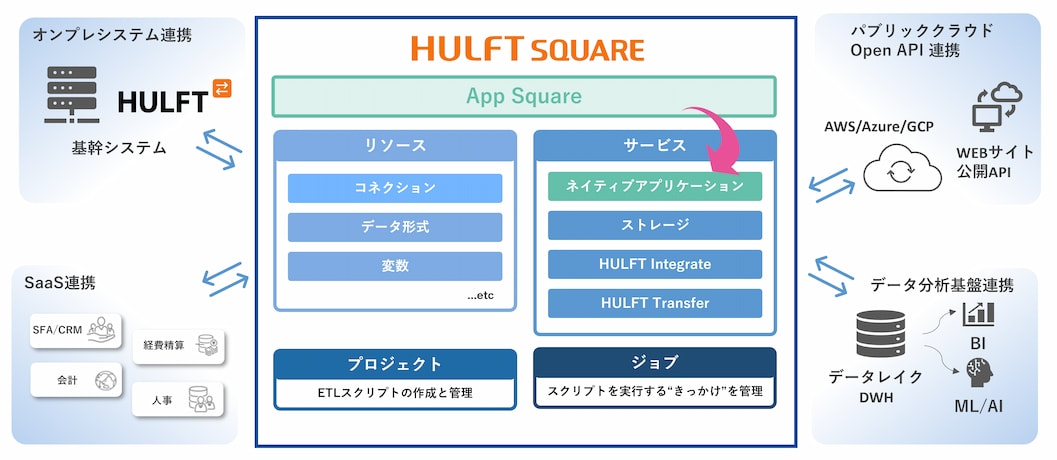
summary
HULFT safely and reliably connects all files, including mainframes, UNIX, Linux, and Windows systems coexisting within a company's information systems, as well as log data and CSV files generated by cloud systems, across organizations and systems.The security and easy error handling functions required by companies can be used simply by configuring the settings, shortening development time.
By combining HULFT with compatible solutions, you can make use of your existing assets while flexibly expanding your business to accommodate changes in your business situation, which can lead to a high return on investment even in the long term.
Please use this article as a reference and use HULFT to accelerate your company's digital transformation.
The person who wrote the article
Related Columns
-

How to eliminate duplicate data entry? Causes, solutions, and key points for system selection.
-

Breaking Through the "Three Barriers" that Hinder Company-Wide Deployment of AI Agents: New Standards for data integration and Governance
-

"Data exists, but it can't be used": Challenges and approaches to data utilization in the real estate industry.

Recommended Articles
-

Standardization is the key to successful data integration
Having a mix of data integration tool within a company can lead to a decline in development efficiency and maintainability. We will explain the importance of "standardization" for efficient data integration. -

iPaaS-based data integration platform HULFT Square
iPaaS, data integration platform, is gaining attention in the age of AI. Check out the product details of "HULFT Square," which meets the needs of this era. -

Get an online consultation about data utilization
If you would like to hear more about our data utilization platform, we also offer online consultations.