What are the problems when analyzing data at home? Support services essential in the era of teleworking

Data analysis has been gaining attention in recent years. Its importance in academia is growing, with many universities establishing data science departments. In addition, data analysis efforts are expected to accelerate in companies as well, with the Cabinet Office aiming to realize "Society 5.0."
Meanwhile, work styles are becoming more diverse, and being in the office is no longer the norm. We are now in an era where individuals can choose the environment in which they can best perform. How can we efficiently analyze data even as teleworking becomes more prevalent? We will introduce some common challenges and their solutions.
"Data preparation" before using BI tools is too difficult
The term "data analysis" covers a wide range of tasks, but the first thing that many companies do is visualize data using BI tools such as Tableau.
- What is a BI tool?
Abbreviation for Business Intelligence. A tool equipped with the functionality to analyze data accumulated by a company and display it as graphs and dashboards, helping to speed up management decision-making. A wide range of products are available, from tools that enable advanced analysis by preparing the data to be analyzed in detail in advance, to tools that enable "self-service BI" that allows field employees to easily analyze data themselves. - What is Tableau?
This cloud-based self-service BI tool is used by over 86,000 companies worldwide. It is easy to use even for people without specialized data analysis skills, and its unique feature is that it allows you to create graphical dashboards and other data.
Even if you use an easy-to-use BI tool, you will still need to take the following steps to analyze the various data held by your company.
-
KPI settings
Set the issues and KPIs you want to visualize
-
Data Preparation
Collect necessary data from various systems and process it into an analyzable format
-
visualization
Input data into the BI tool and set up the necessary graphs, etc.
Among these, the people in charge should particularly focus on "setting appropriate problems and KPIs (STEP 1)" and "considering the structure and design of the report screen so that it's easy for users to understand (STEP 3)." However, in reality, STEP 2, the data preparation, is the most difficult part, accounting for approximately 80% of the total man-hours. In the first place, field employees who are not IT experts often don't know "which data to get from which system to perform the analysis they want," and end up having to ask the IT department for help every time they prepare the data they want to use in their analysis, or "doing it on their own while being taught how to output the data." This hinders progress on the tasks they should be focusing on, such as analyzing the resulting data and considering countermeasures. It's truly disappointing when, after struggling to create a report, it doesn't perform the analysis they envisioned and ends up being unusable.
To ensure that data analysis progresses smoothly, the person in charge needs an "assistant" who can support them so that they can focus on their own tasks. However, it is rare for a company to have such ideal personnel in-house, and with the current shortage of IT engineers, even if you request an IT company, it is not always possible to immediately dispatch the desired personnel.
Furthermore, even if there is someone you can consult with about anything, if everyone is working in the office you can ask them questions immediately, but when working remotely, even asking how to use a tool can be time-consuming. Data analysis becomes more difficult when working remotely than when you are in the office.
Three "I's" necessary for advancing data analysis while working remotely
In order to smoothly carry out data analysis work while working remotely, it is important to keep in mind the three "I's" of "being connected at any time," "being able to understand immediately," and "being able to ask for various requests."
I: Always available I: Understand immediately I: Can ask for various requests
- I: Always connected
In many cases, data analysis is carried out by personnel while continuing with their regular work, and when they get busy, analysis work tends to be put off. If they are unable to ask questions immediately when a question or uncertainty arises, work will be delayed. It is important to be able to contact someone immediately at any time when you get stuck in the analysis. - I: I understand now.
If you have trouble using a BI tool, you can contact support from your IT vendor or tool manufacturer. However, it often takes 2-3 days for a response, and by the time you receive a reply, you may have forgotten what you asked. Having to start over by trying to remember what you were doing can be time-consuming and stressful. - I: I can ask for a lot of things.
Ultimately, the person in charge must create a report screen using a BI tool. While it's easy to convert the designed image into PowerPoint or other programs, using the BI tool can be challenging. However, even if you can ask your in-house information systems department or vendor for support on how to use the tool, you can't rely on them for everything. If there was someone who could actually use the tool and create reports for you, you could expect a dramatic speedup in your analysis work.
"Online concierge" to assist with data analysis work
Saison Information Systems (now Saison Technology) offers a Tableau utilization support service called "Online Concierge." It acts as an "assistant" to support staff members in smoothly progressing with data analysis. The Online Concierge provides an inquiry desk that staff members can consult with at any time. Questions can be asked remotely via phone, email, or web conference, ensuring speedy problem resolution. Furthermore, the Online Concierge can create and provide reports on a BI tool based on images created by staff members in PowerPoint or other tools. It solves all three of the above "I's."
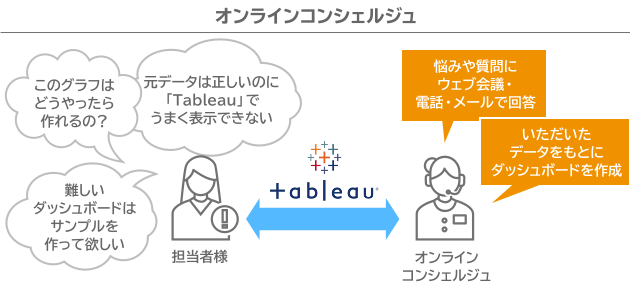
By using the online concierge, you can smoothly carry out your data analysis work regardless of location, whether you are in the office or teleworking. We have prepared a document summarizing the details of our services, so please download it from the link below.