
ZIP Audit logs
- name
- ZIP Audit logs
- business
- common
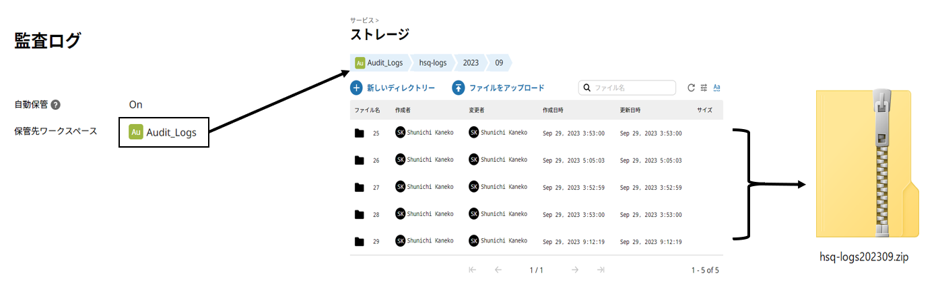
Audit logs for the month before and the current month of the application execution month are saved together in a Zip file.
- If you specify a workspace named "Audit_Logs" as the storage location for audit logs, the audit logs stored there will be saved together as a .zip file for one month.
- The target is the month the application is executed and the month before, and they are saved in different directories. If a file with the same name already exists, it will be overwritten.
Example 1)
If audit logging is enabled, an audit log file for the current month already exists, and execution is performed on September 30th, the following file will be created.
Audit_Logs/hsq-logs/2023/09/hsq-logs202309.zip
Example 2)
If audit logging is enabled, audit log files for the current and previous months already exist, and you run the command on October 10th, the following files will be created.
Audit_Logs/hsq-logs/2023/09/hsq-logs202309.zip
Audit_Logs/hsq-logs/2023/10/hsq-logs202310.zip
- HULFT Integrate service requirements:
CPU 1, Memory 2GB, Scalability 1
- Note:
To change the workspace location, you must copy the script to the project and then edit it.
This application includes:
- ZIP_Directories
Script Details
ZIP_Directories
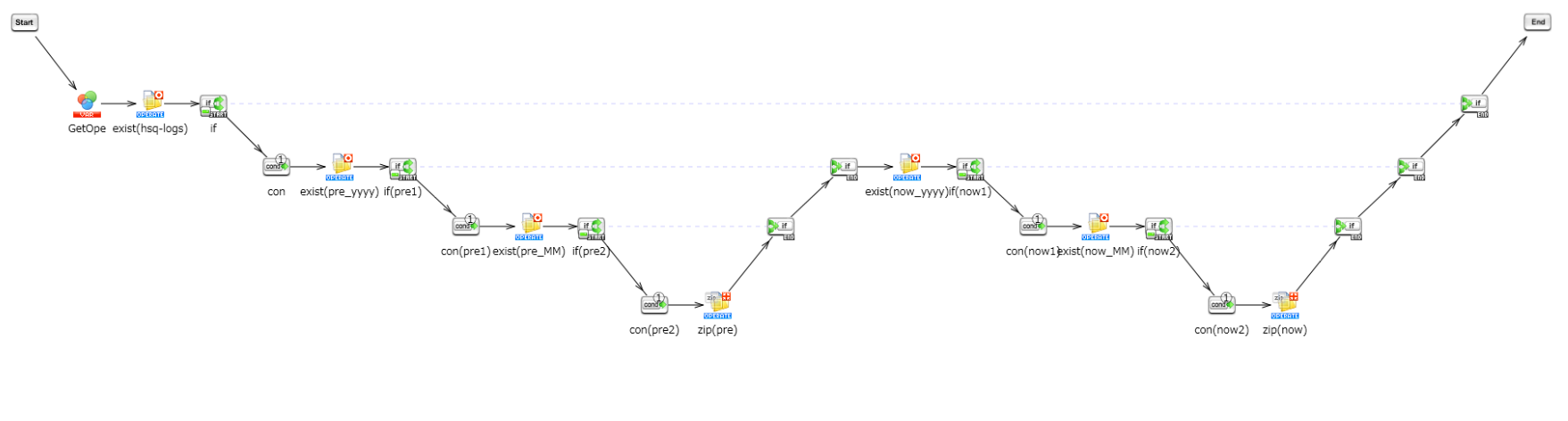
This script saves the audit logs for the current month of application execution as a single .zip file.
If there is a directory for the previous month, the logs for the previous month will be similarly saved in a .zip file at the root of that directory.
To change the destination workspace, change the initial value of the script variable Workspaces_Name.
How to install and use it