
"Easy-to-read documents" are hard for generative AI to read...
How to create "understandable data" that won't mislead generative AI
HULFT problem-solving solutions | For AI project leaders
Have you ever had the experience of "The data looks good, but the AI's answer is wrong?" There are an increasing number of cases where generative AI cannot correctly read the data format and returns answers that are different from the intended answer.
In this article, we will introduce practical preprocessing techniques that dramatically improve the accuracy of RAG responses by formatting and converting this data into a format that is easy for generative AI to handle.
Why does generative AI get it wrong?
Have you ever had the experience of feeding information into a generative AI with the expectation that "if I hand over this document, the AI will surely give me an answer" only to get an answer that was completely off the mark?
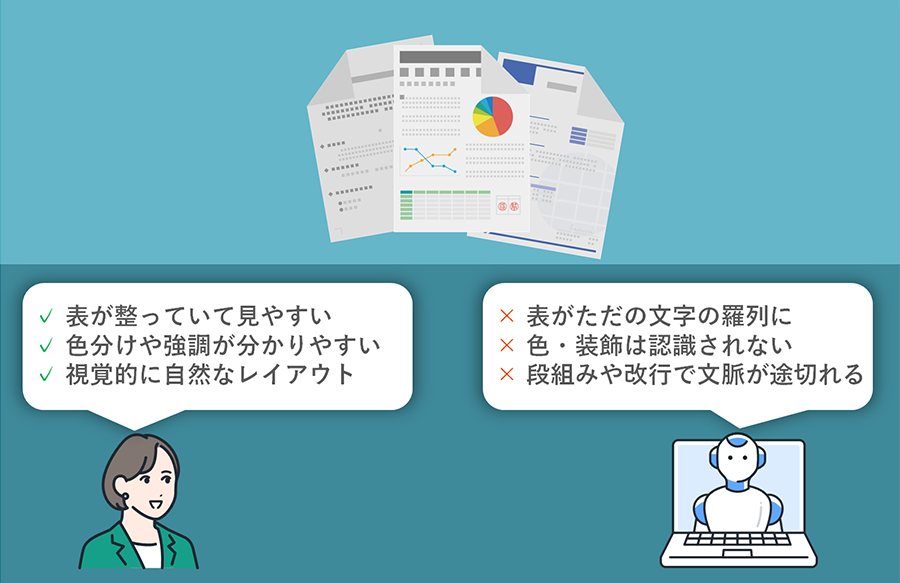
In fact, most of these discrepancies are caused not by insufficient AI performance, but by the difficulty of reading information from the AI's perspective. Even if a document looks visually appealing to humans, it is often "data that is easily misunderstood" by the generating AI, as the AI cannot properly grasp the intent behind it.
For example, PDF files use visual elements such as tables, columns, and headings. However, generative AI only receives the text information that makes it up. There is no context, such as the meaning or structure of tables or paragraph boundaries, and it is interpreted as a list of text. As a result, problems such as "related information being read disjointedly," "words with the same meaning being duplicated or mixed," and "the intent of the document not being conveyed" occur.
Additionally, even with a format with a clear structure like HTML, care must be taken. Generative AI is not a program but a language model, and it attempts to "interpret" the meaning of tags as natural language rather than mechanically processing them. Therefore, if the format contains complex layouts, excessive decoration, or a large number of meaningless tags, there is a risk of losing track of the context.
Generative AI is trained on the premise that it is based on text as "reading material." Therefore, the more it is given simple data structures, meaningful sentence flow, and information without unnecessary embellishment, the more it will demonstrate its true potential.
It's not that there's a problem with the materials themselves. Even if content is carefully crafted and easy to read for humans, it doesn't necessarily mean it's easy for AI to read. Understanding this gap is the first step in utilizing generative AI.
The importance of "pre-processing" that determines the accuracy of RAG
When providing information to generative AI, the format in which the data is passed has a major impact on the accuracy of RAG. No matter how powerful the AI is, it will not get the desired answer if the data is difficult to read.
RAG is a system that generates answers to questions by referencing external documents. Therefore, if the source data is not properly organized, the accuracy of both the search and answer generation will decrease. The important thing is the "preprocessing" process, which involves deciding what information to provide, in what units, and in what form.
Simply converting a PDF into text is not enough. It requires ingenuity to make it easier for AI to understand the context, such as paragraph breaks, the meaning of tables, and the relationship between headings and the main text.
In other words, preprocessing is the process of preparing the data so that it is easy for the AI to understand. By carefully performing this process, you can maximize the performance of RAG.
Different file formats have different readability issues and how to deal with them
To enable generative AI to produce accurate answers, it is important that the information provided is in a format that is easy for AI to read. However, in reality, many files used in business have structures that are difficult for AI to read, and each requires appropriate preprocessing.
- PDF file
For example, PDFs include scanned image PDFs of contracts and other documents that were previously stored in paper format. Because these files do not contain text information, they must be converted to text format using OCR. - Image files
Image files such as JPEGs also contain important information, such as photos of whiteboards or handwritten meeting minutes. These also need to be extracted using OCR and output in a meaningful format. - Audio files
Audio files (such as MP3s) contain recordings of meetings, interviews, etc., but to AI, they are "blank." It is common to transcribe the audio and then perform preprocessing. - HTML file
HTML is used for web pages and internal portals, but it contains many tags, links, special characters, etc., which makes it noisy and reduces search efficiency. By removing tags and symbols and formatting it in a simple format such as Markdown, it becomes easier to use with RAG. - Excel file
Although Excel can handle structured tabular data, AI cannot correctly understand the meaning because it needs to read the data while taking into account the relationships between columns. By converting the data into a flat Q&A format through preprocessing, more accurate searches and answers are possible. - JSON file
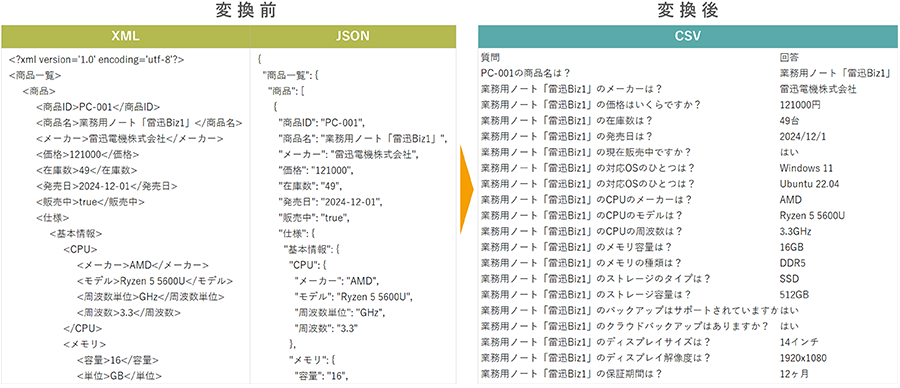
JSON is often used for data obtained from e-commerce sites and external services, but its deep hierarchical structure makes it difficult to split and search information. By converting it to CSV and creating a flat structure, it can be converted into easy-to-use knowledge. - XML file
XML also has a complex hierarchy and is widely used as an industry standard format in fields such as medicine, finance, and government administration, but is not suitable for RAG as is. Converting it to CSV dramatically improves searchability and versatility. - Other manuals
Furthermore, files with large amounts of information, such as business manuals and product manuals, do not have high search accuracy if left unstructured. Converting these documents into a Q&A format and structuring them using CSV or similar formats can greatly improve the accuracy of their use in RAG. - Vectorization (embedding)
Another important step is embedding. This is the process of converting preprocessed data into a "numeric vector" that can be handled by AI in order to import it into RAG. Since the input text and structured data cannot be stored in a vector DB as is, it is necessary to use embedding processing to express the similarity of meaning as a number.
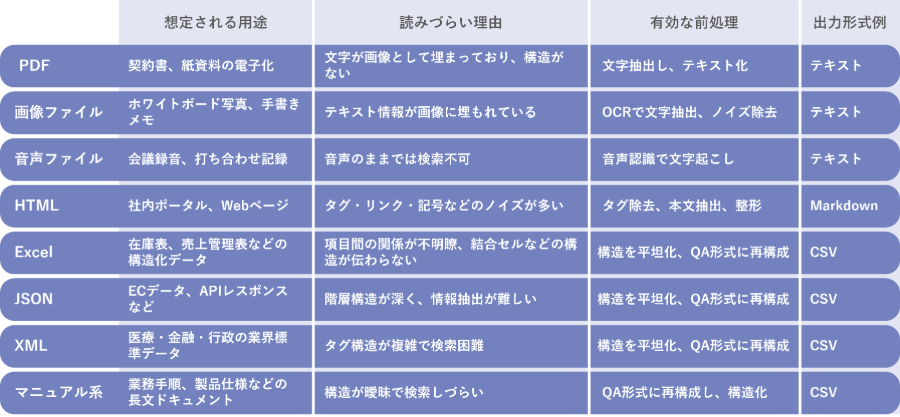
In this way, by understanding the different characteristics and issues of each file and performing appropriate preprocessing, it is possible to convert "documents for people" into "data that is easy for AI to understand." The ingenuity of preprocessing, with an eye toward utilizing RAG, greatly influences the accuracy of the answers given by the generating AI.
"Preprocessing models" that eliminate implementation hurdles and accelerate the use of AI
The more you understand the preprocessing techniques introduced in the previous chapter, the more you may feel that they are too difficult to do yourself. Reading text from images, removing noise from HTML, converting unstructured data into Q&A—each of these is practical, but there are limits to what can be done manually or through scratch development.
To address these challenges, HULFT Square offers applications that package common pre-processing tasks in a usable format. These are practical templates that utilize generative AI and data processing functions, and can be used as is without coding.
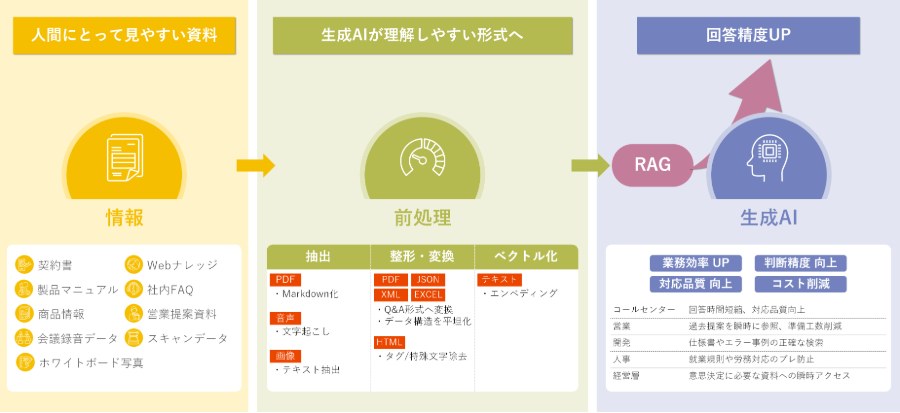
Specifically, it provides the following processes:
| data | Purpose | needs | Processing content | application |
|---|---|---|---|---|
| PDF file | Digitization of contracts and paper documents | Scanned PDFs can only be checked by human eyes, so I want to extract the text and import it. | Text Extraction | AI preprocessing: Extract text from PDF |
| Manuals, procedures | PDF files have low search accuracy, so I want to convert them into structured data before importing them. | Conversion to Q&A format | AI preprocessing: Create QA tables from PDFs | |
| Image files | Whiteboard photos, handwritten notes | I want to extract text from images such as photos of whiteboards and handwritten notes and import them. | Text Extraction | AI preprocessing: Extract text from images |
| Audio files | Meeting recording, interview recording | I want to convert audio from recordings of meetings into text and import it. | Text Extraction | AI preprocessing: Extract text from speech |
| HTML file | In-house portal, web page | I want to remove HTML tags, special characters, symbols, etc., which become noise, and then import them. | Remove HTML tags | AI preprocessing HTML tag removal |
| Delete special characters and symbols | AI pre-processing: Removal of special characters and symbols | |||
| Excel file | Inventory list, sales management list | The accuracy of the answers is low as it is, so I want to convert it into a flat data structure and import it. | Conversion to Q&A format | AI preprocessing: Creating QA tables from Excel |
| JSON file | EC data, API response | The hierarchical structure is complex and it is difficult to split into chunks, so I want to convert it into a flat data structure and import it. | Conversion to Q&A format | AI preprocessing: Create QA table from JSON |
| XML file | Industry standard formats for medical, financial, and administrative purposes | The hierarchical structure and tags are complex, making search accuracy low, so we want to convert the data into a flat data structure before importing it. | Conversion to Q&A format | AI preprocessing: Create QA tables from XML |
| Text data | All preformatted data | I want to convert it into a numeric vector to store in the vector database. | Embedding | AI pre-processing Embedding & Vector DB storage |
These applications are available free of charge to customers with a HULFT Square contract. Some of them have already been released, with more planned to be added in the future.
In this way, by making highly reproducible preprocessing readily available to anyone, the launch of generative AI implementation projects can be accelerated and PoC results can be verified in a short period of time. Eliminating the dependency on individuals in data processing also leads to stabilizing the productivity and quality of the entire team.
Standardizing preprocessing is crucial to ensuring that AI projects do not end as "experiments" but progress to a phase where results are produced in business operations.
How does the AI's answer change before and after plastic surgery?
We will verify the effectiveness of the preprocessing we have explained so far with actual verification data. In an internal experiment, we compared the accuracy of answers when the data was passed to the AI as is, and when the data was preprocessed by QA and format conversion.
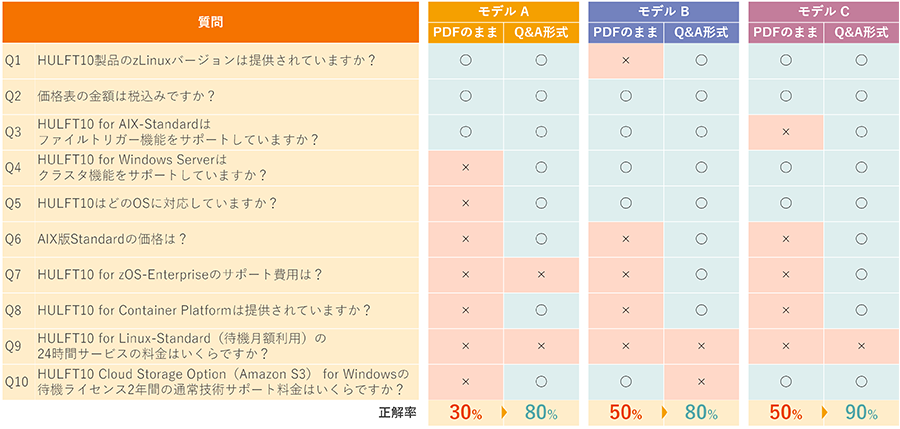
Case 1: Improving accuracy through QA of PDF price lists
Using HULFT 10 price list as an example,
a) Read as PDF
b) Break it down into Q&A and read it in text format
We asked 10 questions in two patterns to three types of large-scale language models (LLMs) and compared the accuracy rates.
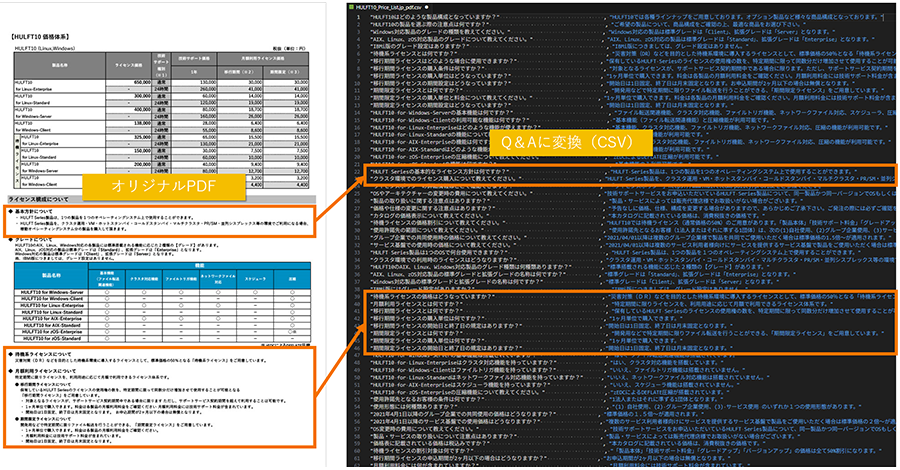
The results showed a significant improvement in accuracy for all models, demonstrating that data shaping through QA significantly improved the accuracy of answers.
Case 2: Comparing response accuracy in XML, JSON, and CSV formats
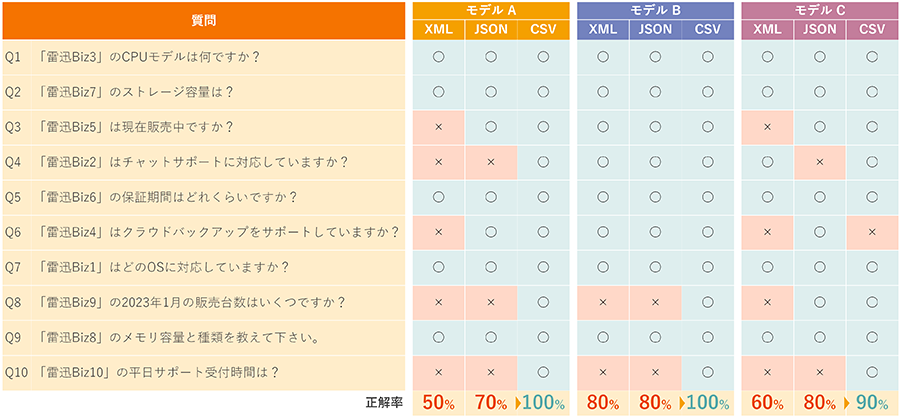
We prepared fictitious product data in three formats: XML, JSON, and CSV (Q&A decomposition), and compared them by asking 10 questions to three different LLMs.
As a result, the data QA'd into CSV recorded the highest overall accuracy rate, and it was found that the simplified CSV format is easier for AI to understand than XML or JSON, which have complex hierarchical structures.
summary
This article explains the importance of "data preprocessing," which is essential for improving the accuracy of generative AI responses, and specifically introduces the reasons why file formats are difficult to read and how to address them. Furthermore, using actual verification data, we numerically demonstrate the improvement in response accuracy achieved through preprocessing, confirming its effectiveness.
In actual testing, we found that by utilizing the HULFT Square application, time-consuming data formatting work can be carried out efficiently, helping to reduce the burden of project implementation. These pre-processing concepts and methods can also be implemented with other tools and systems, and can be adopted according to your own environment and needs.
It is expected that preprocessing technology and know-how will continue to develop in the future to accommodate a wider variety of data formats and more complex business requirements. In advancing the use of generative AI, building this foundation and preparation will be key to producing high-quality results.
We hope this article will be helpful in your AI projects and lead to more effective use of AI.
Reference) We also accept consultations regarding the introduction of generative AI
Saison Technology provides support for implementing generative AI for business use, as well as infrastructure development, including data preprocessing.
Please feel free to contact us with any inquiries, including "I want to utilize the information we have in our company with AI" or "I want to start a PoC but I don't know where to start."
For consultations and inquiries, please click here