

HULFT Short Stories
- Automating file transfer improves the speed and accuracy of information sharing! Eliminates lost sales opportunities -Vol. 10 HULFT Use Cases
-

-
Hello.
My name is Okazaki and I am in charge of HULFT seminar.
Cherry blossoms reached full bloom in Tokyo last weekend.
Did you all enjoy the cherry blossom viewing?
With April upon us, many of you may have moved to a new environment.
It's a season filled with a mixture of excitement and anxiety, but enjoying cherry blossom viewing under the trees in full bloom can leave you feeling refreshed and renewed.
We will continue to deliver useful HULFT news emails to you this fiscal year as well, so we appreciate your continued support.
In this HULFT anecdote, we will introduce some examples of how HULFT is used.
This is an example of how file transfer work, which was previously done by sending emails, was replaced with HULFT.
Let's take a look at the challenges that arose before HULFT was introduced and the benefits that were achieved after its introduction.
assignment
First, let's look at an example of solving an order processing issue at a convenience store.
The customer's challenge was to eliminate manual work in the communication between each store and headquarters.
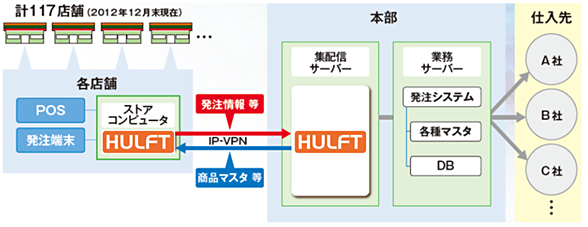
For this customer, orders from each store to headquarters were sent by email, and product master data was communicated from headquarters to each store using USB and paper ledgers.
Even simple tasks such as sending emails or carrying USBs or paper ledgers take time if they are done by humans, and it is impossible to completely eliminate mistakes.
The more stores you have, the higher the cost of USBs and paper ledgers and shipping fees will be, and if there is a malfunction, damage, or soiling, it will take time to recover them.
Sending an email can also become a credibility issue if you send it to the wrong recipient, include incorrect content, or overlook it.
Furthermore, in the convenience store business, even a slight delay in ordering products can lead to delays in communication with suppliers and even delivery dates, which can result in missed business opportunities.
Imagine coming to see the cherry blossoms and finding that there are no bento boxes available at the convenience store.
Even for this customer, as the number of stores increased, problems began to arise with a system that relied on manual labor.
What HULFT has achieved
Point (1) Automatic file sharing
By defining the files (data) to be sent using HULFT, it is now possible to automatically link order data with the system without any human intervention.
As in this example, with automation, you can decide which files to file transfer, define file transfer in advance, and then execute HULFT file transfer to send files whenever you want.
For example, by using the schedule function (*1) or the file trigger function (*2), which transfers files when they are created in a certain folder, you can achieve automation using only HULFT.
In addition, HULFT has a file transfer command, so you can incorporate this command into your business processes to automatically link files.
- 1 Windows version or HULFT Script features
- 2 Features included in the Windows and UNIX/Linux versions
Point (2) Speed
By using HULFT to link order information and product master data, we are now able to link information much faster than transportation times. This has increased operational efficiency for placing and receiving orders and enabled us to place orders without missing business opportunities.
-

-
There is no need to compare whether transportation or transmission is faster.
Regarding speed, in addition to the difference between physical transport and transmission, you can also configure functions such as file compression, file transfer tuning, and message mode settings to prioritize speed, to ensure fast and reliable delivery.
Point (3) Reliability and reliability
By eliminating the risk of accidents or breakdowns that come with physical media, information can now be transmitted reliably.
Furthermore, even if there were to be a problem with the transmission network, HULFT would automatically retry, ensuring that the files would be delivered reliably, making this a highly reliable information sharing platform.
There are several ways to automatically retry, not only in the event of an abnormality, but also when a connection fails, when there is a file conflict when sending or receiving a file, or when a transfer error occurs.
If an abnormality still occurs, there are effective monitoring functions, such as linking the job to send an email containing the error details.
effect
By replacing file transfer and data integration with HULFT, we no longer have to worry about missing sales opportunities due to order information not arriving on time.
Furthermore, if the number of stores increases in the future, the headquarters can easily expand the system by simply adding transfer definitions, without requiring significant effort.
By automating the processes that previously relied on manual labor, we were able to improve our business cycle and build a system that ensures we don't miss out on business opportunities.
file transfer may seem like a minor, unremarkable process in the overall workflow, but even a single delay in file sharing or failure to receive the correct data can lead to missed business opportunities and inconvenience for customers.
While manually sending emails is a method of file transfer, automating the process with tools offers significant advantages, as minimizing human intervention reduces errors and allows for smoother operations.
In addition to file transfer, we also introduce case studies on solving problems related to system integration and data integration so if you are interested, please take a look.
Please visit "HULFT".
Click here for "Introduction Case Studies"
-

-
Next time, we will bring you some short stories related to HULFT! Stay tuned!
Inquiry
We look forward to receiving your opinions, comments, and letters regarding this column.
Contact:hulseminar@hulft.com
Experience HULFT Products.
Product trial use
- We offer a trial version of HULFT Products. You can use it for 60 days. We also provide support for 90 days from the time of application. We will back you up from installation to actual use. Please feel free to apply.
- Try the product here
Seminar (pre-registration required/free)
- We offer a variety of seminars, from those that answer questions like, "What kind of product is HULFT Products? What functions does it have?" to hands-on seminars where you can actually operate HULFT on actual equipment to gain a better understanding of the product. Please come and join us!
- Apply for the seminar here




Recommended Articles
-

How can we turn the "tacit knowledge" lying dormant within our company into "AI knowledge" and utilize it?
We will explain the specific process for turning unstructured data scattered throughout your company into an asset and maximizing the potential of AI. -

Automated classification of product masters using generative AI: How to bring a new perspective to your analysis
We will explain the new perspectives that transformation in product master management brings about through the automatic classification mechanism brought about by generative AI and the benefits that can be gained by adopting it. -

How to get the insights you want without changing your master data
This e-book offers a new approach to solutions for companies that have data but are not making use of it.