
HULFT-HUB
Further optimization and automation of HULFT operations management
Product overview
Further optimization and automation of HULFT operations management!
Are you struggling to manage and operate the growing number of HULFT instances? By introducing HULFT-HUB, data integration between HULFT instances will become more streamlined, enabling you to realize data integration solution that meets your needs.
Resolve various issues that cannot be resolved by "HULFT" alone
HULFT, which facilitates data integration between systems, is based on a "1:1" file transfer. However, as file transfer relationships become more interconnected, new challenges inevitably arise.
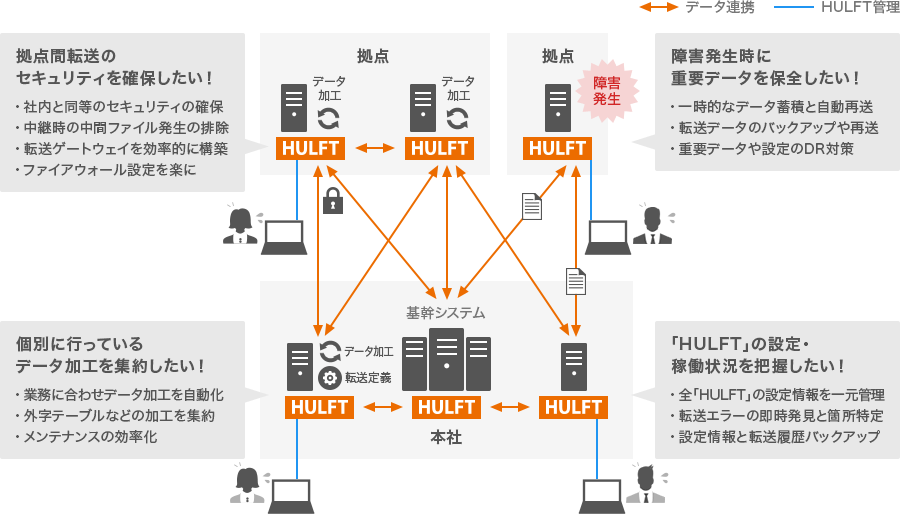
The benefits of collaboration between "HULFT" and "HULFT-HUB" exceed expectations!
"HULFT-HUB," which can centrally manage data transfer operations, manages "HULFT" in an integrated manner, visualizing the HULFT configuration, operation status, settings, and transfers scattered across the system, and creating various effects and operational benefits through a rational configuration.

Visualization of system configuration, settings, and status
You can check the environment, operation status, settings, and transfer status of all HULFT applications from the management screen.
Automating and streamlining operations
Streamline file transfer settings and operations. Automate receive and receiving in line with HULFT 's operating status.
Backup and DR measures
In preparation for system failures, relay data is stored, allowing for efficient retransmission in the correct transfer order and evacuation of important data to a DR site.
Functions and Features
Expected effects of each function
Relay without intermediate files for enhanced security!
The relay and broadcast function for communications only, without storing them in files, strengthens security for both transfer and operation management. It can be used as a proxy for HULFT transfer.

Expected effects of the relay function
- DMZ, relay server information leakage prevention
- Unifying data and management
- Blocking and recording unauthorized communications
- Eliminates the burden of managing relay servers and configuration errors
- Reduced load and improved performance
- Hiding system configuration from the outside
Various controls are possible by accumulating data!
Relay files can be stored on the HUB server. This allows various controls such as storing files temporarily only when transfer to receive side is not possible, or storing files and then sending them out sequentially.

Expected effects of the accumulation function
- Order control and prevention of duplicate transfers
- Disaster prevention measures
- Automatic retransmission upon receive start detection
- Countermeasures for rolling blackouts
- Capacity, generation, deadline management
- HULFT maintenance by client suspension
Automate processing with job flows!
Execution can be controlled by a pre-created job flow. Branching can be performed based on the success or failure of step execution, and if an error occurs, jobs can be re-executed from a specified step.
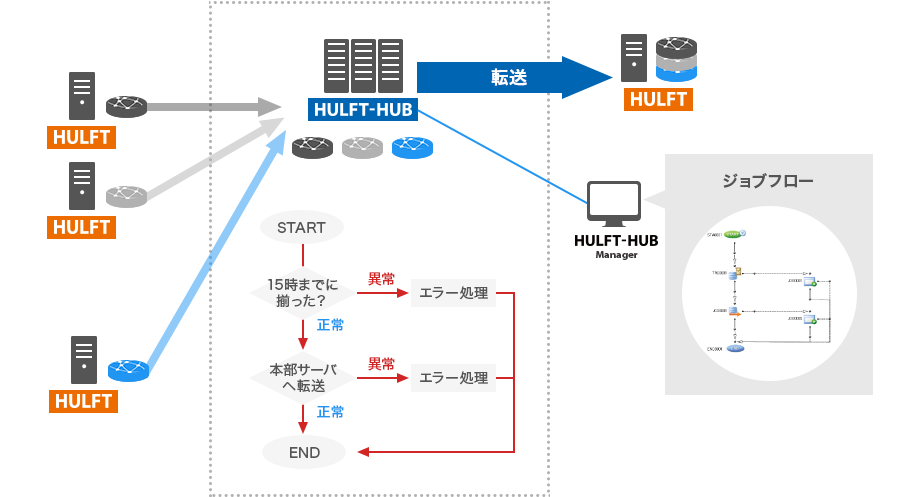
Expected effects of processing functions
- Automating flow processing
- Thorough systematic virus checks
- Data waiting and processing
- Automate response when processing abnormalities are detected
- Monitoring whether transfers are scheduled for processing
- Restarting processing from any step (rerun)
Visualize the operational status of "HULFT"!
"HULFT-HUB Manager" and utilities allow you to consolidate and centrally manage the configuration and operational status of each HULFT. "HULFT" can also be configured in bulk, reducing the workload of operations.


Expected effects of management functions
- Understanding the actual state of HULFT operation
- Management HULFT list output
- Storage and distribution of all HULFT settings
- Login status display
- Monitor and display all HULFT operation status
- History display