
HULFT-WebConnect
HULFT file sharing makes file sharing over the Internet easy and secure!
(Released Monday, November 17, 2025) HULFT-WebConnect Ver.3.1.1 now available
Main changes
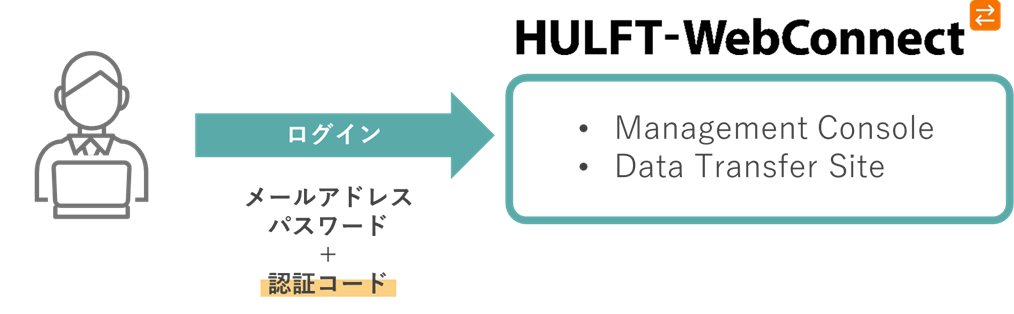
Supports multi-factor authentication when logging in
You can now configure two-factor authentication using a TOTP authentication app when logging in to the Management Console and Data Transfer Site.
This allows you to flexibly strengthen the authentication level according to the usage environment and security requirements, enabling more robust operation.
Other bug fixes and enhancements
For details, please refer to the documentation included with the product.
(Released Monday, May 19, 2025) HULFT-WebConnect Ver.3.1.0 now available
We have released a new version of HULFT-WebConnect, "Ver.3.1.0."
This version is an upgraded version that supports integration with "HULFT 10."
Main changes
Linking with HULFT 10 enables Zstandard transfer
Starting with this version, HULFT-WebConnect now supports HULFT 10. This means that you can now use the new HULFT 10 feature, "Zstandard Transfer," via HULFT-WebConnect.
Zstandard is a new compression algorithm that speeds up compression and decompression processing while maintaining the same compression rate as the Deflate method, achieving high-speed data transfer while reducing CPU load.
For more information about HULFT 10, please visit the product page here.
Zstandard transfer usage scenarios
Zstandard is particularly effective for highly complex files such as PDF files and binary formats. For example, it can be used in the following situations:
- Sending contracts and purchase orders to business partners (PDF format)
Faster compression and decompression processing enables secure and efficient file transmission. - Banks etc. send report layouts and output control files to each store (binary format)
Reduced transfer times and improved stability reduce the burden on batch processing. - Transfer of sensor data and image files (binary format) in the manufacturing industry
Large files can be transferred in a short time, contributing to real-time operations.
For simple data such as text or CSV format, HULFT 's proprietary "horizontal compression" and "horizontal and vertical compression" may be effective in some cases. We recommend using the appropriate compression method depending on the application.
For more information about the Zstandard, see this glossary page.
Other bug fixes and enhancements
For details, please refer to the documentation included with the product.
(Released Monday, February 20, 2023) HULFT-WebConnect Ver. 3.0.5 now available
HULFT-WebConnect Agent for HULFT for IBM i
HULFT for IBM i has been added to the HULFT of support for HULFT-WebConnect Agent, enabling file transfer of HULFT for IBM i using HULFT– WebConnect. If you are already using HULFT for IBM i, you can apply for HULFT– WebConnect to realize file linkage over the Internet.
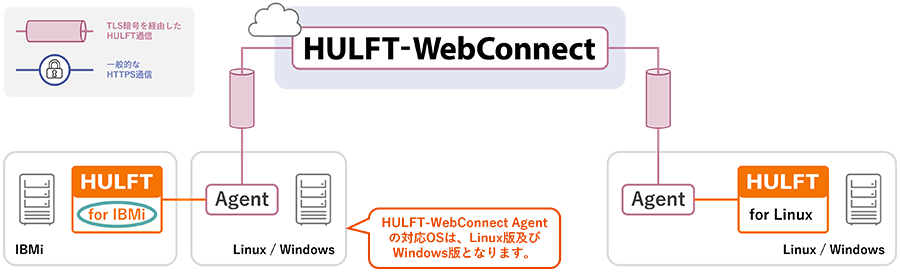
- Since HULFT-WebConnect Agent only supports Windows/Linux operating systems, if you want to use HULFT transfers with HULFT-WebConnect on HULFT for IBMi, you will need a separate server (Windows/Linux) on which to install HULFT-WebConnect Agent. Also, HULFT8 for IBMi versions V8.4.2 and later and HULFT-WebConnect Agent versions V2.3.1 and later are supported.
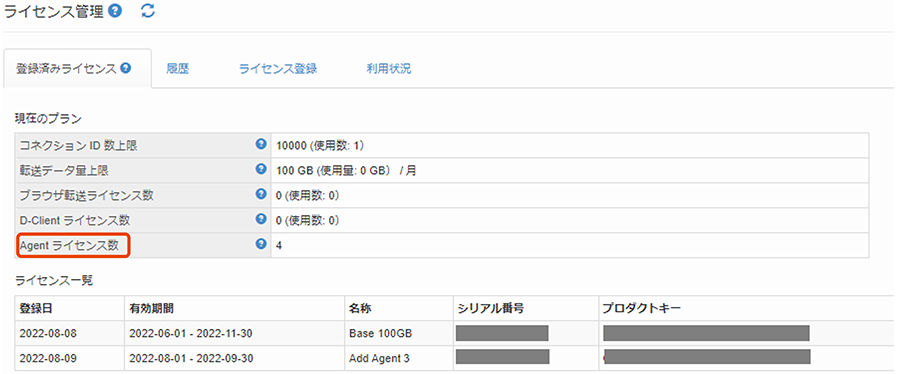
Improved the "License Management Screen" in the Management Console
The number of Agent licenses is now displayed on the "License Management" screen of the Management Console. This reduces the operational burden of license management. In addition, the error message displayed in the Management Console regarding license expiration has been improved to be less misleading.
Improved warning/notification email messages
We have improved the messages sent in HULFT warning and notification emails to reduce operational burdens. Information has been added to guide the person who receives the warning or notification email when taking action.
| Improvement content | |
|---|---|
| Warning emails when license violations occur | The body of the "License violation warning email" now includes instructions on how to deal with the issue and the deadline for doing so. |
| Notification email when user-specified threshold is exceeded | The text of the "Notification email when user-specified threshold is exceeded" was previously written only in English, but has now been changed to include both Japanese and English. |
| Notification email 3 months before license expiration date | The body of the "Notification email 3 months before license expiration" now also includes agent license information. |
Other bug fixes and enhancements
For details, please refer to the documentation included with the product.
(Released on Monday, August 17, 2020) > Announcement of the launch of HULFT-WebConnect Ver.3
In addition to the existing function of enabling file sharing between HULFT between companies or locations via the Internet, the new version also offers "D-Client," file transfer client that enables file sharing using HULFT with multiple business partners, regardless of company size.
Companies using HULFT-WebConnect can centrally manage their business partner settings, and even business partners who do not have IT staff or who do not have high IT skills can easily implement safe and secure file integration using HULFT.
Main new and additional features
file transfer client "D-Client"
D-Client, a new file transfer client, is an application that allows administrators with a HULFT-WebConnect contract account and users without a contract account to file transfer over the Internet.
You can start using it immediately by purchasing a subscription-based D-Client license for the number of users.
Secure file transfer
Communication is double-encrypted using TLS encryption and data is double-encrypted using AES encryption.
In addition, since send destination is set in advance, it is possible to prevent accidental sending of emails and other messages.
Like the previous version of HULFT, it is equipped with compression and delivery confirmation functions, making it less susceptible to the effects of the communication environment when sending and receiving large amounts of data.
Easy operation
Since the administrator sets the user management information, no settings are required on the D-Client user side.
All you need is a regular internet connection, and there is no need to install any equipment or set up a network. This makes it easier to request installation even at sites with insufficient IT skills.
Easy to use
D-Client users can start using the service simply by setting an account password and installing D-Client using the installer downloaded from the specified URL.
The operation screen is simple and specialized for file operations, making it easy for anyone to use.
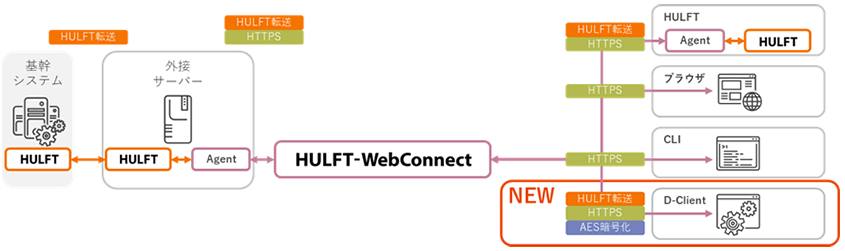
A transfer client that can meet various needs
Depending on your needs, you can connect using various transfer clients. If you have already installed HULFT, you can continue to use your existing operations.
| Transfer client type | Features | remarks |
|---|---|---|
| HULFT | Advanced, non-stop system integration | Agent + Java installation required |
| Web browser | Easy to use, no installation required | Data encryption and compression functions are not available. |
| CLI | Automation by command | Data encryption and compression functions are not available. |
| D-Client (new feature) | No contract or setup required by the user | No need to install Java, easy to install and operate |
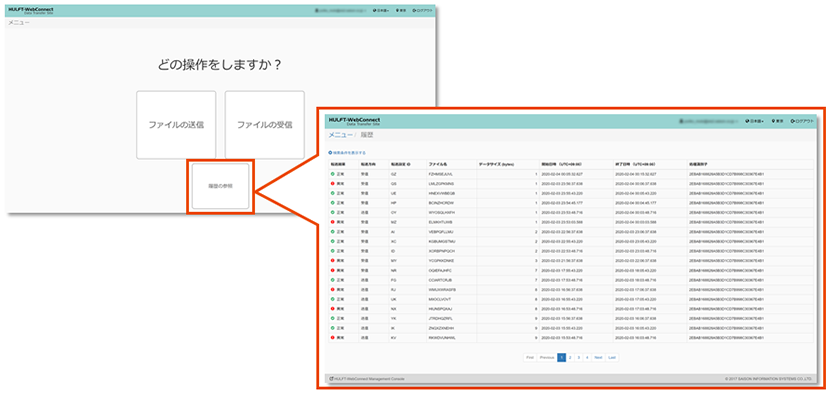
Added transfer history screen for browser transfer
When transferring files via browser, you can now view the transfer history.
Other changes
For other changes to function specifications, please refer to the following documents.
»Information on HULFT-WebConnect Ver.3 Functionality Incompatibility
Please refer to the following materials for information on how to use D-Client and case studies.
»Information on new features of HULFT-WebConnect Ver.3
Changes to the licensing system
In order to further improve the quality of our services, we have reviewed our licensing system.
Overview of changes to the licensing system
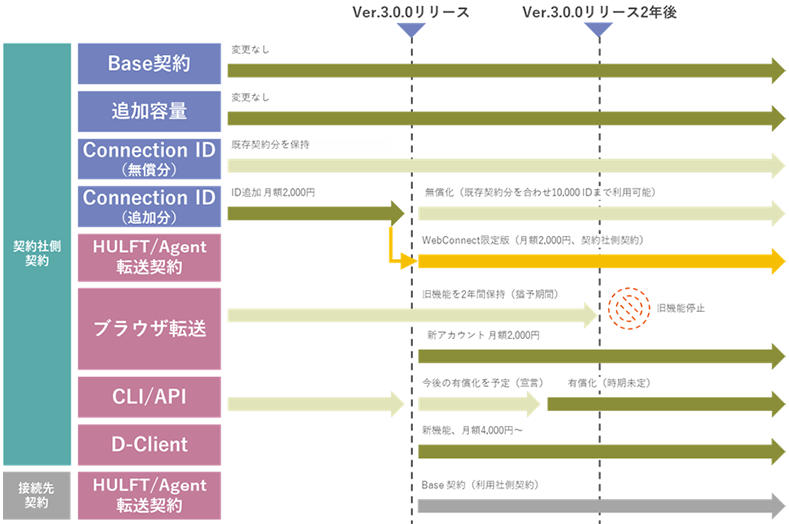
For details on the changes to the licensing system, please refer to the following document.
»Notice of changes to HULFT-WebConnect Ver.3 license system
For information on how to transfer your old browser sub-account, please refer to the following document.
»How to migrate HULFT-WebConnect Ver.3 old browser transfer sub-account