

A clear explanation of HULFT, which provides file transfer functionality essential for business systems


In this column, Akimichi, a technology writer with extensive knowledge of internet infrastructure, reports from his unique perspective on the benefits of using HULFT, which supports companies' data integration platform, and the technologies that support safety and security. Aimed at those who only know the name HULFT, this column provides an easy-to-understand explanation of the basic functions and an overview of file transfer.
Akimichi asked someone at HULFT. Column list
- [Part 1] HULFT provides file transfer functionality essential for business systems
- [Part 2] What is HULFT? Let's take a look at how file transfer works (send Flow)
- [Part 3] What is HULFT? Let's take a look at how file transfer works (pre- and post-processing file transfer)
- [Part 4] The Strengths of HULFT Seen in Job Integration
- [Part 5] Making job integration more convenient -HULFT Script
- [Part 6] HULFT-WebFileTransfer and HULFT-WebConnect which allow you to use HULFT over the public Internet
- [Part 7] HULFT-HUB provides flexibility and reliability when connecting multiple locations
- [Part 8] Coexistence of HULFT and SFTP/FTP
- [No. 9] HULFT meets the requirements of IoT environments
Part 1: HULFT Providing file transfer functionality essential for business systems
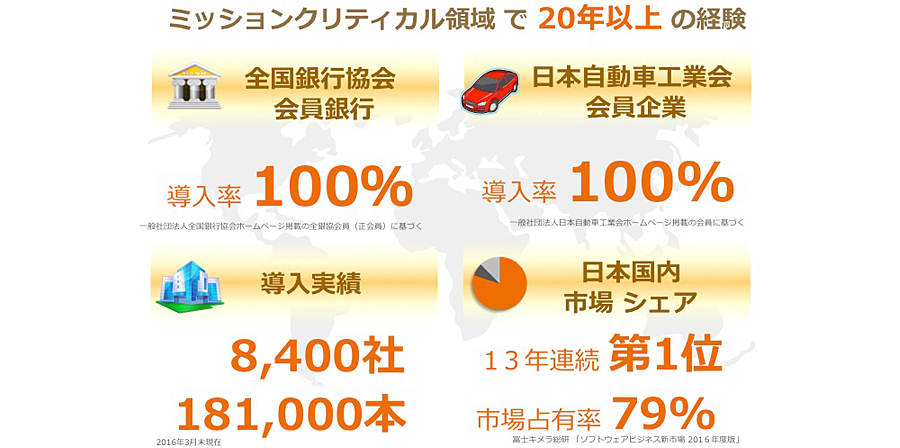
HULFT, originally an abbreviation for Harmonious Universal Link File Transfer, is the most widely used MFT (Managed File Transfer) software in Japan (*1).
To date, more than 8,000 companies have adopted HULFT, including 100% of member companies of the Japanese Bankers Association, 100% of the Japan Automobile Manufacturers Association, and many other companies that use HULFT daily (*2).
If you live in Japan, you may be involved with HULFT in some way without even realizing it.
For example, HULFT may be used when a bank handles a transaction, or HULFT may be used to create products that are on display in stores.
file transfer is actually quite complex
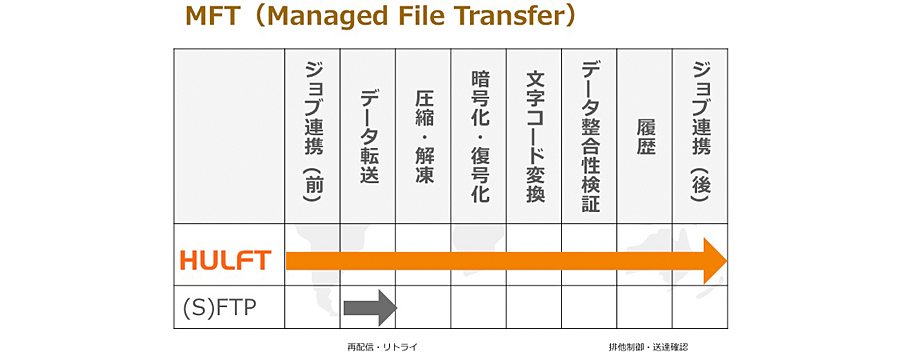
HULFT can be summed up in one word as "file transfer software." However, it does more than simply transfer files. It is software that transfers information in the form of files and handles the processing that occurs before and after the transfer of that information in an integrated manner.
If you simply want to file transfer, you can use the long-standing FTP, or SFTP, FTPS, or SCP, which encrypt the communication channel while file transfer. However, FTP and similar protocols are merely individual tools for file transfer. When using FTP, the user must be clearly aware of which files they want to transfer and how.
Furthermore, anyone who uses FTP must have detailed knowledge of how to use it.
When designing a business system to be used within a company, it is difficult to assume that all employees know how to use a tool called FTP.
When considering information systems for carrying out business, simply transferring files is often not enough.
It's not just the act of transfer itself that involves various processes related to the transfer, such as which files to transfer, where and how, how to ensure that there are no problems with the transfer, and when to transfer them.
An example of a process that occurs after a transfer is a job completion notification. When file transfer using commands such as ftp or scp, the receiving party cannot clearly know when the communication is complete. Therefore, if you need a system that starts some kind of work when reception is complete, a new implementation is required to achieve this. With HULFT, both the sending and receiving parties can know when file transfer is complete.
In addition to these functions, HULFT also has the following functions, each of which is required for business systems.
- Synchronous and Asynchronous Transfers
- send
- Job Function
- Compressed Transfer
- Collection and delivery completion notification
- Scope of control and administrative authority
- Managing generations and history
- Data format and character code conversion
- Integrity Verification
- Combining multiple files
- Intermittent Transfer
- Other various functions
HULFT is a suite of software that allows business systems to implement these various processes. HULFT Managed File Transfer software is not just File Transfer software that transfers files, it is Managed File Transfer software that is file transfer managed.
Reduced man-hours and improved quality through adoption of HULFT
One of the reasons why HULFT continues to be adopted is that it can simultaneously reduce labor costs and improve quality.
In the 20 years since its launch, HULFT has been involved in the development and improvement of numerous business systems.
We have discovered and solved many of the functions necessary to realize business systems, as well as the problems that tend to arise when implementing those functions.
This means that we are involved in the business systems of a wide range of customers, and we have accumulated knowledge about the functions required in Japanese enterprise environments.
When implementing a business system, it is necessary to exchange information internally, but by using HULFT, which contains the on-site know-how required when transferring data in the form of files, you can avoid common pitfalls.
By adopting HULFT, you can avoid the landmines that are often encountered when building something from scratch.
HULFT pays close attention to quality, conducting tests on 200,000 items (*3).
HULFT is implemented in C language, without using languages such as Java, and uses as little middleware as possible to avoid bugs that can be caused by software created by others.
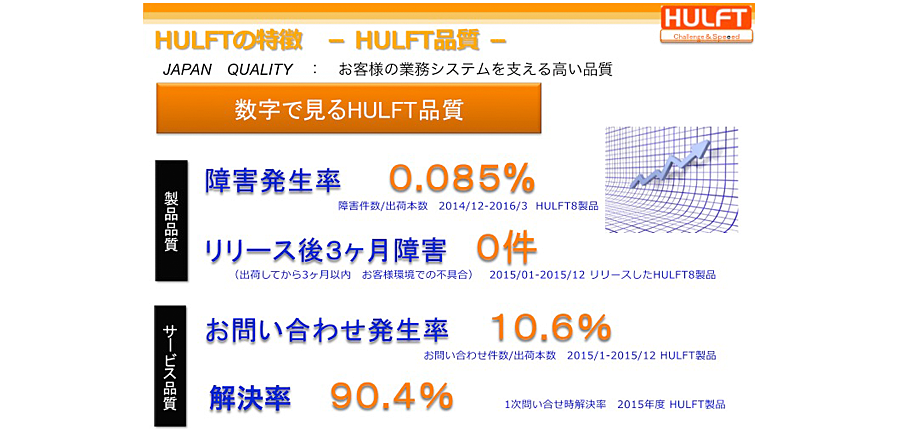
Through these efforts, HULFT achieves high quality.
There have been zero issues in the three months since release, and even if there have been inquiries after implementation in customer environments, the majority of them have been resolved with a single support call.
Overview of HULFT
Now, let's take a look at what HULFT is actually like.
In HULFT, the following three resident programs (daemons) handle file exchanges.
- [hulobsd]
A daemon that accepts requests from the screen, etc. - [hulsndd]
The sender daemon that send. - [hulrcvd]
Receiver daemon. Performs receive.
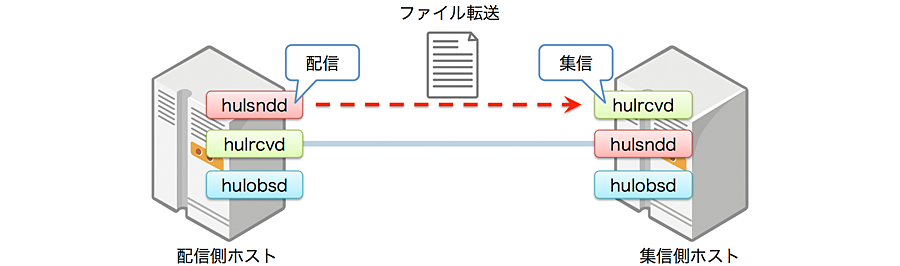
HULFT file transfer in response to requests from the UI or command line.
At HULFT, sending files is called "send" and receiving files is called "receive."
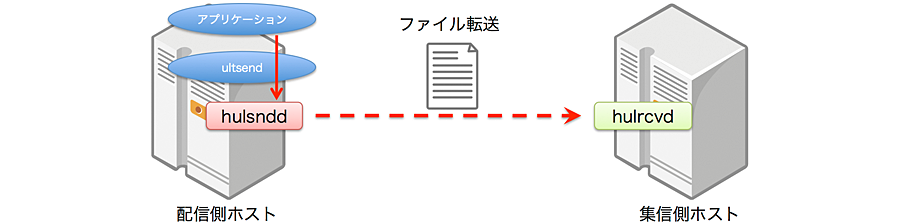
For example, to send a file from the command line, use the command utlsend.
utlsend specifies the file to be send to hulsndd. Upon receiving the command, hulsndd send the file to hulrcvd, which resides on the destination host. hulrcvd, running on the destination host, receive the file.
If an application issues commands to hulsndd using ultsend rather than from the command line, it will look like the following figure.
receive request can also be made from the hulrcvd side. When issuing a file receive request from the command line, send is carried out by issuing receive request from hulrcvd to hulsndd using the utlrecv command. When an application issues a command using ultrecv, it will look like the following diagram.
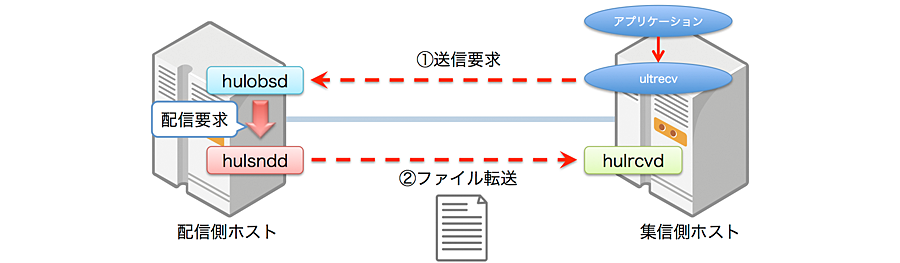
The request from ultrecv is received by hulobsd running on the send host.
When hulobsd receives the request, it issues a send command to hulsndd, which then file transfer to the host where ultrecv is executed.
These resident programs are available for a variety of platforms, including UNIX-based operating systems such as Linux and BSD-based operating systems, Windows, and various general-purpose computers.
The resident programs communicate with each other, allowing the differences between platforms to be absorbed.
- (*1) Fujitsu Chimera Soken Ltd. "2004-2010 Package Business Solution Marketing Handbook" "Software Business New Market 2011-2014 Edition" (Package and Value Based)
- (*2) As of June 2016
- (*3) Number of pre-release tests for HULFT 8
Akimichi asked someone at HULFT. Column list
- [Part 1] HULFT provides file transfer functionality essential for business systems
- [Part 2] What is HULFT? Let's take a look at how file transfer works (send Flow)
- [Part 3] What is HULFT? Let's take a look at how file transfer works (pre- and post-processing file transfer)
- [Part 4] The Strengths of HULFT Seen in Job Integration
- [Part 5] Making job integration more convenient -HULFT Script
- [Part 6] HULFT-WebFileTransfer and HULFT-WebConnect which allow you to use HULFT over the public Internet
- [Part 7] HULFT-HUB provides flexibility and reliability when connecting multiple locations
- [Part 8] Coexistence of HULFT and SFTP/FTP
- [No. 9] HULFT meets the requirements of IoT environments
The person who wrote the article


