

What is HULFT? Let's take a look at how file transfer works (Part 1)


In this column, Akimichi, a technology writer with extensive knowledge of internet infrastructure, reports from his unique perspective on the benefits of using HULFT, which supports companies' data integration platform, and the technologies that support safety and security. For those who only know the name HULFT, he provides an easy-to-understand overview of the basic functions and file transfer.

Part 2: What is HULFT? | Let's take a look at how file transfer works (Part 1)
HULFT is software that transfers information in the form of files and handles the processes that occur before and after the transfer in an integrated manner. However, simply describing it as "software that file transfer" can easily lead to the misunderstanding that it is the same as traditional file transfer software such as FTP. The easiest way to understand the difference is to look at how HULFT file transfer. This article will introduce the specific mechanisms of file transfer using HULFT.
HULFT send Process
First, let's take a look at the overall flow of HULFT.
file transfer with HULFT begins with the establishment of a TCP connection from send host that sends the file to the receive host that receives the file.
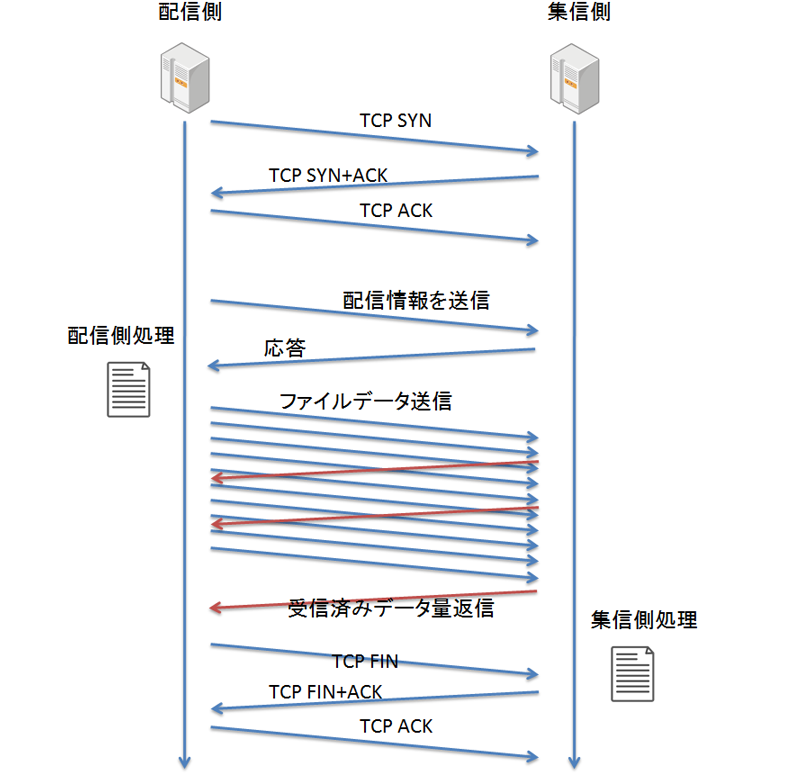
After the TCP connection is established, send side performs preprocessing such as code conversion, compression, and encryption as needed. send side then sends the preprocessed file to receive side via the TCP connection.
When receive side receives the file, it will decrypt any encrypted data, decompress any compressed data, convert codes, etc. as needed. After these processes are complete, job linkage will be performed.
After file transfer is complete, the TCP connection is disconnected and HULFT send ends.
In this way, a TCP connection is established for each file transfer with HULFT.
TCP connection and initialization
Next, let's look at each of these actions in a bit more detail.
send host sends a TCP SYN packet to receive host, and receive host replies with a TCP SYN+ACK packet.
When send host receives the TCP SYN+ACK from receive host, it returns a TCP ACK, completing the TCP three-way handshake.
receive host checks whether send host that has requested a TCP connection is registered in the connection permission list. Any TCP connection from a host that is not registered in the connection permission list is terminated immediately after the TCP connection is established.
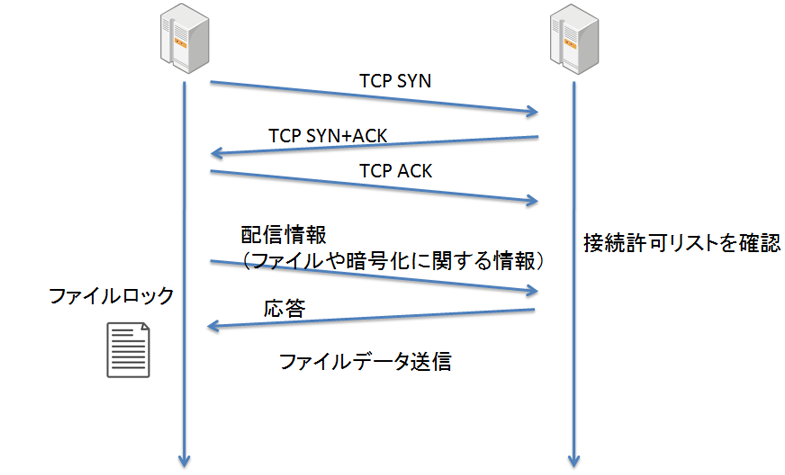
After establishing a TCP connection, the send host sends various information required for HULFT transfer to the receive host. The information sent initially by send host includes information about the file to be transferred, as well as information required for encryption.
send side locks the file to be transferred immediately after the TCP connection is established. receive side also locks the file to be transferred after creating a file to write the received file.
This prevents problems that can occur on both send and receive sides when other processes change the contents of a file during file transfer. Locking may seem like a mundane task and is easy to forget, but it is extremely important for creating a robust file transfer system.
file transfer processing via TCP connection
After the TCP session is established, the file is transferred from the send side to receive side.
Here too, HULFT has put in some ingenuity.
HULFT divides files into small pieces and sends them over a TCP session. When the divided file data arrives on receive side, receive side notifies the send side of information about how much of the data has been received.
In a typical OS, an application passes data to the kernel to be sent over a TCP connection, and the kernel then sends the data over TCP. At this time, the application recognizes that "writing to the TCP socket has been completed" when it passes the data to the kernel, but this is separate from the fact that the data has reached the other end of the TCP connection via the network.
To know whether data has been received over the network, you need to create a program that sends back a notification from the other end of the communication indicating how far the data has reached. However, with HULFT, this function is already built in.
Creating file transfer process from scratch is difficult, but by using HULFT, we can create a system that takes such aspects into consideration from the start.
file transfer completes and the TCP connection closes
send After sending all the data of the file to the receive side, the side sends a notification that all the files have been sent. Upon receiving the notification, the receive side checks the received file size and other information to confirm that the file has been transferred correctly.
receive After the send side finishes writing to the file, the file transfer side informs the side that has finished successfully.
The TCP connection used for file transfer is terminated from send side. By disconnecting from receive side (which listens for send connection), information about the TCP socket can be prevented from remaining in the TIME_WAIT state on receive side's TCP.
As you can see, there is a lot of know-how regarding the procedures involved in completing file transfer.
To be continued in the second part
This time, we introduced the general flow from the start to the end of a TCP connection for file transfer using HULFT.
In the next article, we will look at some useful processes that can be performed in conjunction with file file transfer, such as processing before and after file transfer, data integrity verification, and job linkages.
If you want to learn more, click here
➡ You can try out HULFT Family products. Check them out first.
➡ We hold hands-on seminars where you can experience products, mainly HULFT and DataSpider.
Akimichi asked someone at HULFT. Column list
- [Part 1] HULFT provides file transfer functionality essential for business systems
- [Part 2] What is HULFT? Let's take a look at how file transfer works (send Flow)
- [Part 3] What is HULFT? Let's take a look at how file transfer works (pre- and post-processing file transfer)
- [Part 4] The Strengths of HULFT Seen in Job Integration
- [Part 5] Making job integration more convenient -HULFT Script
- [Part 6] HULFT-WebFileTransfer and HULFT-WebConnect which allow you to use HULFT over the public Internet
- [Part 7] HULFT-HUB provides flexibility and reliability when connecting multiple locations
- [Part 8] Coexistence of HULFT and SFTP/FTP
- [No. 9] HULFT meets the requirements of IoT environments
The person who wrote the article


