

What is HULFT? | Let's take a look at how file transfer works (Part 2)


In this column, Akimichi, a technology writer with extensive knowledge of internet infrastructure, reports from his unique perspective on the benefits of using HULFT, which supports companies' data integration platform, and the technologies that support safety and security. For those who only know the name HULFT, he provides an easy-to-understand overview of the basic functions and file transfer.
Part 3: What is HULFT? | Let's take a look at how file transfer works (Part 2)
In the first part, we introduced the general flow from the start to the end of a TCP connection for file transfer using HULFT. In this article, we will take a closer look at the processes that accompany file transfer.
Processing before and after file transfer
file transfer with HULFT is not just about transferring files, but is characterized by the various processes that accompany file transfer processes that accompany file transfer include pre-transfer processing that occurs on send side, post-transfer processing that occurs on receive side, and a synchronization function that allows processing to be performed on the send side after processing on receive side has finished.
The pre-transfer processing performed on send side is in the following order: file input, code conversion, compression, encryption, and send.
While transcoding, compression, and encryption are processes that accompany file transfer, they are not required for all file transfer. Administrators can configure which pre- and post-processing is performed on each file transfer. For example, they can configure certain file types to be transcoded before transfer, while other files can be compressed or encrypted.
Let's take a closer look at the processes involved in HULFT file transfer.
First, regarding code conversion, mainframes are sometimes used in the internal systems of major Japanese companies. While there are downsizing, migration, and distribution efforts to reduce the number of mainframes that were once widely used, there are cases where it is difficult to migrate all functions to a UNIX-based OS or Windows, and the mainframes need to connect to external systems.
When a mainframe computer connects to other systems, character codes can become an issue. There are cases where the character codes used on a mainframe computer cannot be processed by other systems. However, creating a program from scratch to support the individual character codes used on various mainframe computers would require an enormous amount of man-hours.
HULFT 's character code conversion function supports the character codes used on various general-purpose computers, and character code conversion can be performed during file transfer.
This reduces the development time required for character code-related programs, which often occurs when supporting general-purpose computers, and also prevents bugs from occurring.
Next, regarding compression, HULFT ver8 offers two types of compression: a compression method similar to the run-length method, and Deflate compression using the Huffman method. The former is effective for general-purpose machines that often use padding at the end of data, while the latter is effective for a variety of text data.
If encryption is enabled, the data to be transferred is encrypted on the send host before being sent over the network. There are three types of encryption available in HULFT 8: HULFT encryption, C4S encryption, and AES encryption.
On receive side, decryption, decompression, code conversion, and file output are performed according to the processing performed on send side.
Pre- and post-processing on send and receive sides is performed in memory, so no intermediate files are generated for pre- and post-processing.
Data Integrity Validation
HULFT also has a data integrity verification function.
This function verifies whether the original data is corrupted during the series of file transfer processes performed by HULFT.
HULFT uses TCP to file transfer.
TCP has an error detection code called CRC (Cyclic Redundancy Check), but there is a possibility that corrupted data may slip through the CRC check due to noise on the network.
Although it is rare, it is possible for data to be corrupted within the network but still be successfully transferred.
HULFT is used in a large number of systems, but such problems are reported several times a year.
TCP is generally believed to be a reliable communication method, but in reality it does not completely guarantee the contents of the data.
HULFT 's data integrity verification can also detect data errors that occur over TCP.
Job Linkage
"Job linkage" is a process that can be performed at the beginning of send and at the end of receive. As the name suggests, job linkage links file transfer with jobs that accompany file transfer.
The job linkage function can be used to achieve a variety of things, but the most common use for job linkage is synchronous transfer.
For example, you may want to send certain files in order.
In such cases, you can also file transfer synchronous file transfer transfers to be carried out in order, so that the next file transfer begins after one file is completed.
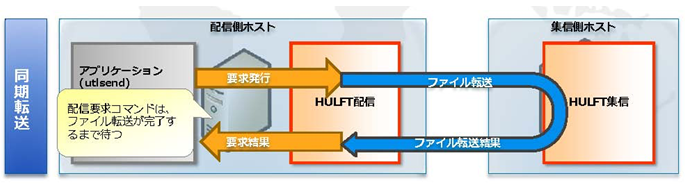
In addition, there are cases where send side wants to check not only the completion of file transfer, but also whether everything, including the processing performed on receive side after file transfer was successful.
After that, send side may confirm that file transfer to receive side was successful and then delete the file in its possession.
When using file transfer commands such as ftp, it is necessary to implement such functions separately from file transfer command, but by using HULFT 's job linkage function, you can achieve this without having to develop anything new.
lastly
This time, we introduced what actually happens during HULFT file transfer.
Simply saying that "HULFT also handles processes associated with file transfer" might raise questions about how it differs from FTP and other similar services. However, if you look at how file transfer are carried out, the difference becomes obvious, and you will understand that there is no comparison between the two.
Next time, we will take a closer look at HULFT 's functions.
Akimichi asked someone at HULFT. Column list
- [Part 1] HULFT provides file transfer functionality essential for business systems
- [Part 2] What is HULFT? Let's take a look at how file transfer works (send Flow)
- [Part 3] What is HULFT? Let's take a look at how file transfer works (pre- and post-processing file transfer)
- [Part 4] The Strengths of HULFT Seen in Job Integration
- [Part 5] Making job integration more convenient -HULFT Script
- [Part 6] HULFT-WebFileTransfer and HULFT-WebConnect which allow you to use HULFT over the public Internet
- [Part 7] HULFT-HUB provides flexibility and reliability when connecting multiple locations
- [Part 8] Coexistence of HULFT and SFTP/FTP
- [No. 9] HULFT meets the requirements of IoT environments
The person who wrote the article


