

Make job integration more convenient -HULFT Script


In this column, Akimichi, a technology writer with extensive knowledge of internet infrastructure, reports from his unique perspective on the benefits of using HULFT, which supports companies' data integration platform, and the technologies that support safety and security. For those who only know the name HULFT, he provides an easy-to-understand overview of the basic functions and file transfer.
Part 5: Making Job Linkage More Convenient -HULFT Script
In previous articles, we have introduced how HULFT is not just file transfer tool, but a framework for system integration that uses file integration as an interface.
The system integration framework provided by HULFT also includes job (batch) control that takes place before and after the implementation.
However, the previous version of HULFT did not cover the contents of the job itself.
Its scope was to execute specified jobs at the appropriate time while absorbing differences between operating systems, but implementing the contents of the jobs was outside its scope.
Since jobs executed by HULFT are not within the scope of HULFT, each HULFT user had to implement them themselves according to their environment, such as the host OS.
HULFT Script is optional product that was launched in 2014 and is designed to make it easier to achieve areas that were previously outside the scope of HULFT.
This time, we will introduce HULFT Script.
Robust script generation with GUI
As the name HULFT Script suggests, its main feature is that it makes it easy to generate scripts that are executed as HULFT jobs.
On a device where HULFT Script is installed, the web server "HULFT Script Studio" is started to realize the GUI (Graphical User Interface) of HULFT Script.
Administrators who set up HULFT jobs can create and configure jobs by accessing HULFT Script Studio via a web browser.
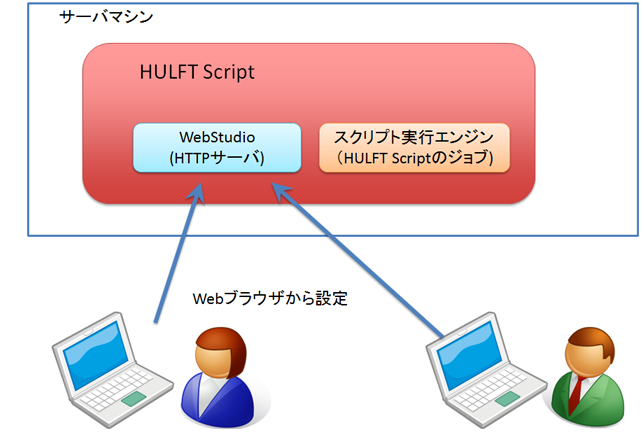
Settings using HULFT Script Web Studio are performed via a web-based GUI, so a major feature is that there is no need to install a dedicated application like with conventional HULFT applications.
HULFT Script Web Studio allows you to generate scripts using a web browser.
To try out HULFT Script Web Studio for the first time, we recommend that you download the HULFT Script template, which is a collection of general-purpose scripts, from the HULFT customer page "my HULFT" and then install it into HULFT Script.
The following screen example is an example when using the "send Request/Request file transfer in a Folder" included in the HULFT Script template.
Figure 2
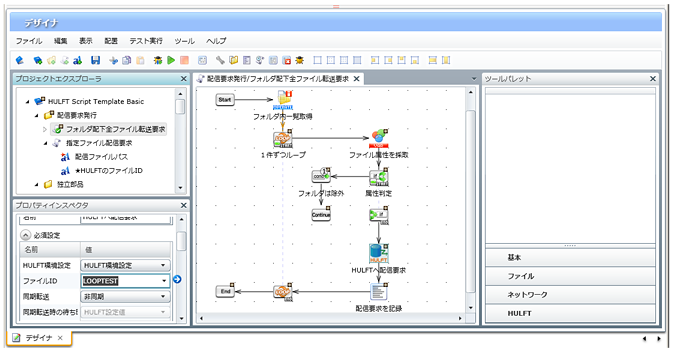
This template issues a request to send all files contained in a specific folder on the device on which HULFT Script is running.
Settings for individual elements included in a script are made in the Property Inspector window, where you can make various settings required for send, receive, etc. For example, when send, you can specify whether to make specific settings or whether to coordinate with settings in HULFT main module.
Realizes OS-independent job execution scripts
With previous versions of HULFT, job linkage via IDs was OS-independent, but the jobs that were actually executed were OS-dependent.
For example, while batch files are implemented as jobs to be executed on Windows, shell scripts are implemented on Linux; scripts to be executed as jobs had to be created according to the OS environment.
How to implement jobs was a major issue for HULFT users.
HULFT Script is optional product HULFT product that solves these issues.
With HULFT Script, you can simply connect related processes using a unique GUI, and you can branch using loops and conditional judgments, extract standard output and error output, make judgments, and output logs without having to write batch or shell scripts.
Because HULFT Script absorbs differences between operating systems, jobs created with HULFT Script are not dependent on a specific operating system.
With the previous version of HULFT, it was difficult to run batch files created on Windows on Linux as is, but now it is possible to run scripts created with HULFT Script as common processes for use on multiple operating systems.
More control
HULFT Script is based on DataSpider.
The communication parts for send and receive are the same as those used in the previous HULFT, but the parts that build scripts and execute jobs are implemented and run based on DataSpider as an independent system separate from HULFT.
This means that script execution can be incorporated without affecting existing HULFT operations or business processes.
DataSpider provides a wide range of adapters and functions for data processing and access to various clouds and databases, but HULFT Script adds functions for performing conventional HULFT transfers while retaining the command execution essential for HULFT job control, file name renaming, folder movement, password-protected ZIP compression of files, and email sending.
Previously, jobs executed with HULFT involved running external executable files that were completely separate from HULFT, but jobs that execute scripts created with HULFT Script are now run directly by HULFT Script.
Figure 3
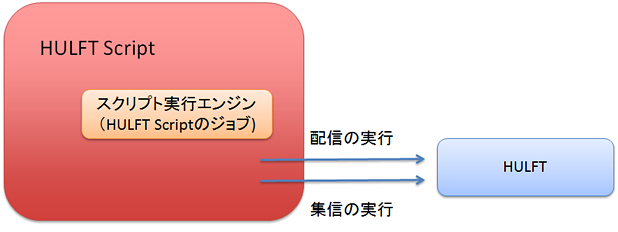
These design differences make it possible for HULFT Script to achieve detailed control over jobs, which was difficult to achieve with the previous version of HULFT.
For example, with the previous version of HULFT, it was only possible to know whether a job as an external executable file was successful or not.
With HULFT Script, if a job fails, you can find out where and how the failure occurred.
Even if the operation is successful, you can still understand what steps were taken to achieve the desired result.
HULFT Script is able to grasp detailed job-related status, so you can perform specific processing after the transfer of a specific group of files is complete, or create settings that depend on a specific completion code or the source or destination host.
HULFT Script allows you to create jobs independent of the OS and at the same time enables more detailed control.
Automatically generate job specifications
HULFT Script also has a "specification creation function" that automatically generates specifications for jobs created in the GUI.
Specifications can be output on a script-by-script and project-by-project basis.
Figure 4
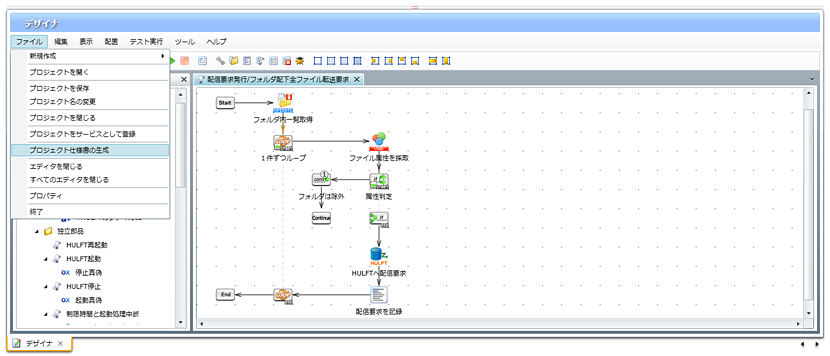
Figure 5
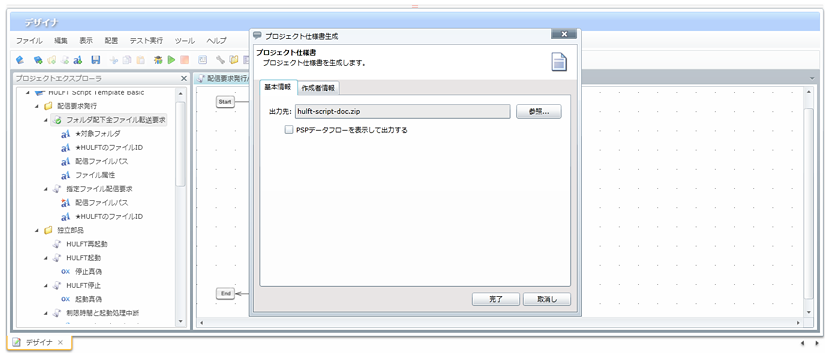
By using the specification creation function, you can significantly reduce the amount of work required to create service development deliverables, handover documents, and operation manuals.
lastly
HULFT Script is optional product, but its content is based on DataSpider.
Therefore, if you find that you want to use more features while using the service, you can migrate to DataSpider.
It can be said that it is a new software suite with easy-to-use functions while maintaining compatibility with the previous HULFT.
There is also a free evaluation version of HULFT Script available, so if you are interested, please give it a try.
When doing so, don't forget to also download the HULFT Script template, which contains a large number of script samples!
Akimichi asked someone at HULFT. Column list
- [Part 1] HULFT provides file transfer functionality essential for business systems
- [Part 2] What is HULFT? Let's take a look at how file transfer works (send Flow)
- [Part 3] What is HULFT? Let's take a look at how file transfer works (pre- and post-processing file transfer)
- [Part 4] The Strengths of HULFT Seen in Job Integration
- [Part 5] Making job integration more convenient -HULFT Script
- [Part 6] HULFT-WebFileTransfer and HULFT-WebConnect which allow you to use HULFT over the public Internet
- [Part 7] HULFT-HUB provides flexibility and reliability when connecting multiple locations
- [Part 8] Coexistence of HULFT and SFTP/FTP
- [No. 9] HULFT meets the requirements of IoT environments
The person who wrote the article


