

HULFT-WebFileTransfer and HULFT-WebConnect allow you to use HULFT over the public Internet


In this column, Akimichi, a technology writer with extensive knowledge of internet infrastructure, reports from his unique perspective on the benefits of using HULFT, which supports companies' data integration platform, and the technologies that support safety and security. For those who only know the name HULFT, he provides an easy-to-understand overview of the basic functions and file transfer.
Part 6: HULFT-WebFileTransfer and HULFT-WebConnect which allow you to use HULFT over the public Internet
When it comes to HULFT, many people may think of it as being used in on-premise environments or in combination with private lines, but there are also products called HULFT-WebFileTransfer and HULFT-WebConnect that allow for use in environments with greater flexibility, including over the internet.
For example, HULFT is used in systems that use ISDN lines as private lines to build order entry and delivery systems that connect multiple locations.
However, with ISDN lines likely to be phased out in the future, there is an increasing number of designs that use the Internet as part of the communication lines.
To meet these demands, HULFT-WebFileTransfer and HULFT-WebConnect were developed, which use HTTPS, which is encrypted using the standardized TLS specification, as a communication channel and can utilize the Internet.
The main difference between HULFT-WebFileTransfer and HULFT-WebConnect is that with HULFT-WebFileTransfer, HULFT is operated within a web server that has already been built, while with HULFT-WebConnect, customers do not need to build their own web server.
HULFT-WebFileTransfer can be used over the public Internet as well as private networks that cannot be connected to the Internet, while HULFT-WebConnect is designed for communication via the public Internet.
Now let's take a closer look at HULFT-WebFileTransfer and HULFT-WebConnect.
»HULFT-WebConnect product introduction page
HULFT-WebFileTransfer
HULFT-WebFileTransfer is a package middleware that uses web technologies such as HTTP and TLS to perform secure data transfer.
By running a web server, communication with web browsers and other devices is possible.
The web server uses Apache Tomcat.
Figure 1
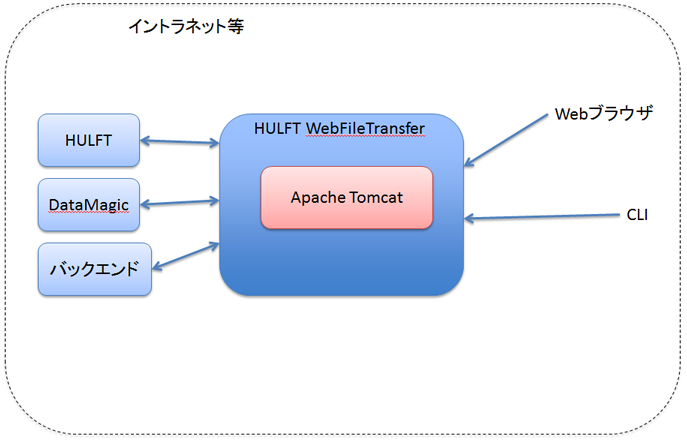
One way to utilize HULFT-WebFileTransfer is to create web services on an intranet.
HULFT-WebFileTransfer works with HULFT, DataMagic, and other backends, enabling secure file transfer using a standard web browser.
As shown in Figure 2, HULFT-WebFileTransfer can also be used as a public Internet-facing interface.
In this operational model, HULFT-WebFileTransfer acts as a bridge between the back-end system within the intranet and the client on the public Internet side.
Because it uses common web technologies, it is also possible to implement a mechanism for authenticating clients on the public Internet side by using client certificates, etc.
Figure 2
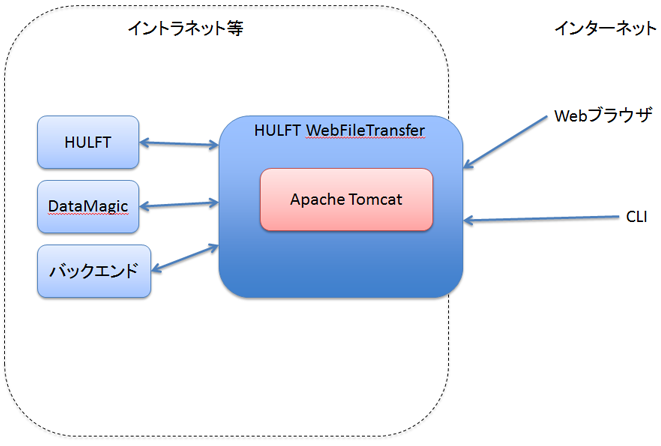
HULFT-WebFileTransfer provides a mechanism for secure communication with clients directly connected to the Internet, enabling smooth and secure file transfer over the Internet.
For example, in the traditional EFSS usage scenario, you can store files on a self-built web server and automatically distribute them to a back-end system, but you can also delete the files for security reasons. Alternatively, the stored files can be distributed so that each site can access them by connecting to a browser. You can also send emails to each site to encourage them to retrieve the files, allowing for a design and operation that is more in line with business needs than an EFSS service that is simply a file repository.
Furthermore, the ability to integrate with existing HULFT and DataMagic on the backend means that it has high compatibility with existing systems.
While continuing to make the most of the benefits of traditional HULFT, such as job integration, you can also use HULFT-WebFileTransfer as a means of using the Internet to achieve collaboration with remote locations.
HULFT-WebFileTransfer does not require the use of HULFT in the back-end, so it can of course be used in environments that do not use the previous HULFT or DataMagic.
HULFT-WebConnect
HULFT-WebConnect is a service that allows file transfer by HULFT easily and securely via a public Internet connection.
HULFT The main difference from -WebFileTransfer is that HULFT-WebFileTransfer customers operate their own web servers, while HULFT-WebConnect uses a service that bridges the two HULFT services.
Figure 3
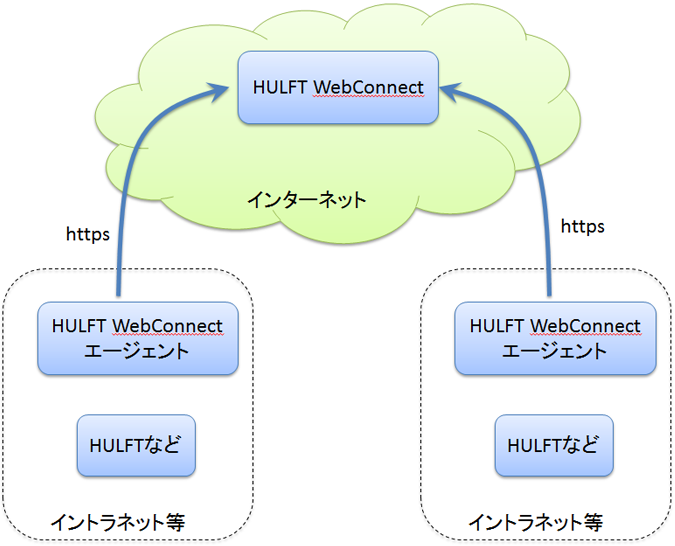
HULFT-WebConnect uses WebSocket.
HULFT uses its own proprietary protocol, and there are security devices such as firewalls that cannot directly handle the HULFT protocol. However, HULFT-WebConnect uses WebSocket, making it easy to configure firewalls and other devices.
From the perspective of the firewall, HULFT-WebConnect communication can be treated as HTTPS via WebSocket.
HULFT-WebConnect An agent in the firewall makes a WebSocket connection to the relay service at HULFT-WebConnect. Through the WebSocket connection established by the agent, the two HULFT systems can communicate in both directions.
Since the client's system does not need to open a port to allow connections from outside the firewall, it is highly resistant to network attacks. Yet the convenience of connecting two HULFT sites that are both behind firewalls is a key feature of HULFT-WebConnect.
HULFT It is cheaper and more secure than a VPN connection between two remote sites HULFT-WebConnect.
If encryption is configured to be performed on HULFT used inside the firewall, data encrypted by HULFT will pass through HULFT-WebConnect.
In this case, HULFT-WebConnect relay service cannot perform HULFT encryption between end nodes.
The communication between HULFT-WebConnect and the agent is encrypted using TLS, and the data passing through is also encrypted using HULFT encryption, resulting in double encryption.
HULFT-WebConnect relay service runs on AWS.
The relay service is operated in several regions, but communication between the relay service regions is conducted internally within AWS.
In other words, because it utilizes AWS's robust back-end system, depending on the environment, using HULFT-WebConnect may result in higher communication quality than directly connecting two points.
In fact, a customer currently using HULFT-WebConnect on a line connecting Europe and Japan has seen similar results.
This tends to happen in environments where the RTT for passing through AWS is shorter than the RTT for passing through a normal BGP route.
The appeal of HULFT-WebConnect is that it allows you to connect between distant locations or with business partners that are not connected via LAN, without having to install any devices like a VPN.
Here is an example of an e-commerce site where this is being used by a customer. After a customer order is received in the front system of the e-commerce site, the order information is automatically linked to the warehouse and delivery company, and the product is shipped. After that, a notification of shipment completion is automatically sent to the company that has the front system. This is an example of how "different companies have been able to link together as if they were one system."
lastly
Although both can be used over the public internet, HULFT-WebFileTransfer and HULFT-WebConnect have different use cases and design concepts.
HULFT-WebFileTransfer and HULFT-WebConnect continue to evolve.
For example, even as I write this article, new features for HULFT-WebConnect have been released.
The addition of new features also means that the number of environments in which they can be adopted increases.
If you considered it a while ago but are still interested, please feel free to contact us regarding the latest features.
Akimichi asked someone at HULFT. Column list
- [Part 1] HULFT provides file transfer functionality essential for business systems
- [Part 2] What is HULFT? Let's take a look at how file transfer works (send Flow)
- [Part 3] What is HULFT? Let's take a look at how file transfer works (pre- and post-processing file transfer)
- [Part 4] The Strengths of HULFT Seen in Job Integration
- [Part 5] Making job integration more convenient -HULFT Script
- [Part 6] HULFT-WebFileTransfer and HULFT-WebConnect which allow you to use HULFT over the public Internet
- [Part 7] HULFT-HUB provides flexibility and reliability when connecting multiple locations
- [Part 8] Coexistence of HULFT and SFTP/FTP
- [No. 9] HULFT meets the requirements of IoT environments
The person who wrote the article


