

HULFT-HUB provides flexibility and reliability when connecting multiple locations


In this column, Akimichi, a technology writer with extensive knowledge of internet infrastructure, reports from his unique perspective on the benefits of using HULFT, which supports companies' data integration platform, and the technologies that support safety and security. For those who only know the name HULFT, he provides an easy-to-understand overview of the basic functions and file transfer.
Part 7: HULFT-HUB provides flexibility and reliability when connecting multiple locations
HULFT, which allows for secure file transfer and job integration, basically uses one-to-one connections.
Even when connecting multiple HULFT, the basic principle is a one-to-one connection, so the settings become more complex as the number of connections increases.
For example, if there is one HULFT running at each of three locations and communication is required between each location, each location will be connected to the other two locations in a full mesh connection.
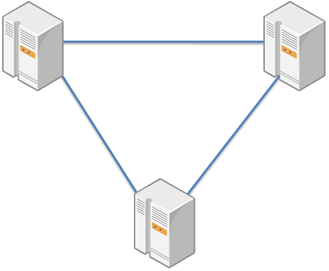
A full mesh is not a problem if there are around three locations, but as the number of locations increases, the number of connections from each location to other locations also increases. If there is a business that requires file transfer between multiple locations, and you configure the settings to implement that business content directly using HULFT transfer, it becomes necessary to connect the locations. This problem is very common, as the term "combinatorial explosion" has been coined in information engineering.
Depending on file transfer required for business, it is often not necessary for all locations to be connected in a complete full mesh, so just knowing what is connected and how can become a challenge.
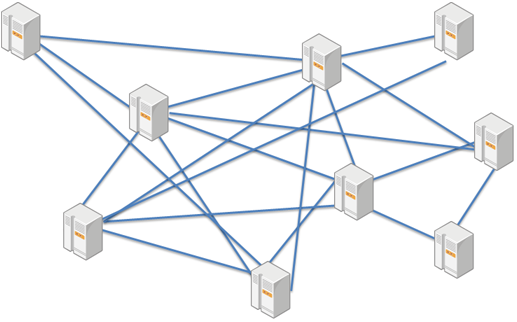
As the number of connections increases, the number of settings for those connections also increases. As the scale of business expands, the number of settings also tends to increase accordingly.
Considering that all bases will need to be set up to connect to other bases, it is also an important task to ensure that all bases have the latest settings.
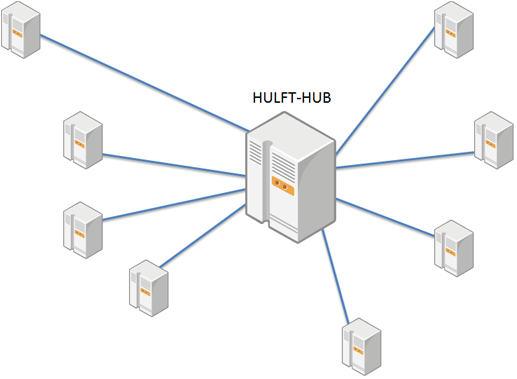
One technique for operating HULFT is to avoid such complex configurations by assigning a framework like a "HUB" where a specific location acts as a relay point and processes connections between multiple locations before connecting them.
However, in order to make such settings, it was necessary to create a job that would operate like a HUB, so there was a demand for HULFT Products that provided such functionality from the start, and HULFT-HUB was developed.
HULFT-HUB allows for flexible connection to multiple locations.
For example, you can configure certain file transfer to be sent only to specified parties, rather than to all connected parties.
»Click here for HULFT-HUB product introduction page
Storage and transmission using HULFT-HUB
HULFT uses the words "send" and "receive" when describing file transfer. HULFT is file transfer software that can easily perform broadcast send as well, but the term "send" from broadcast send is used for sending files, and the term "receive" is used as the corresponding term for send.
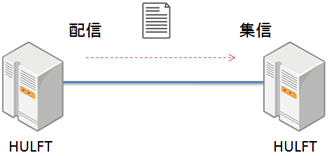
In HULFT-HUB, apart from the expressions "send" and "receive", the expressions "accumulation" and "send" are used. This is because HULFT-HUB can accumulate send from HULFT as needed and send the accumulated files as configured.
Furthermore, it is possible to "relay" send from HULFT or "broadcast" it to multiple HULFT.
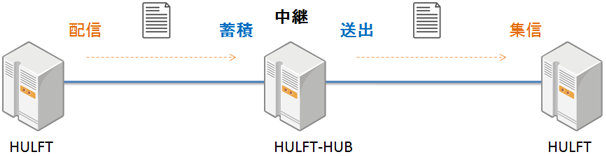
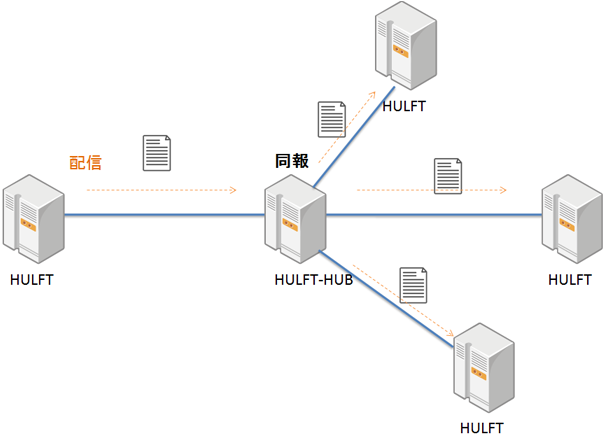
In this way, HULFT-HUB HULFT-HUB philosophy is reflected in its terminology.
Topology understanding function
HULFT-HUB has topology understanding and management functions.
The management function allows you to manage HULFT configuration information from HULFT-HUB and also allows you to start file transfer to HULFT from HULFT-HUB.
From the perspective of HULFT-HUB, there are three types of HULFT:
- HULFT allows file transfer relay and manages configuration information
- HULFT allows file transfer relay but cannot manage configuration information
- HULFT cannot relay or manage data, but it can recognize its existence
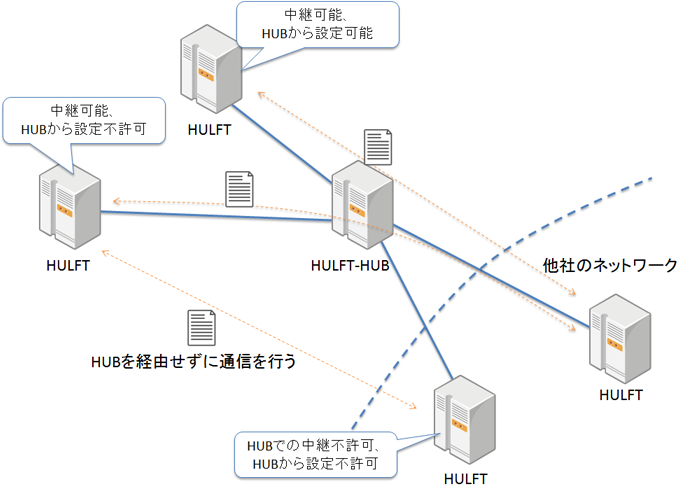
HULFT has an architecture that makes it easy for different organizations to file transfer while clearly defining the boundaries of responsibility. The topology detection function of HULFT-HUB utilizes this architecture and employs a mechanism that enables topology detection to the extent that it can be made public.
HULFT-HUB can also understand HULFT, which cannot relay or manage data. For example, even if different organizations are connected via HULFT-HUB, the topology can be understood within the permitted range.
File storage and retransmission functions
The storage function is also extremely useful when using HULFT to file transfer to overseas bases.
It's hard to notice because Japan's internet connection services are very stable, but internet lines overseas are not operated with the same quality as those in Japan.
For example, in Southeast Asia, internet connections can suddenly drop.
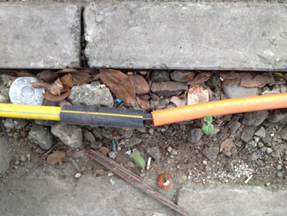
Condensation can cause problems inside data centers, and optical fiber cabling outside the data center can be exposed above ground.
Not only can internet connections be affected, but power supplies can also be suddenly cut off due to power outages. Communication problems often occur for reasons that are unimaginable in Japan.
- Example of outdoor fiber optic installation at a data center in Indonesia (reference) http://www.geekpage.jp/blog/?id=2017-5-30-1
Furthermore, there are situations where the internet will be unavailable during a specified period of time.
To deal with such situations, HULFT-HUB 's file storage and file retransmission functions are extremely useful.
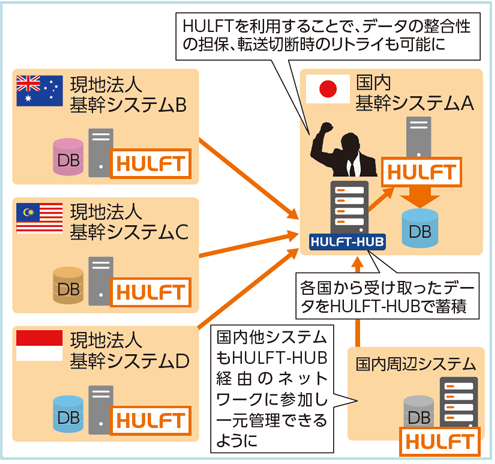
For example, if you are using HULFT-HUB to file transfer between a Japanese corporation with multiple overseas bases and the headquarters and the overseas bases, the following configuration would be convenient.
Let's say that a computer that handles mission-critical business operations and HULFT-HUB are in operation in Japan, where data centers and lines have very high quality.
Multiple locations within Japan are also simultaneously connected to HULFT-HUB.
All file transfer from Japanese bases to overseas bases are via HULFT-HUB.
When transferring files overseas from HULFT-HUB, you can configure settings for storing files and resending files in case of failure.
This means that even if the connection to HULFT at an overseas base fails for some reason, HULFT-HUB will continue to file transfer once communication is restored.
In this way, HULFT-HUB not only simplifies the connection topology between HULFT, but also enables the creation of a robust system that can withstand network failures, etc.
 HULFT-HUB 's storage function maintains the "file transfer order"
One of the benefits of HULFT-HUB 's file storage and retransmission functions is that it can maintain the order of file transfer when a failure occurs along the route.
In the standard HULFT settings, file transfer settings are configured for each ID.
If you send multiple transfers to a specific ID, the default setting is to overwrite them.
So, for example, if you file transfer files whose contents change gradually every five minutes, and the first file transfer fails due to a network problem, even if the next file transfer is successful, depending on the settings, the contents that were supposed to be transferred in the first file transfer may be overwritten.
When the order of files being sent is very important, such as when the order is important when inputting files into a database, it is important that the contents of each file arrive in the correct order, even if they have the same ID.
When the accumulation of each individual action is important, if file transfer fails somewhere along the way and is overwritten, an important step may be missed.
It is possible to achieve such functionality with regular HULFT, but it requires job implementation to achieve it.
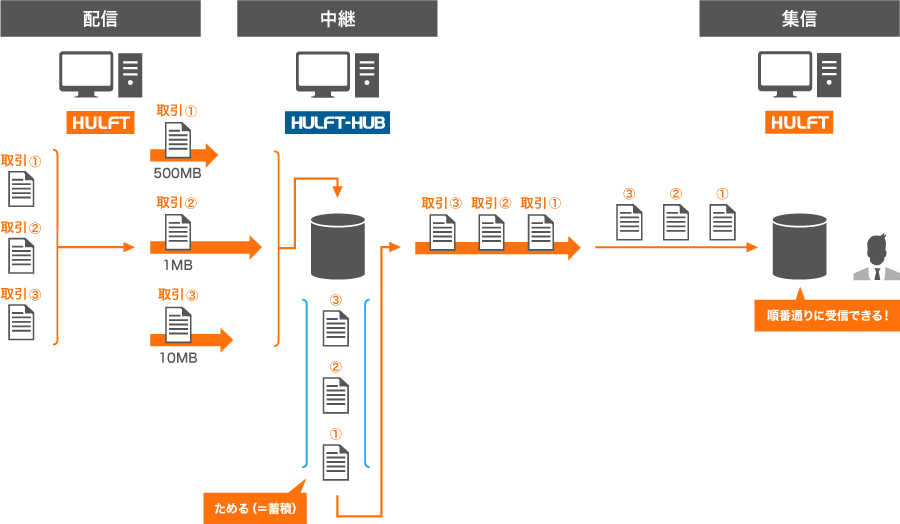
By using HULFT-HUB 's file storage and retransmission function, even if a file needs to be retransmitted due to an unexpected network problem, the file will be stored and retransmitted in the same order as it was stored.
It can also be configured to maintain order by continually resending the accumulated files in order until a failed file transfer is successful.
By using HULFT-HUB, it becomes much easier to file transfer to overseas bases where network problems are frequent.
Although there are time differences and differences in holidays overseas, HULFT-HUB can automatically resend messages in response to any problems.
Furthermore, file transfer history can be maintained, so if any kind of problem occurs, checking HULFT-HUB first makes it easier to identify the source of the problem.
Figure 1 (Before) -HULFT alone does not guarantee the transfer order -
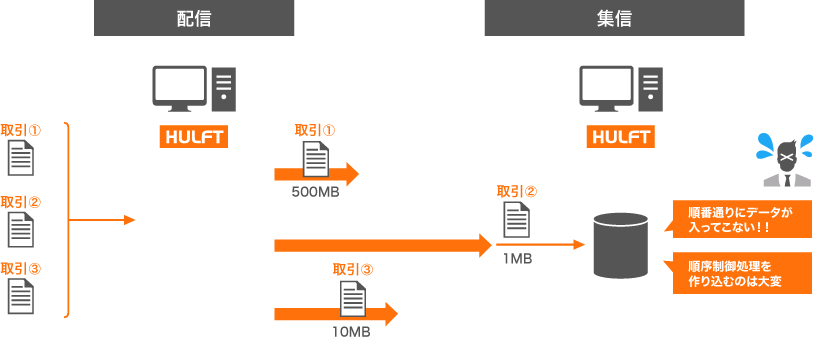
Figure 2 (After) - Guaranteeing the transfer order using HULFT-HUB-
summary
In this way, HULFT-HUB not only functions as a hub that can relay multiple HULFT, but also has the function of operating and managing complex topologies. Although this can be achieved with HULFT alone if properly configured, using HULFT-HUB also makes it easier to recover from sudden communication failures.
The term "hub" suggests that it is intended for use in environments of a certain size, so it has fewer users than regular HULFT, but I think it is an interesting piece of software.
Akimichi asked someone at HULFT. Column list
- [Part 1] HULFT provides file transfer functionality essential for business systems
- [Part 2] What is HULFT? Let's take a look at how file transfer works (send Flow)
- [Part 3] What is HULFT? Let's take a look at how file transfer works (pre- and post-processing file transfer)
- [Part 4] The Strengths of HULFT Seen in Job Integration
- [Part 5] Making job integration more convenient -HULFT Script
- [Part 6] HULFT-WebFileTransfer and HULFT-WebConnect which allow you to use HULFT over the public Internet
- [Part 7] HULFT-HUB provides flexibility and reliability when connecting multiple locations
- [Part 8] Coexistence of HULFT and SFTP/FTP
- [No. 9] HULFT meets the requirements of IoT environments
The person who wrote the article


