

Coexistence of HULFT and SFTP/FTP


In this column, Akimichi, a technology writer with extensive knowledge of internet infrastructure, reports from his unique perspective on the benefits of using HULFT, which supports companies' data integration platform, and the technologies that support safety and security. For those who only know the name HULFT, he provides an easy-to-understand overview of the basic functions and file transfer.
Part 8: Coexistence of HULFT and SFTP/FTP
This spring, HULFT8 Ver.8.4.0 was released.
The most significant point of the update to HULFT8 Ver.8.4.0 is probably the significant enhancement of the functionality for coexistence with SFTP/FTP.
This enhancement makes it much easier to file transfer file transfer from external SFTP/FTP to HULFT, and from HULFT to SFTP/FTP.
This increases the options for coexisting the traditional HULFT network with SFTP/FTP.
For example, HULFT is sometimes used to integrate internal systems that already use multiple products, or to integrate systems following a corporate merger. Similar issues arise when collaborating with other companies.
When used for such purposes, the communication standards that can be used by existing systems are of great importance.
HULFT8 Ver.8.4.0 makes SFTP/FTP easier to use, making integration easier.
A common way to use HULFT is to combine multiple HULFT systems to form a HULFT ecosystem.
HULFT is often thought of as being used on-premise, but its use in the cloud and other environments is also becoming more widespread.
By using the enhanced SFTP/FTP functions in HULFT8 Ver.8.4.0, file transfer with HULFT ecosystem, which are realized through communication between HULFT, can now be performed between various platforms and applications.
For example, if there are two different types of public clouds and HULFT ecosystem exists on one of them, you can file transfer to HULFT ecosystem using the sftp function provided by the other cloud.
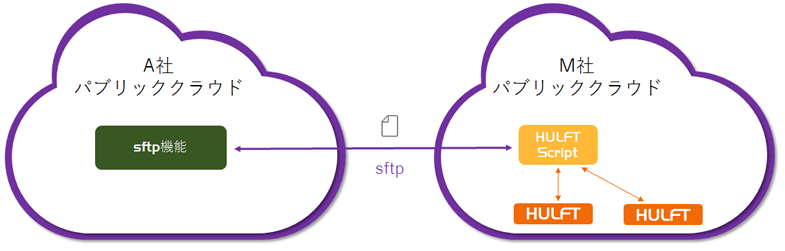
This new sftp function can also be used to connect on-premise to public clouds.
This enables you to file transfer from HULFT to a public cloud that supports file transfers via sftp, or to send files to HULFT from an application that supports file transfer via sftp.
The enhanced sftp/ftp functionality has increased the options for linking with and expanding HULFT HULFT, allowing for more flexible design.
The SFTP/FTP function of HULFT8 Ver.8.4.0 is included in HULFT Script.
If you enable the SFTP function in HULFT Script in HULFT8 Ver.8.4.0 and then build an external integration platform with your existing HULFT network, it will look like the diagram below.
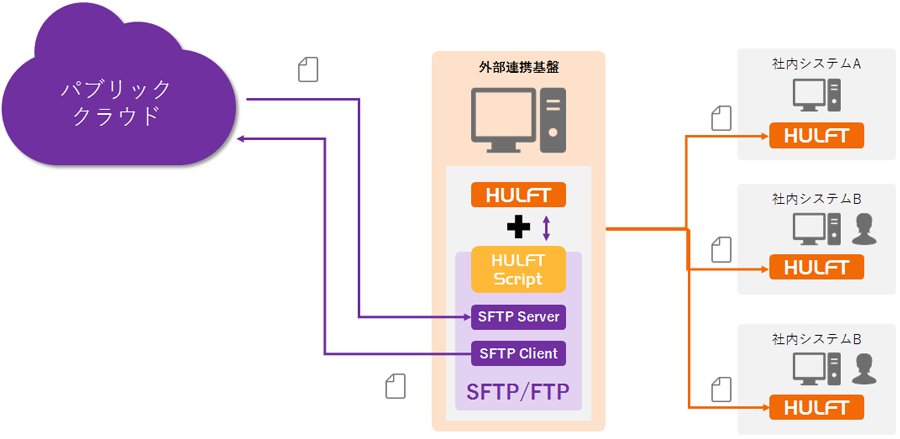
This diagram shows an environment in which a public cloud and an external integration platform on which HULFT is running send and receive files via sftp.
The external integration platform receives files from the public cloud via SFTP and sends and receives files between the internal system and HULFT based on pre-configured behavior.
Files can be sent and received in both directions.
It is also possible to send files to public clouds via SFTP, instead of sending and receiving files using HULFT within your in-house system.
The environment shown in Figure 2 is also used in conjunction with SaaS.
For example, Concur, a SaaS expense management service, has an SFTP connection function.
This can be used to link external SaaS with internal mission-critical system, core system using HULFT + HULFT Script.
To give you a more concrete idea, we will introduce some use cases that are already being used.
In businesses that receive printing data from customers and deliver printed materials, there are cases where dedicated lines are set up for each customer and communications are established using HULFT.
However, since not all of our business partners are able to adopt HULFT, we use SFTP with HULFT to communicate with some of our clients, primarily foreign companies.
At this time, as shown in Figure 3, we communicate with many customers using HULFT, and with some customers we use SFTP.
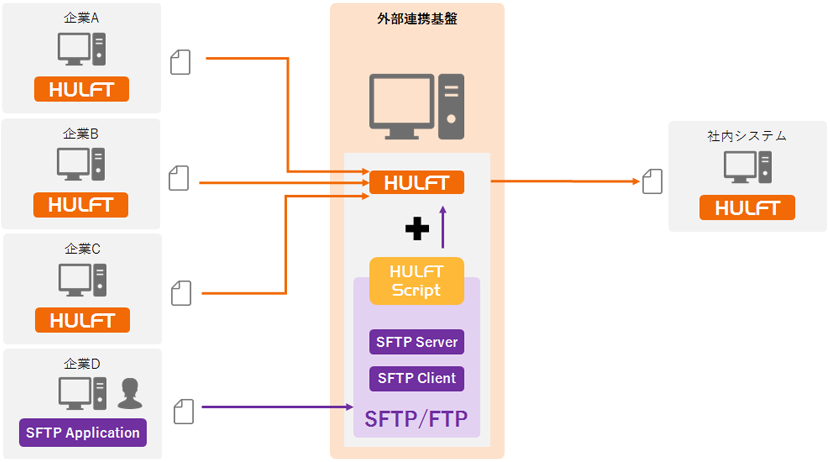
The enhanced functionality of HULFT8 Ver.8.4.0 further enhances the options for linking the HULFT network with external applications.
Support for Amazon Linux 2
HULFT8 Ver.8.4.0 now supports Amazon Linux 2.
Amazon Linux is a Linux operating system provided by Amazon Web Services.
Amazon Linux is designed to take advantage of the latest features of Amazon Elastic Compute Cloud (Amazon EC2).
It can be used not only with Amazon EC2 but also with various virtual environments.
HULFT 8.1.0 supported Amazon Linux, but in June 2018, Amazon Linux 2, based on RHEL7 (Red Hat Enterprise Linux), was released to the public.
HULFT8 Ver.8.4.0 now supports not only Amazon Linux but also Amazon Linux 2, further expanding the scope of HULFT use on AWS.
AWS Transfer for SFTP, a managed SFTP service that works in conjunction with Amazon S3, was announced in November 2018. HULFT8 Ver. 8.4.0 now supports Amazon Linux 2 and has enhanced SFTP functionality, making it even more compatible with AWS.
Help Web Publishing
Previously, HULFT help was provided in PDF format, which meant that an environment was needed to store the PDFs in some form and to view them.
Now that the help is available on the Web, you can check HULFT error codes by searching for them on Google or other search engines during maintenance work.
It may sound a little mundane, but this change will surely bring convenience to many workplaces.
Other release features
HULFT8 Ver.8.4.0 also includes the following release features:
- Adding security enforcement mode
- Improved the function for accepting requests from unregistered hosts
- Performance Improvement
- Automation and improved operational operability
- Exporting and Importing Management Information
- Improved log output function
- Improved UX
- Easy Transfer
- Simplified installation
- Mainframe Improvements
Differences from HULFT-WebFileTransfer and HULFT-WebConnect
Finally, let's take a look at the differences between the existing functions that enable integration with the HULFT network and the sftp/ftp functions added in HULFT8 Ver.8.4.0.
Existing functions that enable integration with the HULFT network include HULFT-WebFileTransfer and HULFT-WebConnect.
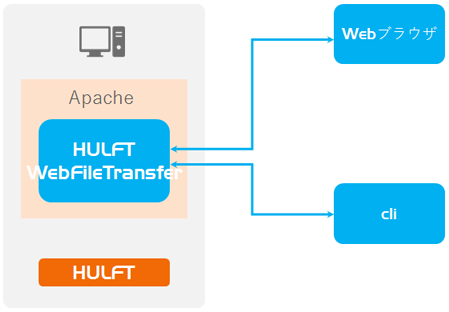
HULFT-WebFileTransfer is a package middleware that uses web technologies such as HTTP and TLS to perform secure data transfer.
By running a web server using Apache Tomcat, communication with web browsers and other devices is realized, and file transfer to HULFT are mediated.
HULFT-WebFileTransfer can be used on the public Internet as well as on private networks that cannot be connected to the Internet.
HULFT-WebConnect allows you to file transfer easily and securely using HULFT via a public internet connection, via a service that acts as a bridge between HULFT servers.
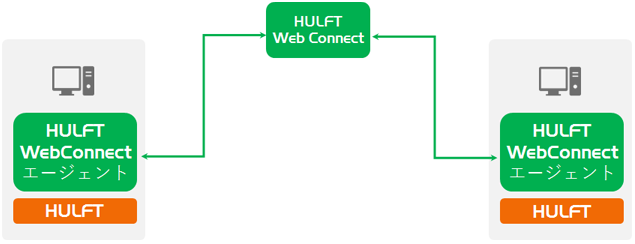
As such, HULFT-WebFileTransfer and HULFT-WebConnect have different sftp/ftp functions and use cases.
With HULFT8 Ver.8.4.0, in addition to HULFT WebFileTransfer and HULFT-WebConnect, sftp/ftp has been added as an option for external integration.
»Reference: HULFT-WebFileTransfer and HULFT-WebConnect allow you to use HULFT via the public Internet
Akimichi asked someone at HULFT. Column list
- [Part 1] HULFT provides file transfer functionality essential for business systems
- [Part 2] What is HULFT? Let's take a look at how file transfer works (send Flow)
- [Part 3] What is HULFT? Let's take a look at how file transfer works (pre- and post-processing file transfer)
- [Part 4] The Strengths of HULFT Seen in Job Integration
- [Part 5] Making job integration more convenient -HULFT Script
- [Part 6] HULFT-WebFileTransfer and HULFT-WebConnect which allow you to use HULFT over the public Internet
- [Part 7] HULFT-HUB provides flexibility and reliability when connecting multiple locations
- [Part 8] Coexistence of HULFT and SFTP/FTP
- [No. 9] HULFT meets the requirements of IoT environments
The person who wrote the article


