HULFT Upgrade Technical Column 3 - Use Cases -
[Part 1] Benefits of upgrading: Enhancements to the latest version HULFT8
The latest version, HULFT8, maintains compatibility with previous versions while expanding its connectivity options to keep up with the changing times and enhancing the core functions required for a file sharing platform in the cloud and big data era.
Performance Improvement
Achieve optimal file transfer for cloud and big data
HULFT8 focuses on data compression to ensure stable, high-speed file transfer. Furthermore, by adding an automatic tuning function for transfer settings, it achieves transfer speeds six times faster than FTP *1. This ensures stable performance without the need for special tuning, even when transferring long distances, large files, or between cloud services.
Measurement conditions
-
- OS:Linux
- Product used: HULFT8 for Linux
- Transfer section: Our company to Amazon AWS (Tokyo region)
- File size: 500MB
- Transfer method: Upload a 500MB file from our company to the AWS environment
- These are reference values based on in-house measurements. Results may vary depending on your usage environment, and transfer speeds are not guaranteed.
Improved data compression reduces transfer times
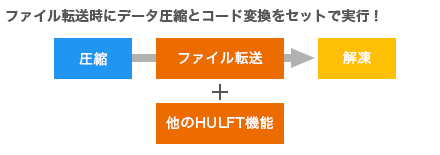
The addition of a new file compression method, "DEFLATE compression," has improved data compression rates. Furthermore, HULFT8 performs compression in memory during file transfer, allowing code conversion processing to be used at the same time.
Automatically obtains optimal transfer settings, no need for individual adjustments
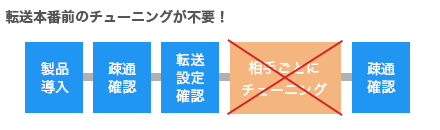
Transfer settings are automatically optimized, eliminating the need for tedious tuning, such as searching for the best transfer speed for each send. With HULFT8, you can always enjoy the benefits of faster file transfer.
Enhanced operability
Implemented a transfer test function that does not affect the production environment
Easily transition from evaluation to production environments
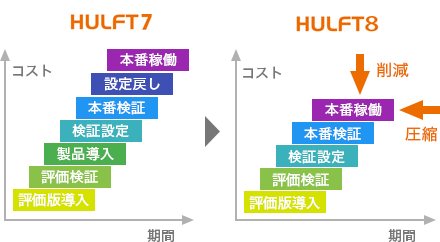
When conducting a transfer test, HULFT8 allows you to individually specify the scope of operation, such as job execution and history output. By specifying the scope that does not affect business operations, such as when changing HULFT settings, you can perform testing without stopping the production environment. In addition, since no module replacement occurs when migrating from an evaluation environment using the trial version to a production environment, retesting is not required. This greatly contributes to reducing operational costs by simplifying verification and implementation.
Expanded upper limit of setting items
In HULFT8, the maximum character length for file ID settings was 8 bytes, and there was also a length limit for the message function used in subsequent jobs. In HULFT8, the file ID setting item has been expanded to 50 bytes. The size of the message function has also been expanded to 200 bytes. This makes it easier to manage the naming conventions set for file IDs, and it now enables job linkage (message function) using full path file names using the message function.
Improved connectivity
optional product HULFT Script
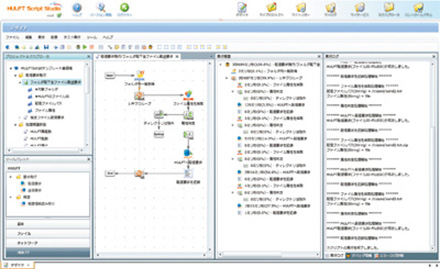
Data processing is always required before and after file transfer using HULFT, requiring programming using batch files, shell scripts, etc. Utilizing HULFT Script allows business processes to be quickly built using a GUI, reducing the burden on IT engineers and contributing to cost reductions. Furthermore, scripts can generate specifications and be managed as job documents, eliminating dependency on individual staff and realizing visualized operations.
Global Response
Switch between Japanese and English with one package
While HULFT8 had separate products for Japanese and English, HULFT8 allows you to switch languages within a single package. You can also switch between different date formats for different countries, such as YY:MM:DD and DD:MM:YY.
Multifaceted quality improvement
HULFT8 has undergone 180 functional improvements. We are constantly incorporating improvement requests from our customers and working to improve quality.
180 functional improvements have been implemented while maintaining compatibility with previous versions.
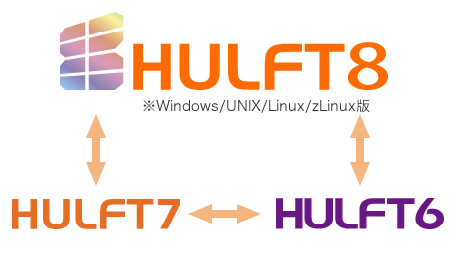
It maintains communication compatibility with older versions, allowing you to migrate to HULFT8 without making major changes to your current system configuration.
HULFT8 can communicate with HULFT7 and HULFT8.
Supports rapid resolution when problems occur
With HULFT8, error messages and manuals have been completely revised, making them easier to search and identify the cause. This means that any configuration errors or questions that arise can be resolved quickly, contributing to shorter failure recovery times.