

Technical details of the product you are using
(Functions, operation, and troubleshooting)
Customers who have signed up for technical support services
If you have technical support agreement, you can use the "Technical FAQ" in addition to the "General FAQ." If you have a question that cannot be resolved by the FAQ, please log in to my HULFT and contact us using the "Inquiries" > "Post-purchase technical inquiries" form.
- The contact information varies depending on your contract. Please check my HULFT.
Log in to my HULFT → [License] - [License Management] - Click the corresponding serial number → The support service desk will be displayed.
Inquiry example
- How to check your serial number, how to troubleshoot installation errors, how to download products and manuals, product specifications, how to set up, causes and solutions for problems, error symptoms, etc.
If you are unsure about your technical support agreement status...
You can check the status technical support agreement in "License Management" on my HULFT. For the information required to register your license on my HULFT, please refer to the "my HULFT Guide" sent to you by our company after purchasing the product.
Customers who have purchased HULFT 10 for Container Services
If you have purchased HULFT 10 for Container Services, please note down your AWS ID and Agreement ID at the time of purchase and refer to the above page.
Customers who downloaded the trial version
For the evaluation version, you can use technical support for 90 days from the date of application. We will answer any technical inquiries you may have about using the product.
For information on how to contact us, please check the email sent to you when you registered for the trial version or my HULFT.
How to check the email sent when you registered the trial version
You can check how to contact us from the following email that was sent to you when you registered the trial version.
From: myhulft_info@hulft.com
Subject: [my HULFT] Trial Version Application Information (For sending only)
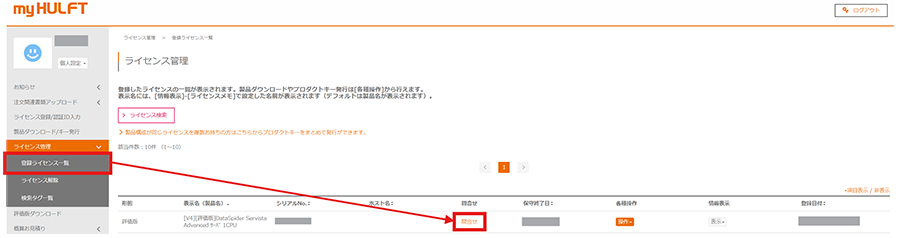
How to check on my HULFT
1. Log in to my HULFT.
2. From [License Management] - [Registered License List], click [Inquiry] for the applicable evaluation license.
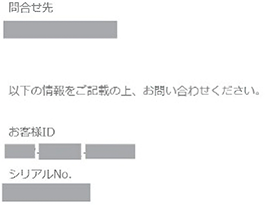
3. You will be shown how to contact us.
Customers without technical support agreement
If you have not signed up for the technical support service, we regret that we are unable to provide any technical support services.