

Make Box even more convenient! Improve file management efficiency by utilizing metadata


When companies use Box, they often hear of issues such as "the number of files has increased so much that it's difficult to find them" or "management rules vary from department to department." One of the keys to solving these issues is "metadata."
By using metadata, you can use Box as a highly searchable information infrastructure, going beyond simple file storage. This article will carefully explain the basics of metadata, as well as implementation steps, use cases, and operational points.
What is metadata? Basic mechanisms and features
To utilize metadata in Box, it is important to first understand its structure and types. This article explains the definition of metadata and the attributes that can be used in Box.
Definition and role of metadata
The term "metadata" may sound difficult to some, but in fact, much of the information we use on a daily basis is metadata. For example, photos taken with a smartphone come with information such as the date taken, the location taken, and the type of camera. While this information is not part of the photo itself, it is essential auxiliary information for organizing and searching for photos.

What is Metadata? A comprehensive guide from the basics to the latest trends
We have compiled information about metadata. We hope you will use it to establish a system for consistent metadata management across your organization and realize efficient information utilization!
What types of metadata can I use in Box?
Box's metadata feature allows you to add attribute information such as "contract date," "customer name," and "document type" to files stored in Box. Box supports multiple property types, including strings, numbers, dates, and drop-down lists. This allows for flexible classification and condition specification, enabling optimal searches and aggregations for each business.
The benefits of using metadata in Box
By making full use of metadata, you can go beyond simple file management and significantly improve work efficiency and searchability.

Improved searchability and information organization
Traditional file management relied on folder structures and file names. Contracts were placed in a contracts folder, invoices in an invoices folder, and so on. However, this often led to the following issues:
- There are a lot of folders for each contract, and it's hard to remember where you saved the files.
- File names vary from person to person, making them difficult to search
- When the person in charge is transferred, the file organization rules are not inherited.
By utilizing Box's metadata, you can organize information without relying on folders. For example, by searching for "contracts signed in 2025" or "invoices from business partner A," you can instantly find the files you need.
By organizing attribute information in this way, you can quickly access the necessary materials even among thousands or tens of thousands of files. This prevents information from being buried in complex folder hierarchies and enables cross-sectional file management.
Improved operational efficiency and reduced human error
Manual renaming and folder organization is no longer necessary, and search errors and missing entries can be prevented. Standardizing templates prevents dependency on individuals and enables consistent information management across the organization.
How to create and manage metadata templates
Creating a template enables consistent metadata management across the organization. Here we will review the creation procedure and key points for management.
Template creation flow
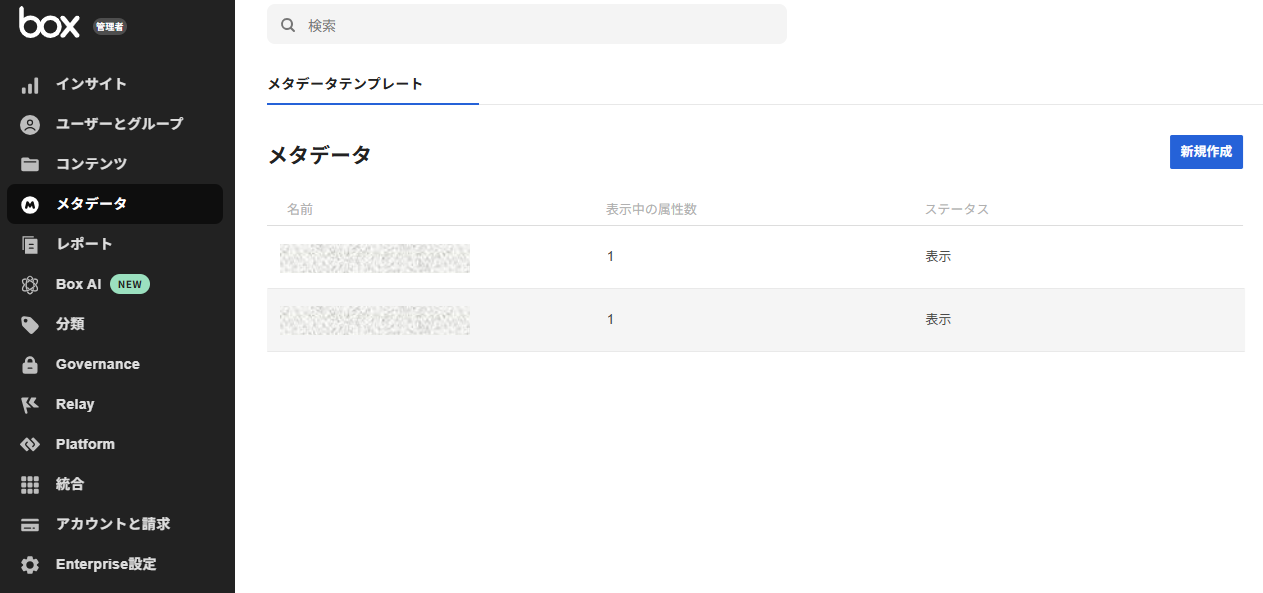
Create a template from the Box admin console. By setting the property type and input format, users can enter consistent information. Setting the drop-down format is effective in preventing input inconsistencies and improving search accuracy.
Important points for administrators to keep in mind
When creating a template, you need to carefully decide on naming conventions and field definitions. Additions and deletions later may affect existing files, so it's important to decide on the necessary elements early on. Keep in mind that a company can define up to 500 templates, and each template can define up to 200 fields.
How to apply metadata to files and folders
Once you have created a template, the next step is to apply the attributes to the actual files and folders. Here we will explain how to apply it to a single file and to multiple files at once.
Steps to apply to a single file
Adding metadata in Box is very simple.
1. Open the file and click "Add Metadata" in the details pane on the right.
2. Choose an available template
3. Enter the information and save it
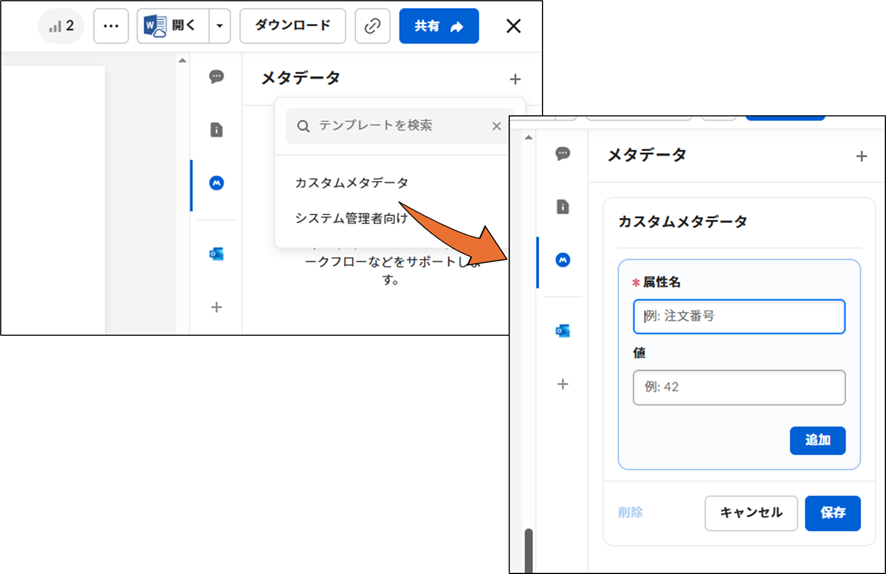
This operation alone will link the information to the file. Please check in advance as this may not be possible depending on your permissions.
Apply to multiple files at once
If there are only a few items, manual processing is sufficient, but if there are more than a few hundred items, it is convenient to assign them all at once using the Box API or to integrate with an external system.
Our HULFT Square Box Connector also supports metadata manipulation. You can build a no-code process for adding metadata and run it automatically.

We will explain the overview of Box system integration and the optimal integration method.
Automated Metadata Utilization
To further improve the efficiency of metadata management, it is effective to utilize automation functions. This section introduces automatic input and workflow integration.
How auto-fill and auto-apply work
Attributes can be automatically assigned to newly uploaded files based on predefined rules. For example, you can automatically extract the date or department name from the file name or folder structure, streamlining standard tagging. This reduces work errors and helps maintain consistent operational rules.
Examples of workflows and external collaboration
By linking Box with other systems, you can automate the entire process, such as automatically generating approval requests when contracts are uploaded. You can also semi-automate classification and search by using AI technology to analyze document content and automatically input suggested metadata.
HULFT Square uses a dedicated connector to handle content operations such as uploading content to Box, user operations, and, as mentioned above, metadata operations.
It is possible to build automatic contract storage processing in combination with electronic contract services and document management processing in combination with AI without coding.

iPaaS-based data integration platform HULFT Square
HULFT Square is a Japanese iPaaS (cloud-based data integration platform) that supports "data preparation for data utilization" and "data integration that connects business systems." It enables smooth data integration between a wide variety of systems, including various cloud services and on-premise systems.
We have also published a case study on HULFT Square which has achieved integration with Box.

Contributing to solving social issues with solutions that visualize the movement of goods and connect the supply chain. Absorbing discrepancies between service and customer data requirements with HULFT Square to improve delivery speed.
Advanced use: Information utilization through search and query
By using searches and queries, you can make advanced use of information using metadata. Here we will review the basic operations and points to note.
Basic operations for metadata search
In addition to standard searches, Box allows you to narrow your search by metadata attributes, allowing you to instantly extract the terms your business needs, such as contract expiration dates or customer names.
Restrictions and points to note when using queries
There are limits to the number of fields and response times that can be handled in a single query. When specifying a large number of conditions, use splitting and pagination to prevent errors and timeouts. It is also important to check attribute names and data types and conduct tests in advance.
Operational Points
In order to operate templates and metadata stably, it is essential to strictly follow design and management rules.
Template Design and Updates
It is important to pay attention to the upper limit of the number of templates and attributes, and to organize unnecessary templates and duplicates. When using cascade policies, be careful not to apply them incorrectly to deep folder hierarchies.
Impact of metadata updates and deletions
Changing attributes or definitions may affect search results and linked systems. Deleting data cannot be restored, so be careful and clarify sharing rules within your organization.
summary
By effectively using metadata, Box evolves from a simple file repository into a flexible and powerful information management platform. By combining template design, application rules, search, and automation, the efficiency of file organization, search, and sharing is dramatically improved. The greater the number of departments and file volume that adopt Box, the greater the effect, leading to business improvements across the organization.
The person who wrote the article
Recommended Content
-

Generative AI for Business Analytics
This webinar will explain practical initiatives using data utilization platforms, with demonstrations. Please also take a look at this. (Viewing time: approximately 20 minutes) -
Product introduction seminar for first-time users
We will introduce what HULFT Square, HULFT, and DataSpider are, their features, usage scenarios, and implementation examples. -

Get an online consultation about data utilization
If you would like to hear more about our data utilization platform, we also offer online consultations.
Related Content
-

Eliminate financial data silos! What is an autonomous decentralized architecture using iPaaS?
-

Data analysis is moving from the BI era to the AI era: Three reasons for accelerating the democratization of data
-

Automated classification of product masters using generative AI: How to bring a new perspective to your analysis