

HULFT Short Stories
Vol.8 Essential for system integration in a multi-vendor environment! Easily convert file formats and character codes!
-

-
Hello.
My name is Okazaki and I am in charge of HULFT seminar.
One month has already passed in 2017.
The cold is severe and we are experiencing freezing cold days.
Recently, I've been sleeping with a hot water bottle in my futon.
It warms you from the core of your body in a way that is different from air conditioning or stoves, so I encourage you to give it a try.
Please take care of your health so that you don't catch a cold.
In the previous HULFT anecdote, we introduced data processing before data analysis.
This time, we will continue to bring you some short stories about data conversion and processing.
When sharing files between systems, file format conversion is almost always necessary.
Mainframes used in mission-critical system, core system often handle fixed-length files.
In a fixed-length file, the length (number of bytes) of the data for each field in a record is fixed, and the length of each record is also constant.
Therefore, text files used in business are designed so that all records are the same length, and if the length is insufficient, they are filled with spaces or other characters.
On the other hand, open systems often handle variable-length files in which the length of the records is not fixed, and often use the CSV format, which represents fields within a record using delimiters.
When linking systems in a multi-vendor environment where mainframes and open systems coexist, file formats must be converted to those that can be handled by each system.
Furthermore, in a multi-vendor environment, the character codes used by each server are different.
When integrating systems, different character codes are used, such as "IBM Kanji" or "JEF" for mainframes and "SJIS" or "UTF-8" for open systems. In such cases, you need to consider not only file format conversion but also character code conversion.
Converting file formats from fixed length to variable length (CSV) in a multi-vendor environment may seem like a simple conversion at first glance, but when trying to achieve this through programming,
- Remove fixed length whitespace characters
- Inserting CSV delimiters and enclosures
- Character code conversion in a multi-vendor environment
There are many points to take into consideration, such as:
Read the dozens of items of data in one record, create a conversion process that meets the conditions, and repeat this until the end of the record, and include a process to convert character codes.
Furthermore, it seems like it would be a bit of a hassle to consider exclusion conditions, taking into account the presence of irregular data.
Furthermore, it can be quite difficult to think about whether it would be better to come up with an executable format that is easy for people to convert.
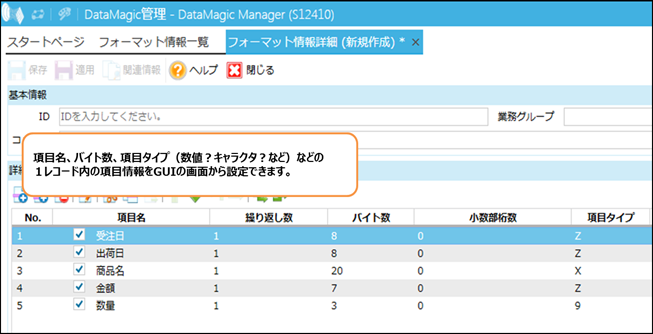
DataMagic is a multi-data conversion tool that allows you to easily convert file formats and character codes by simply registering the layout of each file.
It's very easy to use; just select and enter the file format, information for each item (item name, length, etc.), and character code from the GUI screen.
-

-
Also, when you think of variable-length files, CSV files come to mind.
CSV stands for Comma Separated Values, which means values separated by commas.
But variable length files are not just comma-separated files.
One of the customers who came to the seminar said, "I want to convert it into a TSV file."
TSV file stands for Tab Separated Values, which means it is a tab-delimited file.
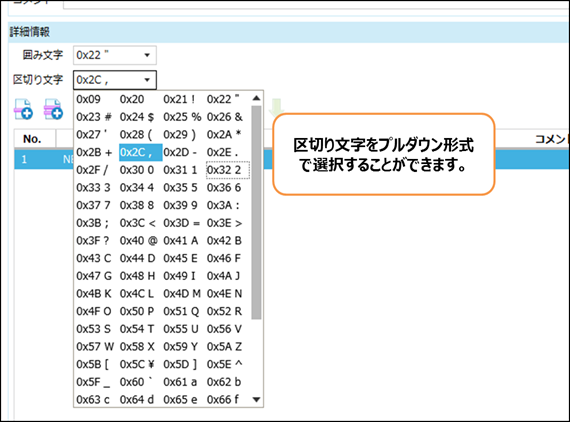
DataMagic allows you to choose from a variety of delimiters and enclosures, so converting to TSV or SSV (space-separated) files is no problem.
It is also possible to convert between Excel and DB tables, so you can directly connect data managed in Excel, which is often used in business, to a DB.
Using Excel's functions, it is possible to convert formats by selecting the file saving format.
However, if you are also simultaneously performing "data processing" such as character code conversion and data cleansing, which we introduced in the previous HULFT Short Story Vol. 7, using a data conversion tool like DataMagic is very efficient as it allows you to convert everything at once.
You can't tell whether a data conversion tool like this is easy to use until you actually try it out.
Starting last month, we have been holding seminars where participants can experience file format conversion and character code conversion using DataMagic by operating actual machines.
Conversion and processing can be done with simple operations, so even if you are using a data conversion tool for the first time, please feel free to join us.
Click here for the "DataMagic Product Introduction Hands-on Seminar: Solving Data Processing Issues"
-

-
I look forward to meeting you all (^^)
Inquiry
We look forward to receiving your opinions, comments, and letters regarding this column.
Contact:hulseminar@hulft.com
Experience HULFT Products.
Product trial use
- We offer a trial version of HULFT Products. You can use it for 60 days. We also provide support for 90 days from the time of application. We will back you up from installation to actual use. Please feel free to apply.
- Try the product here
Seminar (pre-registration required/free)
- We offer a variety of seminars, from those that answer questions like, "What kind of product is HULFT Products? What functions does it have?" to hands-on seminars where you can actually operate HULFT on actual equipment to gain a better understanding of the product. Please come and join us!
- Apply for the seminar here




Recommended Articles
-

How can we turn the "tacit knowledge" lying dormant within our company into "AI knowledge" and utilize it?
We will explain the specific process for turning unstructured data scattered throughout your company into an asset and maximizing the potential of AI. -

Automated classification of product masters using generative AI: How to bring a new perspective to your analysis
We will explain the new perspectives that transformation in product master management brings, through the mechanism of automatic classification brought about by generative AI and the benefits that can be gained by adopting it. -
How to get the insights you want without changing your master data
This e-book offers a new approach to solutions for companies that have data but are not making use of it.