
Customers who have signed up for DataSpider Cloud
About the process from ordering to starting use
The process from ordering to starting use (new users)
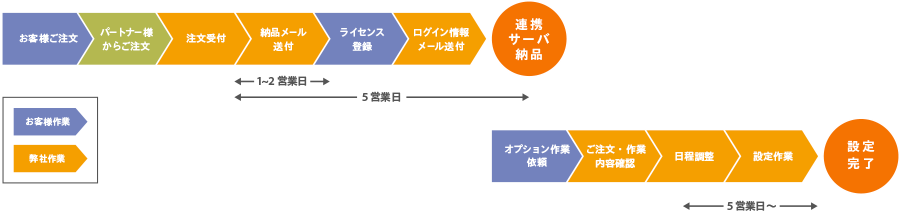
The diagram below shows the general flow from placing an order to starting use when building a new environment.
Here we will guide you through the process of starting to use the service, following the diagram below.
① Order procedure
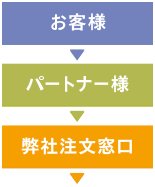
Customers place orders with our partners, who then process the orders with us.
Approximately one business day after completing the procedure with our company

② License registration
After completing the order process, we will issue the license and send you an [ID notification (Delivery Email)].
Please register your license according to the instructions in the email.
ID通知書(納品メール)
送付先:ライセンス申請書「納品先」
送信元:orders_shipment@hulft.com
件名:重要:納品認証IDのご案内[お客様注文番号] / [IMPORTANT] Delivery: Your Authentication ID [PO Number]
Approximately 5 business days after sending ID notification (delivery email)
③Log in to the linked server
After issuing the license, we will build a "connected server" which is a server dedicated to DataSpiderCloud customers.
After the setup is complete, we will send you a [Login Information Email] containing your server login information.
At this point, you will be able to log in to DataSpiderCloud.
ログイン情報メール
送付先:環境設定シート「システム管理者」
送信元:no-reply@dataspidercloud.com
件名:
【重要】DataSpiderCloud 初期画面ログイン情報のお知らせ
【重要】DataSpiderCloudStudioログイン情報のお知らせ
The login information email will contain a "contract tag" and "server ID" to identify your environment.
Please be careful not to lose this information as it will be necessary when contacting our support team in the future.
④Request for option settings (some options only)
Some options can only be used after you have purchased them and requested our support team to set them up.
Please see below for the types of options available and how to contact us.
A minimum of 5 business days after receiving your work request
Environment construction completed