DataMagic
Data processing and conversion tools
Product overview
I want to implement data processing and data conversion processing without programming and at low cost.
Building an information analysis platform for data utilization
Many companies have built information analysis platforms that utilize the vast amounts of data accumulated over the years to support their business strategies. In order to utilize data, it is essential to implement data conversion processes, such as extracting only specific data from business systems and cleansing unnecessary data before storing it in a database.
Achieve a variety of character code conversions! Adaptable to a wide range of code types and data formats
DataMagic supports a wide range of code systems. It fully supports conversion to user-defined external characters and EBCDIC codes, as well as Windows-specific characters (~∥-¢£¬) that cause problems when converting to Unicode (as of the end of January 2011). In addition to CSV and XML data formats, it also supports conversion to standard formats such as Zengin and CII by using hierarchical formats. It is now possible to perform date calculations including Japanese and Western calendar conversion of date data, and calculations on numeric strings that include digit separators and currency symbols, enabling a wide range of conversions, including database integration.
- DataMagic Desktop does not have code conversion functionality.
Reduces running costs and tuning workloads in the data conversion process
Every time a data format or process is added, program development and verification work is required. This increases running costs, which can slow down data utilization. It can also take time to fine-tune the system to efficiently convert large amounts of data. This is why you need a data processing and conversion tool that can automate and speed up the entire process, from data extraction and processing to conversion and database integration, without the need for program development.
What is "DataMagic" that enables high-speed data conversion?
"DataMagic," specializing in data processing and data conversion processes, is a low-cost tool that enables data conversion tasks that arise during business operations, such as bulk conversion of existing formats and extracting only necessary data for database storage. It features a high-speed data conversion engine with processing power up to 10 times faster than other companies' ETL tools, making it easy to convert large volumes of data. It comes standard with a variety of essential functions for data processing and data conversion processes, such as a merge function that enables duplicate elimination, a numeric field calculation function that outputs calculation results as output field values, and an attribute conversion function that converts data to any numeric format.
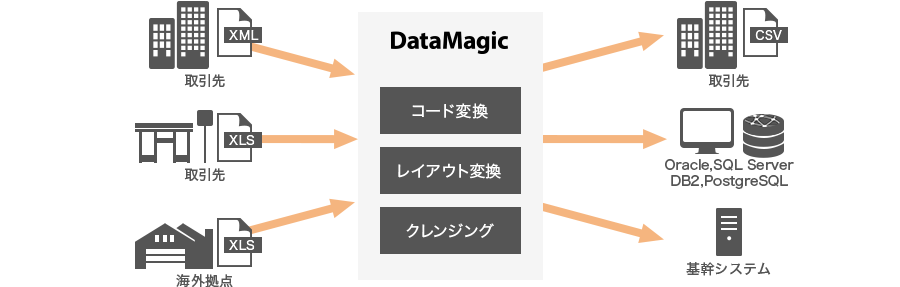
Furthermore, setup is simple with a GUI, no complex program development is required, and the Windows version can be introduced at one of the lowest prices in the industry. By converting vast amounts of data that previously could not be fully utilized into the required format, it can contribute greatly to the construction of systems that make use of existing environments, such as formulating management strategies through information analysis, and converting old industry-standard formats into new data formats tailored to business operations.
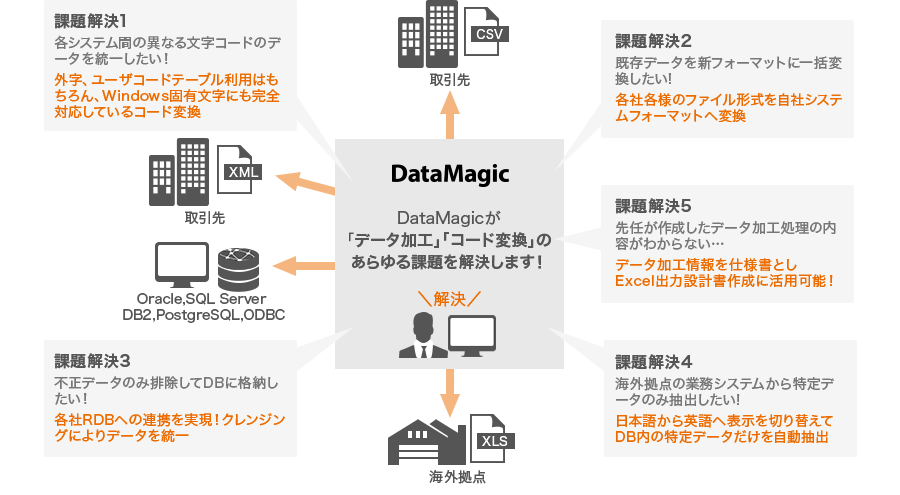
Various data processing is required to link different systems
DataMagic solves all your data processing and code conversion issues
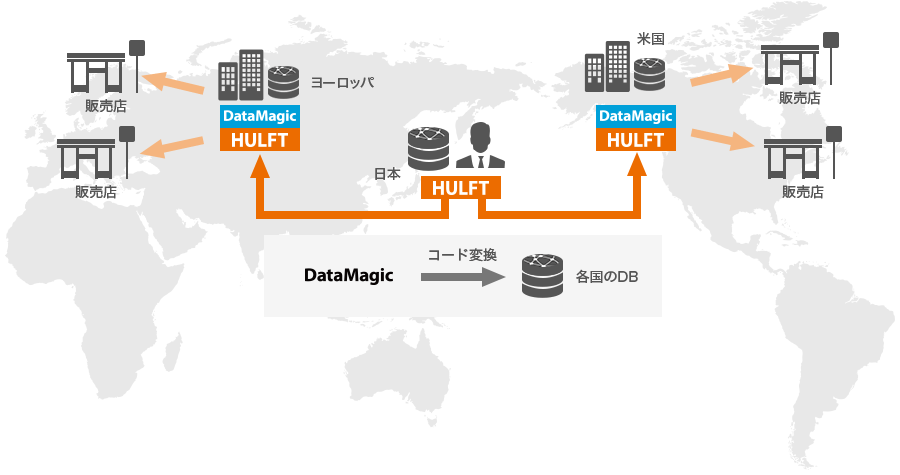
Global Response
DataMagic has a language switching function that allows you to switch between Japanese and English on the settings screen. DataMagic can also be used by local staff to convert character codes and product codes in the database between Japan and overseas bases in English.