
DataSpider adapter details "Box"
DataSpider adapter details "Box"
Seamless integration with "Box," a cloud-based file sharing and collaboration service, is achieved without programming, making it effective for automating business processes and strengthening collaboration with external parties.
Use Cases
- Box can be used not just as a file server, but also as a platform for automating business processes and automatically connecting data with external parties.
- You can automate routine tasks such as transferring data between Box and other internal and external entities, and processing and manipulating data.
- This will help streamline data migration work when implementing Box and user management work during operation.
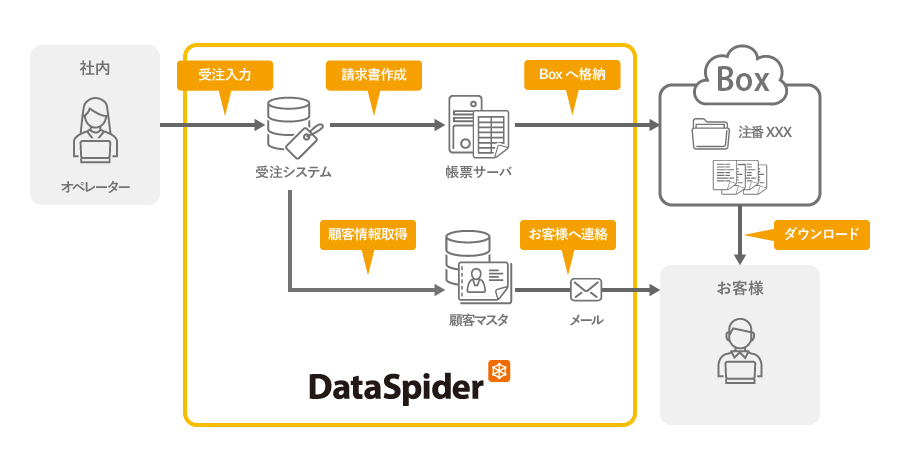
Collaboration image
List of features
| function | overview | DataSpider Servista |
DataSpider Cloud |
|---|---|---|---|
| Create a folder | Create a folder in Box |
○ |
○ |
| File Request Copy | Applying File Request to a Box folder |
○ |
○ |
| Content Movement | Move Box files and folders to another folder |
○ |
○ |
| Content Copy | Copy files and folders from Box to another folder |
○ |
○ |
| Content deletion | Delete files and folders in Box |
○ |
○ |
| Content Upload | Upload files and folders to Box |
○ |
○ |
| Content Download | Download files and folders from Box |
○ |
○ |
| Get content list | Get list of contents from Box |
○ |
○ |
| Content attribute information acquisition | Get file and folder attribute information from Box's content ID |
○ |
○ |
| Get a shared link | Get a shared link for a file or folder |
○ |
○ |
| Create a shared link | Create a shared link for a file or folder |
○ |
○ |
| Delete shared link | Remove a shared link for a file or folder |
○ |
○ |
| User Creation | Create a user in Box |
○ |
○ |
| User Updates | Update Box user information |
○ |
○ |
| User deletion | Delete a Box user |
○ |
○ |
| Group Creation | Create a group in Box |
○ |
○ |
| Group Update | Update group information in Box |
○ |
○ |
| Delete Group | Delete a Box group |
○ |
○ |
| Add Membership | Adding Box users as group members |
○ |
○ |
| Membership deletion | Remove a Box user from a group |
○ |
○ |
| Collaboration Added | Share Box files and folders |
○ |
○ |
| Delete collaboration | Unshare a Box file or folder |
○ |
○ |