
DataSpider adapter details "Database"
DataSpider adapter details "Database"
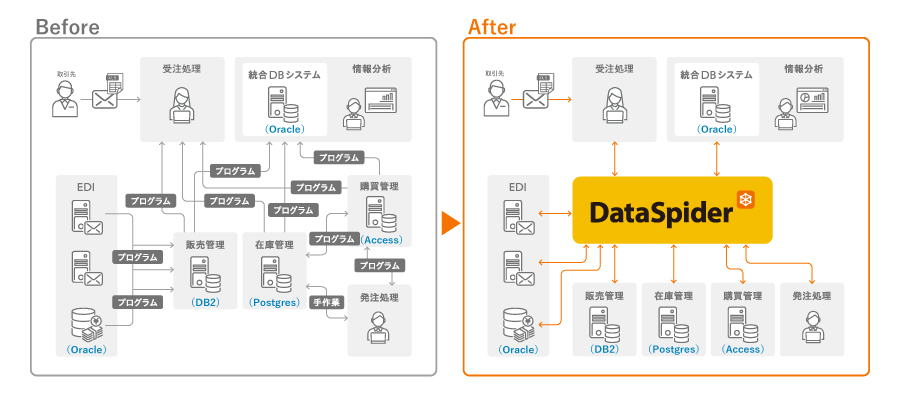
We enable data integration between database software (Oracle Database / Microsoft SQL Server / PostgresSQL / MySQL / IBM DB2 / Microsoft Access, etc.) and business systems without programming.
Use Cases
- The database used by the system is automatically linked to files and data scattered throughout the company, significantly reducing the amount of operational work required by customers.
- The data cleansing required for integration can be easily configured using a GUI, making the process visible and preventing operations from becoming dependent on individual personnel.
- We provide error handling during integration and a wide range of triggers, providing strong support for our customers' operations.
Collaboration image
List of features
| function | overview | DataSpider Servista |
DataSpider Cloud |
|---|---|---|---|
| Oracle | |||
| Data Read | Read all data from a table |
○ |
○ |
| Read data using any search SQL statement (SELECT) |
○ |
○ |
|
| Data writing | Write input data to a table |
○ |
○ |
| Write data using any update SQL statement (INSERT, UPDATE, DELETE, etc.) |
○ |
○ |
|
| Execute a stored procedure |
○ |
○ |
|
| Write the contents of a file to a table using a loader |
○ |
○ |
|
| Microsoft SQL Server | |||
| Data Read | Read all data from a table |
○ |
○ |
| Read data using any search SQL statement (SELECT) |
○ |
○ |
|
| Data writing | Write input data to a table |
○ |
○ |
| Write data using any update SQL statement (INSERT, UPDATE, DELETE, etc.) |
○ |
○ |
|
| Execute a stored procedure |
○ |
○ |
|
| Write the contents of a file to a table using a loader |
○ |
○ |
|
| PostgreSQL | |||
| Data Read | Read all data from a table |
○ |
○ |
| Read data using any search SQL statement (SELECT) |
○ |
○ |
|
| Data writing | Write input data to a table |
○ |
○ |
| Write data using any update SQL statement (INSERT, UPDATE, DELETE, etc.) |
○ |
○ |
|
| Execute a stored procedure |
― |
― |
|
| Write the contents of a file to a table using a loader |
― |
― |
|
| MySQL | |||
| Data Read | Read all data from a table |
○ |
○ |
| Read data using any search SQL statement (SELECT) |
○ |
○ |
|
| Data writing | Write input data to a table |
○ |
○ |
| Write data using any update SQL statement (INSERT, UPDATE, DELETE, etc.) |
○ |
○ |
|
| Execute a stored procedure |
○ |
○ |
|
| Write the contents of a file to a table using a loader |
― |
― |
|
| DB2 | |||
| Data Read | Read all data from a table |
○ |
○ |
| Read data using any search SQL statement (SELECT) |
○ |
○ |
|
| Data writing | Write input data to a table |
○ |
○ |
| Write data using any update SQL statement (INSERT, UPDATE, DELETE, etc.) |
○ |
○ |
|
| Execute a stored procedure |
― |
― |
|
| Write the contents of a file to a table using a loader |
○ |
○ |
|
| DB2 for i | |||
| Data Read | Read all data from a table |
○ |
― |
| Read data using any search SQL statement (SELECT) |
○ |
― |
|
| Data writing | Write input data to a table |
○ |
― |
| Write data using any update SQL statement (INSERT, UPDATE, DELETE, etc.) |
○ |
― |
|
| Execute a stored procedure |
― |
― |
|
| Write the contents of a file to a table using a loader |
○ |
― |
|
| Microsoft Access | |||
| Data Read | Read all data from a table |
○ |
― |
| Read data using any search SQL statement (SELECT) |
○ |
― |
|
| Data writing | Write input data to a table |
○ |
― |
| Write data using any update SQL statement (INSERT, UPDATE, DELETE, etc.) |
○ |
― |
|
| Execute a stored procedure |
― |
― |
|
| Write the contents of a file to a table using a loader |
― |
― |
|
| JDBC | |||
| Data Read | Read all data from a table |
○ |
○ |
| Read data using any search SQL statement (SELECT) |
○ |
○ |
|
| Data writing | Write input data to a table |
○ |
○ |
| Write data using any update SQL statement (INSERT, UPDATE, DELETE, etc.) |
○ |
○ |
|
| Execute a stored procedure |
○ |
○ |
|
| Write the contents of a file to a table using a loader |
― |
― |
|
Oracle Database Restrictions
Connections to Amazon RDS DB instances are not supported. To connect to an Amazon RDS DB instance, use the Amazon RDS for Oracle adapter.
IBM DB2 Limitations
If you do not limit the number of tables to be displayed in the global resource list settings or if you specify a large number, it may take some time to open the property setting dialog box depending on the number of tables in the database.