
DataSpider adapter details "Microsoft Excel"
DataSpider adapter details "Microsoft Excel"
Seamless integration with Excel, a vital file used for all sorts of purposes to support business operations, is achieved without programming. This automates inefficient data entry and transcription work, preventing time and errors.
Use Cases
- Automate routine tasks using email and Excel files
- Complex macro processing can be easily replaced with GUI operations, eliminating the dependency on individual tasks.
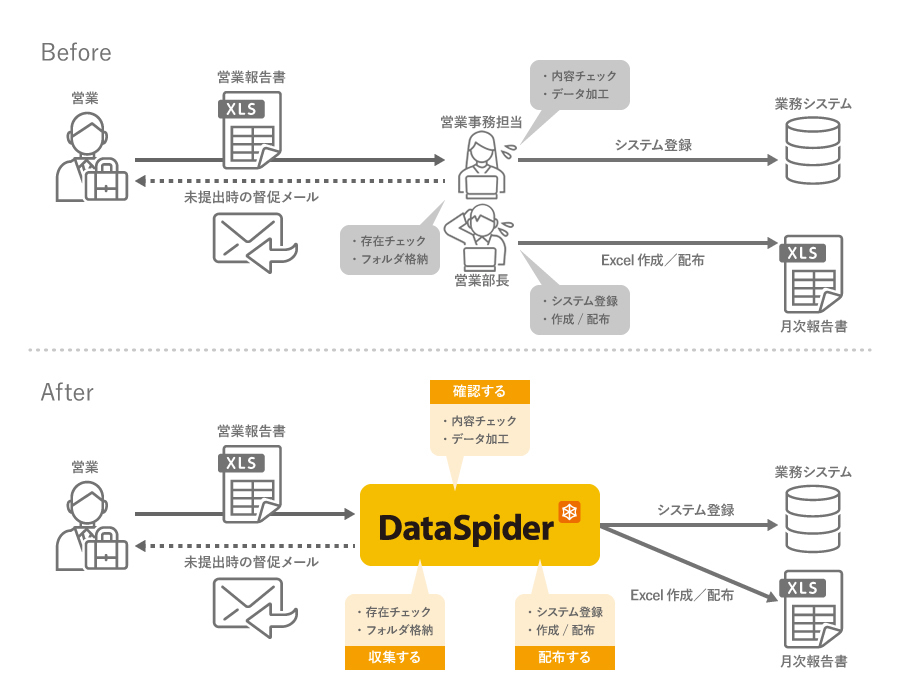
- By converting and processing data from various internal and external systems and automatically generating Excel files, you can reduce operational workload.
Collaboration image
List of features
| function | overview | DataSpider Servista |
DataSpider Cloud |
|---|---|---|---|
| Sheet data reading | Read Excel data by sheet |
○ |
○ |
| Read from a defined range | Read Excel data in a defined range |
○ |
○ |
| Cell specification reading | Specify a cell and read Excel data |
○ |
○ |
| Get sheet name list | Get a list of sheet names contained in an Excel file |
○ |
○ |
| write | Write input data to an Excel file |
○ |
○ |
| Cell specification write | Specify a cell and write input data |
○ |
○ |
| Workbook and sheet protection | For Excel workbook files, you can protect the workbook and sheets by specifying a write password. |
○ |
○ |
| Show/hide sheets, rows, and columns | Set visibility for sheets, rows, and columns in Excel workbooks |
○ |
○ |
| Renaming a sheet | Change the sheet name of the specified Excel workbook. |
○ |
○ |
| Copying a Sheet | Copy a sheet from a specified Excel workbook |
○ |
○ |
| Deleting a sheet | Deletes a sheet in the specified Excel workbook. |
○ |
○ |
| Excel Read Wizard | By dragging in Excel, you can easily specify the read range from the sheet. |
○ |
○ |
| Excel Write Wizard | By dragging in Excel, you can easily specify the read range for writing from the sheet. |
○ |
○ |
Case studies
-

Flexible integration of data from a variety of systems, including Excel, improving in-house system development.
Nissan Chemical Co., Ltd. -

The process of compiling and submitting monthly sales performance reports was shortened by one week, and the use of BI and EAI tools eliminated the need for Excel report creation without modifying the core system.
Towa Electric Co., Ltd.