
DataSpider adapter details "Salesforce"
DataSpider adapter details "Salesforce"
Seamless integration with Salesforce, a cloud-based customer relationship management (CRM) software solution, is achieved without programming, eliminating the various challenges of developing from scratch, such as the skills required, man-hours required, and costs.
Use Cases
- Customer information on Salesforce and sales information can be automatically linked, allowing you to utilize the management dashboard in real time.
- By linking customer information on Salesforce with the behavioral history of marketing tools, you can streamline your marketing activities.
- Automatically link on-premise customer information to Salesforce to support speedy sales activities.
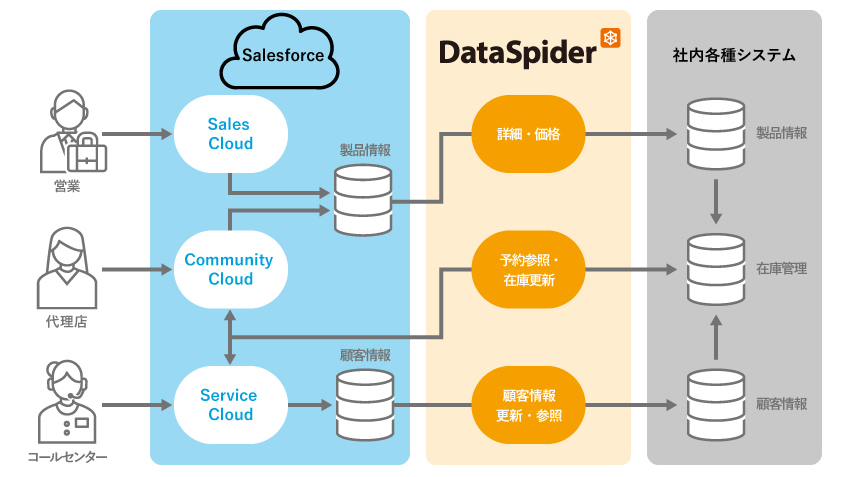
Collaboration image
List of features
| function | overview | DataSpider Servista |
DataSpider Cloud |
|---|---|---|---|
| Data reading (query) | Read data using the query/queryAll service of the SOAP API |
○ |
○ |
| Data Read (Replication) | Use the SOAP API getUpdated/getDeleted services to read data that has been added/modified/deleted within a certain period. |
○ |
○ |
| Data reading (search by ID) | Use the SOAP API retrieve() to read data that matches the specified ID. |
○ |
○ |
| Data reading (parent->child relationship) | By using the query/queryAll service of the SOAP API and selecting child objects from a parent object, you can read data down to the object one level below. |
○ |
○ |
| Data reading (child → parent relationship) | By using the query/queryAll service of the SOAP API and specifying the parent object from the child object's perspective, you can read data up to the object one level above. |
○ |
○ |
| Read data (execute SOQL) | Use the query/queryAll service of the SOAP API to write SOQL (Salesforce Object Query Language) to read data. |
○ |
○ |
| Data writing (INSERT) | Add data using the create service of the SOAP API |
○ |
○ |
| Data writing (UPDATE) | Update data using the SOAP API update service |
○ |
― |
| Data write (DELETE) | Delete data using the delete service of the SOAP API |
○ |
○ |
| Data writing (UPSERT) | Adding and updating data using the SOAP API upsert service |
○ |
○ |
| Multi-data file generation | Output data to a local file to process multiple object records in a single update API call |
○ |
○ |
| Multi-data writing | Read the file output by the [Generate Multi-Data File] process and update it to Salesforce. |
○ |
○ |
| Password Reset | Reset your password using the resetPassword service of the SOAP API |
○ |
○ |
| Password Set | Use the setPassword service of the SOAP API to set the user's password. |
○ |
○ |
| Data deletion (trash) | Use the empty_recycle_bin service of the SOAP API to delete data from the recycle bin |
○ |
○ |
| Data Recovery (Trash) | Use the SOAP API undelete service to restore data from the trash |
○ |
○ |
| Send one email | Send a single email using the sendEmail service of the SOAP API |
○ |
○ |
| Send multiple emails | Send multiple emails using the sendEmail service of the SOAP API |
○ |
○ |
| Login (by session ID) | If you have already logged in to Salesforce using another application, you can use the Salesforce adapter by inheriting the session information. |
○ |
○ |
| Search Parameter Formation | Based on the set conditional expression and input data, a string to be used in the SOQL (Salesforce Object Query Language) WHERE clause is created. |
○ |
○ |
| Server Information Acquisition | Use the SOAP API getServerTimestamp() to get the current timestamp of the server system and limit information for API calls. |
○ |
○ |
| User information acquisition | Obtain the logged-in user's personal information using the SOAP API getUserInfo() |
○ |
○ |
| Salesforce Bulk Adapter Related | |||
| Bulk data write (INSERT) | Execute INSERT using Bulk API |
○ |
○ |
| Bulk data write (UPDATE) | Execute UPDATE using Bulk API |
○ |
○ |
| Bulk data write (DELETE) | Execute DELETE operation using Bulk API |
○ |
○ |
| Bulk data write (UPSERT) | Use the Bulk API to perform an UPSERT operation |
○ |
○ |
| Bulk data reading (QUERY) | Use the Bulk API to execute a query and create a CSV file. |
○ |
○ |
| Job Creation | Create a job |
○ |
○ |
| Job Update | Update the status of a job |
○ |
○ |
| Batch Creation | Create a new batch for the specified job |
○ |
○ |
| Batch result acquisition | Get batch results using job ID and batch ID as keys |
○ |
○ |
| Get job/batch information | Get job and batch information list |
○ |
○ |
| Login (by session ID) | If you have already logged in to Salesforce using another application, you can use the Salesforce Bulk adapter by inheriting the session information. |
○ |
○ |
| Salesforce Metadata Adapter Related | |||
| Read (Picklist Values) | Read Picklist Values |
○ |
○ |
| Read(RecordTypePicklistValues) | Read the available picklist values for a record type |
○ |
○ |
| Result acquisition (AsyncResult) | Based on the AcyncResult ID specified in the input data, obtain the AcyncResult using the CheckStatus service. |
○ |
○ |
| Add (Picklist Value) | Add a value to a picklist |
○ |
○ |
| Update(PicklistValues) | Update picklist values |
○ |
○ |
| Delete (Picklist Value) | Remove a value from a picklist |
○ |
○ |
| Sort by (Picklist Values) | Sort picklist values in a specified order |
○ |
○ |
| Update (Picklist Controlling Field Value) | Update the picklist's controlling field value |
○ |
○ |
| Update(Record Type Picklist Values) | Update available picklist values for a record type |
○ |
○ |