
HULFT 10 Features
Managed File Transfer(MFT)
Lineup
This is a basic product with file transfer functionality. It is multi-platform compatible, so you can choose the product that best suits your environment.
HULFT10 for Windows/Linux/AIX/IBMi/zOS
This product is compatible with mainframes, mid-range computers, and open operating systems.
HULFT10 for Container Services
This product is purchased from the AWS Marketplace and used as a container image, and has features that comply with cloud best practices.
HULFT10 for Container Platform
This is a Kubernetes container orchestration platform used on Red Hat OpenShift. It is Red Hat Operator certified, ensuring the quality and compatibility of Kubernetes resource management.
- 2. We guarantee the quality and reliability of "Operator," a Kubernetes cluster management method.
By using it in combination with HULFT 10, you can improve the convenience and operational efficiency of file transfer.
HULFT10 Smart Proxy
This is an internet-compatible proxy that specializes in relaying data integration.
By relaying HULFT installed on-premise with various cloud services, a secure connection is established.
HULFT10 API Gateway
This product uses a web screen and REST API to manage multiple HULFT via the internet. Management information and collection send history for multiple HULFT can be managed in an integrated manner from the management screen.
HULFT10 Manager
It integrates management information and send history for multiple HULFT machines installed within a LAN.
By adding it to HULFT 10, you can expand its functionality.
HULFT Cipher Option (Encryption Option)
Uses the AES encryption method, which has stronger encryption strength than the standard encryption method.
By implementing this option, you can file transfer more securely.
HULFT Cloud Storage Option
You can upload and download files directly to object storage on the cloud (Amazon S3 / Azure Blob Storage / Google Cloud Storage™ Service).
HULFT10 for Container Services
Provided by Amazon Web Services
HULFT compatible with container orchestration services
HULFT 10 can be used with managed container services such as Amazon Elastic Container Service (Amazon ECS). It has high compatibility with various AWS services, allowing you to quickly access the tools you need while efficiently deploying, managing, and scaling HULFT 10.
Get started now on the Marketplace

Evaluate, buy, deploy, and manage with AWS Marketplace.
In addition, CloudFormation allows you to start using it without any installation work.
Resource and cost optimization

It supports scaling and can flexibly secure the necessary resources according to the transfer load.
It also optimizes costs with hourly pay-per-use pricing.
Automatic integration with external services

Web APIs can be called before and after file transfer, allowing for automated integration with external services and business applications.

"AWS Qualified Software"
HULFT 10 is AWS Qualified Software.
The service is recognized for adhering to AWS best practices to reduce risk related to security, reliability, and operational good practices.
Consists of a management container and a transfer container
Management container: Provides a web screen for managing management information, history, control of transfer containers, external collaboration, etc.
Transfer container: This can be used in a configuration where multiple transfer containers are placed under one management container by performing file transfer using HULFT.
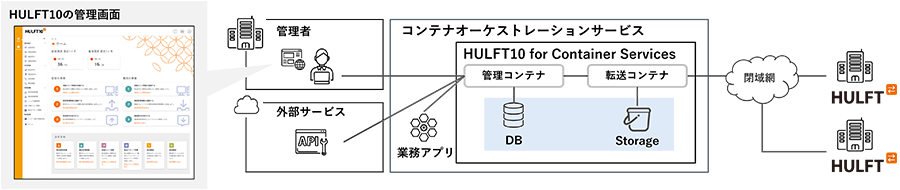
Function 1: Ensuring service availability and business continuity
The transfer container is automatically started according to the transfer load and restarted in the event of a failure, providing an environment that maintains high availability and allows business continuity.
Feature 2: Automatic integration with external services via API
Web APIs can be called before and after file transfer, allowing you to automate integration with external services and business applications.
This will improve the efficiency of data processing and business flows before and after file transfer.
Feature 3: Cloud storage integration
You can download and upload files stored in Amazon Simple Storage Service (Amazon S3), a cloud storage service, making it easy to access large amounts of data.
How to use
-
Buy on AWS Marketplace
Please visit the AWS Marketplace, check the terms of the agreement, and then purchase.
-
Setup environment construction
Deploy HULFT 10 Container Services and configure the network.
-
Start using it in production
Establish the operating environment and start file transfer operations.
-
Post-implementation technical support
Support is included in the usage fee. We also provide technical consultations after installation.
- If your usage is different from your company's, please contact us before purchasing. Please refer to the explanation of usage here.
HULFT10
for Container Services
This product introduction document focuses on HULFT 10 for Container Services. It provides detailed information on features, use cases, pricing, and more.
HULFT10 for Container Platform
Can be used in a variety of environments running Red Hat OpenShift
HULFT 10 can be used in a variety of environments where Red Hat OpenShift is running, including in-house built systems, on-premise environments provided by Red Hat's domestic partners, and fully managed services provided by major overseas cloud services.
While maintaining the value provided by HULFT 10, deployment and lifecycle management can be performed on Red Hat OpenShift.
Certified Operator

Red Hat OpenShift Certification certifies the quality and reliability of the "Operator" Kubernetes cluster management methodology.
Resource cost optimization

One of the advantages of containers is that they can be started automatically, allowing you to flexibly secure the necessary resources depending on the transfer load, and also ensuring availability in the event of a failure.
Automatic integration with external services
Web APIs can be called before and after file transfer, allowing for automated integration with external services and business applications.
HULFT 10 for
Container Platform Introduction Materials
This is a product introduction document specifically for HULFT10 for Container Platform. It introduces detailed features, use cases, pricing, and more.
HULFT10 Smart Proxy
Open internet communication while keeping HULFT in a closed environment
By using HULFT10 Smart Proxy, you can securely collect and send files over the Internet without changing the system configuration of your on-premise HULFT environment.
Feature 1: Proxy function
By relaying file transfer using HULFT and using it as a proxy, you can communicate securely over the Internet.
It can be integrated with cloud as well as on-premise.
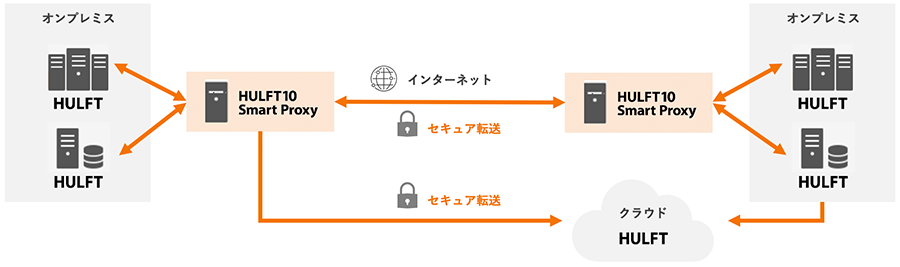
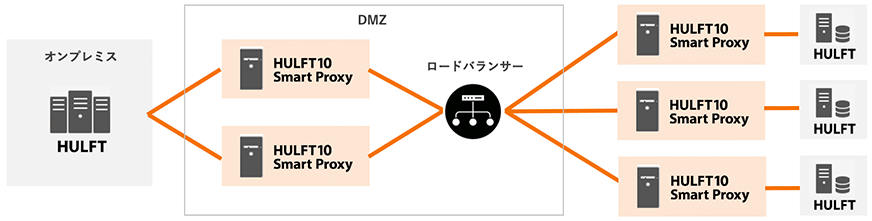
Feature 2: Supports load balancing and contributes to stable system operation
This distributes the temporary load that occurs when multiple HULFT servers are simultaneously relaying send, ensuring stable system operation.
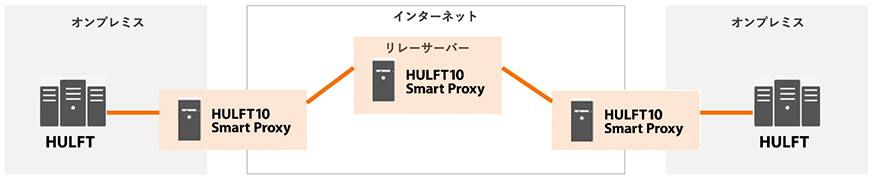
Feature 3: Improved transfer speeds during ultra-long distance transfers
By introducing it as a relay server for ultra-long distance transfers, data transfer speeds can be improved without increasing the server capacity of existing systems.
HULFT 10
Smart Proxy introduction material
This product introduction document focuses on HULFT 10 for Smart Proxy. It provides detailed information on features, use cases, pricing, and more.
API Gateway
Integrated management of multiple HULFT via the Internet using REST API and web screens
HULFT 10 API Gateway is an application that allows multiple HULFT instances to be linked with external services using REST APIs.
In addition to operation via API, management information and collection/ send history can be centrally managed from an easy-to-use web screen, allowing operation using the same method regardless of the connected platform.
Feature 1: Management and operation via REST API
You can manage and operate one or more HULFT instances using the REST API.
Integrated management of HULFT is also possible from HULFT Square or DataSpider via HULFT 10 API Gateway.
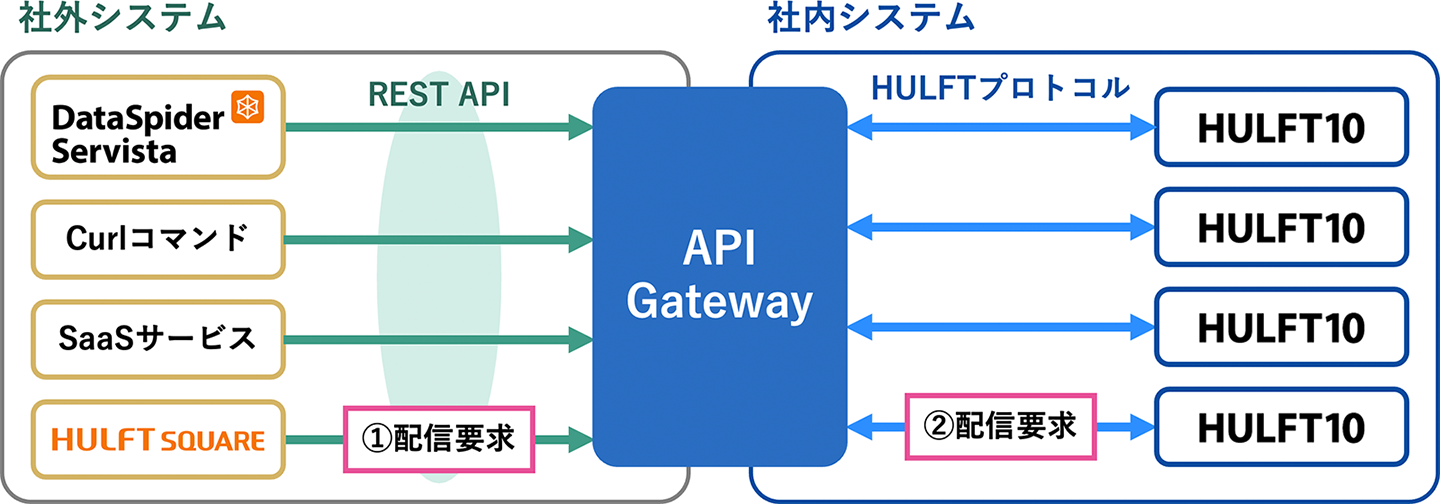
For example, you cannot directly access HULFT 10 on your company's intranet from HULFT Square, an iPaaS, but you can do so via API Gateway.
Feature 2: Centralized management of multiple HULFT via a web screen
Multiple HULFT instances can be centrally managed from a newly designed, easy-to-use web interface.
Not only can you operate HULFT in your in-house environment, but HULFT in remote locations and on different platforms with the same UI, significantly reducing operational and learning costs.
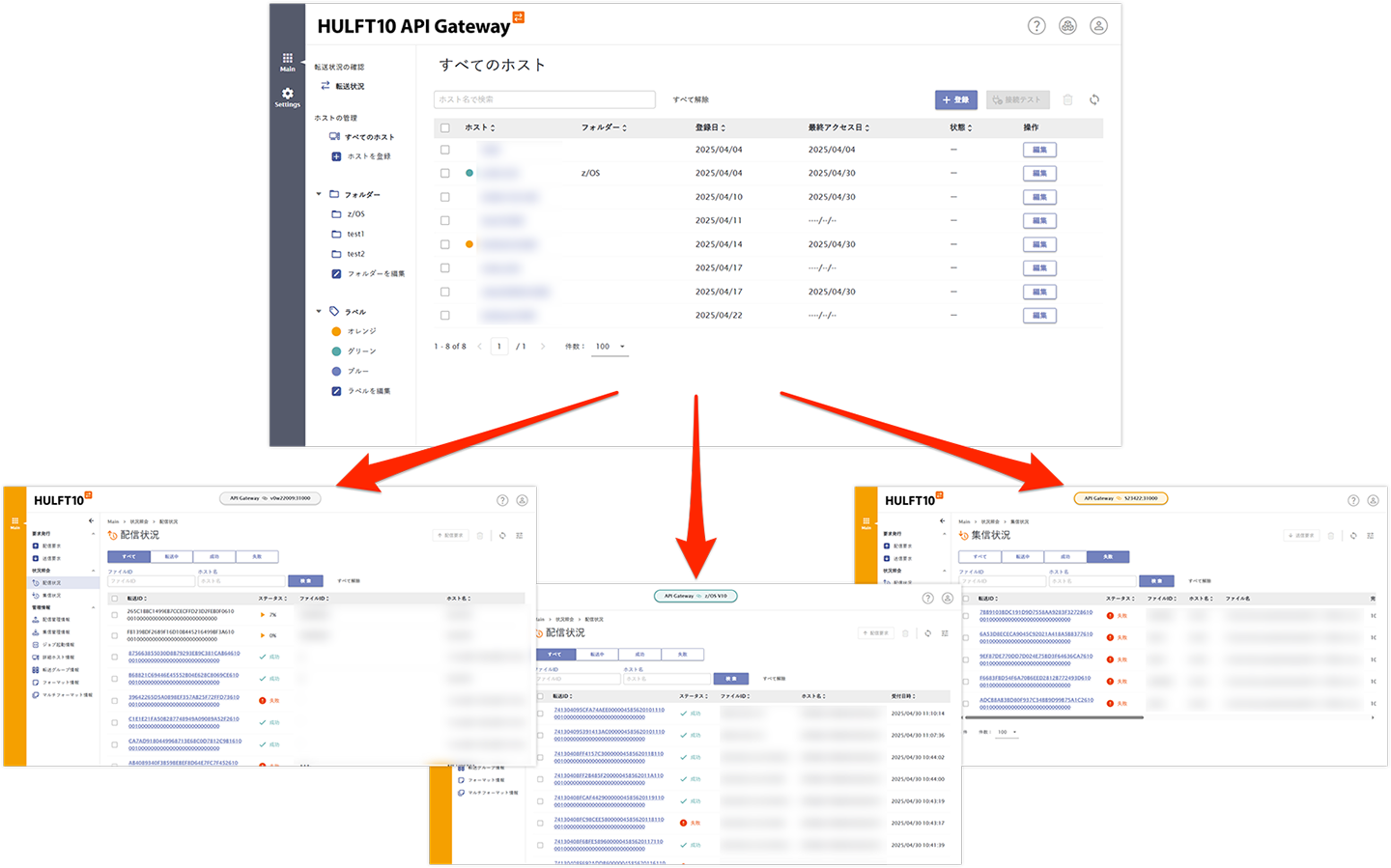
- Display multiple HULFT simultaneously in browser tabs
- The host name display area at the top reflects the color set in the label.
Feature 3: Monitor the transfer status of multiple HULFT at once
You can check the transfer status of multiple registered HULFT on one screen.
When a problem occurs, you can eliminate the need to check each HULFT instance each time, making it easier to track information and deal with the problem.
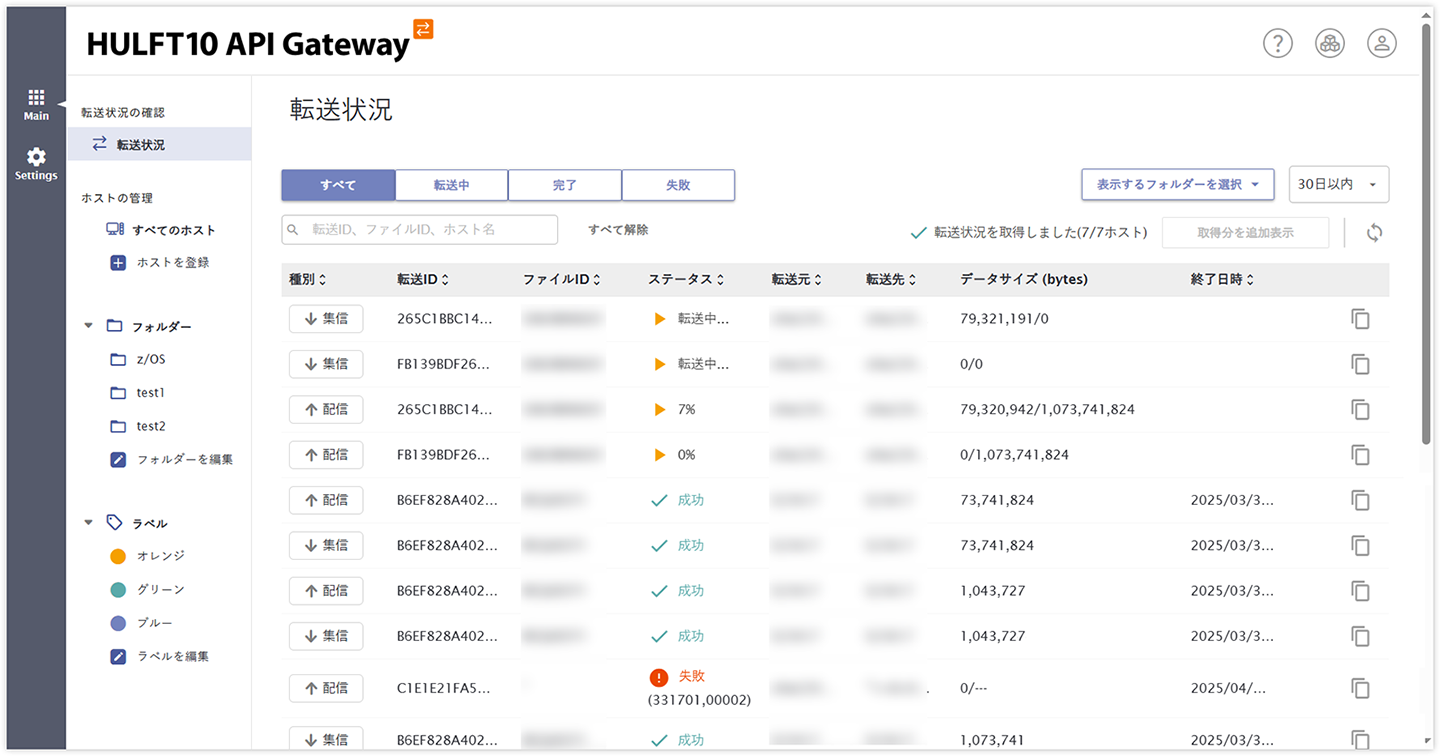
- You can filter by transfer status: transferring, completed, or failed.
Download trial version
You can download the trial version from my HULFT (user registration required).
After logging in, select "Download trial version" from the menu on the left.
HULFT 10
API Gateway introduction materials
This is a product introduction document specifically for HULFT 10 for API Gateway. It introduces detailed features, use cases, pricing, and more.