HULFT Short Stories
Vol.7 Before you start analyzing data! How can you easily process data into a usable form?
-

-
happy new year.
My name is Okazaki and I am in charge of HULFT seminar.
How did you all spend the New Year holidays?
Whether you were able to get together with your family for the first time in a while or went on a trip abroad, I'm sure everyone enjoyed themselves, but for me, the happiest moment is when I take my time to eat ozoni.
We will continue to work hard to bring you HULFT short stories that you can enjoy this year as well, so we hope you will continue to support us.
Well, for the first HULFT story of the year, I would like to change the topic a little from file transfer.
This may be a bit sudden, but what is the purpose of file transfer in your work?
- Business file sharing between servers and locations
- Collecting logs from a running system
The reasons vary depending on the customer, but for many, the goal is not to transfer files in and of itself, but to collect and compile the data and then use it for analysis.
Nowadays, the use of big data is increasing, and there may be cases where you want to analyze data in conjunction with BI tools.
However, in order to aggregate and analyze data, it may be necessary to process the collected data into a usable form.
According to AWS (Amazon Web Services), it is said that processing data before analysis accounts for 70 to 80% of the total effort required for data utilization.
In this HULFT anecdote, we will introduce a way to easily create such data processing using the HULFT Family product "DataMagic"!
-

-
First, let's look at some examples of data that need to be organized.
Pre-conversion data
| Company Name | post code | prefectures | address |
|---|---|---|---|
| Saison Technology Co., Ltd. | 212-0058 | Tokyo | 3-1-1 Higashi-Ikebukuro, Toshima-ku |
| Saison Technology Co., Ltd. | 212-0058 | Tokyo | 3-1-1 Higashi-Ikebukuro, Toshima-ku |
| Saison Shokai Co., Ltd. | 101-8443 | Tokyo | 2-3 Kanda Nishikicho, Chiyoda-ku |
| Saison Sangyo Co., Ltd. | 810-0042 | Fukuoka Prefecture | 1-16-10 Akasaka, Chuo-ku, Fukuoka City |
| Saison Trading Co., Ltd. | 135-0121 | Tokyo | 2-3-1 Daiba, Minato-ku |
First, let's look at the "Company Name" section...
You can see that the spelling of "Kabushiki Kaisha" varies, with some being "Kabushiki Kaisha" and others being "(Kabushiki Kaisha)."
If you just want to view it as a list, this state may be fine.
However, if you want to aggregate this data or even compare it with other files and aggregate it, this won't work.
It is necessary to standardize the inconsistent formats into a usable form.
If you try to process this data without using a tool, you would have to make manual edits or, in the case of Excel, program it using macros.
But there seem to be a number of challenges.
For example, when it comes to manual correction, it seems like it would be possible to correct just a few pieces of data quickly, as shown above, but what happens when there are hundreds or thousands of pieces of data?
It's a little mind-boggling...
Human error can occur, and correcting mistakes takes time, creating efficiency issues.
Even if macros are used, there is a possibility that when maintaining or modifying a program, it may become personalized and only the creator can understand it.
By using "DataMagic", you won't have to worry about such issues and can easily create processing by operating the GUI.
Let me give you a quick idea of how the processing works.
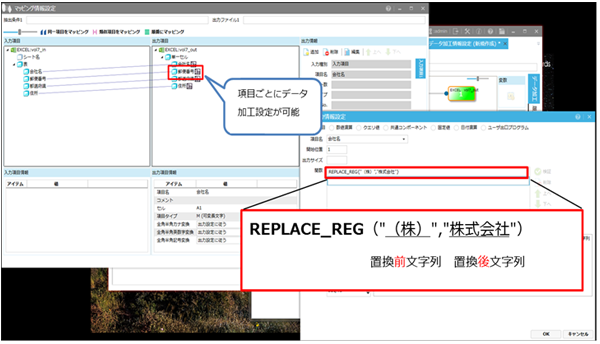
With DataMagic data processing, you can process data item by item by using functions as shown above.
"REPLACE_REG" is a string replacement function.
Other than that,
- Date format conversion
- Item Type Conversion
- Get the number of bytes of data
- Extracting a string from a specified position
You can set various processing options, such as:
In addition, full-width/half-width conversion of alphanumeric characters can be easily set with just one click.
The execution result looks like this.
Converted data
| Company Name | post code | prefectures | address |
|---|---|---|---|
| Saison Technology Co., Ltd. | 212-0058 | Tokyo | 3-1-1 Higashi-Ikebukuro, Toshima-ku |
| Saison Technology Co., Ltd. | 212-0058 | Tokyo | 3-1-1 Higashi-Ikebukuro, Toshima-ku |
| Saison Shokai Co., Ltd. | 101-8443 | Tokyo | 2-3 Kanda Nishikicho, Chiyoda-ku |
| Saison Sangyo Co., Ltd. | 810-0042 | Fukuoka Prefecture | 1-16-10 Akasaka, Chuo-ku, Fukuoka City |
| Saison Trading Co., Ltd. | 135-0121 | Tokyo | 2-3-1 Daiba, Minato-ku |
The "Address" item is also written in a different way (block number and hyphen) and the numbers are written in different capitals and lowercase.
With DataMagic, this formatting can be easily standardized by simply setting the GUI.
Furthermore, DataMagic has commands for executing data processing, so it can also be integrated with HULFT.
HULFT has a job linking function, so by registering a data processing execution command in a job, it is possible to automatically process data when it is transferred by HULFT.
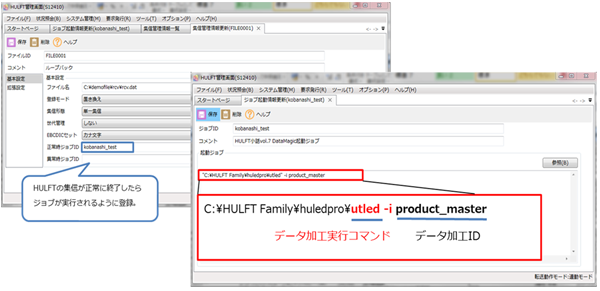
With DataMagic, you can automatically perform file transfer to make use of your data with just a few settings.
The more complex the number of data processing, the more difficult it is to deal with manual and programming.
The work of aggregating and analyzing data is not an end in itself, but the most important part is the subsequent "utilization".
Leave the complex, time-consuming aggregation and analysis to a tool like DataMagic, freeing up man-hours to make the most important data use.
In addition to data processing, DataMagic is also good at file format conversion (CSV⇔format (fixed length) conversion, etc.) and code conversion.
-

-
I won't go into detail about the features in this short story, but here's what you can do:
If you are even slightly interested, please take a look at the product introduction page.
Click here for "DataMagic product details"
Starting this month, we will also be holding hands-on seminars where you can experience creating data processing using DataMagic.
Even if you are a first-time user, you will be able to experience DataMagic 's operation and the steps for creating processes, so please feel free to join us even if you would like to give it a try!
Click here for the "DataMagic Product Introduction Hands-on Seminar: Solving Data Processing Issues"
Next time, we will bring you some tips on how to make the most of HULFT!
Please look forward to it!
Inquiry
We look forward to receiving your opinions, comments, and letters regarding this column.
Contact:hulseminar@hulft.com
Experience HULFT Products.
Product trial use
- We offer a trial version of HULFT Products. You can use it for 60 days. We also provide support for 90 days from the time of application. We will back you up from installation to actual use. Please feel free to apply.
- Try the product here
Seminar (pre-registration required/free)
- We offer a variety of seminars, from those that answer questions like, "What kind of product is HULFT Products? What functions does it have?" to hands-on seminars where you can actually operate HULFT on actual equipment to gain a better understanding of the product. Please come and join us!
- Apply for the seminar here