

Electronic Signature
"Electronic Signature"
This glossary explains various keywords that will help you understand the mindset necessary for data utilization and successful DX.
This time, we will explain about electronic signatures, which often need to be taken into consideration when going paperless in business, and consider why they are necessary and what should be considered when using electronic signatures.
What is an electronic signature?
An electronic signature is a digital signature that functions in electronic data in a similar way to a signature or seal on a paper document.
Digital data can easily be completely copied or rewritten. While this characteristic brings great convenience, it also makes it difficult to verify that a document is an original or who created it. Electronic signatures are used to solve this problem by providing digital data with the same functionality as signing or stamping paper documents.
If we were to work towards going paperless
Recently, many companies have been promoting paperless initiatives that utilize IT to eliminate paper-based work. With the shift to teleworking since the COVID-19 pandemic, some people may have no choice but to go paperless.
For example, if your company's operations were still heavily reliant on paper documents and you were assigned to promote a paperless system, what would you do? First, you would probably focus on introducing some kind of digital tool and encouraging employees to use it.
For example, I think that the first steps that are often taken are to encourage the use of Excel and email instead of fax, to introduce cloud services such as kintone so that work that was previously done with paper documents can be done with electronic data on the cloud, and to try using scanners and OCR software to digitize and eliminate existing paper documents.
Let's say that efforts are progressing well and a paper-based culture is changing. It would be ideal if we could continue along this path and become completely paperless, but in many cases this is not the case. Even when everyone wants to stop using paper, there are still troublesome paper documents that are difficult to get rid of, such as contracts that require signatures and seals.
Why is a signature or seal required?
Why are signatures and seals necessary? Signatures and seals are used to clarify who created the document or to clarify that the person agreed to the contents of the document. They are not used as a means of recording and storing data on paper, but to fulfill a different function.
Paper itself can be digitized using a scanner. If that's the case, then digitizing paper-based transactions as they are would seem to allow signatures and seals to be captured as well. However, in digital data, seals are merely image data. It's easy to copy and paste them onto other documents, erase the seal, replace it with another seal, or even tamper with the content of the document itself.
Although it is not impossible to falsify or forge paper documents, it is not easy. It is particularly difficult to falsify documents without leaving any evidence. For this reason, paper documents can be said to be a means that can be expected to have a certain degree of reliability for the purpose of clarifying and recording who wrote what document, when, and who agreed to what. For this reason, paper documents that are properly signed and stamped can serve as legally valid evidence of an agreement.
In other words, paper documents and signatures are quite excellent methods, and rather than simply trying to eliminate paper, it may even be possible to achieve good results by using them in conjunction with digital data. Perhaps the situation where "troublesome paper documents that are difficult to get rid of remain" is even an excellent situation in which the advantages of paper and digital data coexist.
Go paperless with "electronic signatures"
Even if we understand that paper documents have their advantages, that doesn't mean that there will be situations where a paperless system is desirable. For example, even if a remote work environment is established, it is common for people to come to the office "only" to receive invoices and contracts that have arrived at the company, or to go to the head office "only" to get the manager's seal. This is not a very efficient situation.
Or, if we truly want to move towards a paperless world, we must take some measures to enable the functions of signatures and seals to be performed using digital data alone. And the means to perform such functions is the "electronic signature."
Digital data can be "signed"
Just like stamping a seal, you can leave a record of "I signed" in the digital data.
You can verify that it has not been tampered with
I can confirm that the contents of the document have not been altered since I signed it.
What can be clarified is "when did it come from"?
It may be possible to check when the signature was made and how long the digital data has been around.
Something that cannot be denied later
If you cannot refute the statement, "I don't know about such a document, and I don't remember agreeing to it," then it will not function as a means of enforcing a contract. As long as the data exists, you need to be able to assert that you must have agreed to this content.
How to achieve this
Digital data can be copied identically to the original and can be easily modified. The above functions cannot be achieved by simply storing the contents of a document as digital data; some kind of ingenuity is required. There are various ways to achieve this, but the method using public key cryptography is known to be the basic mechanism.
What is public key cryptography?
Public key cryptography is characterized by the pairing of encryption keys: a "private key" that only the individual possesses and a "public key" that is made public to everyone. Public key cryptography technology is used in a wide range of applications, and is particularly essential as a technological foundation for achieving safety and security.
To encrypt data, a key pair is used to encrypt with a public key and decrypt with a private key, but when used for electronic signatures, this key pair is used as a means of signing and verifying.
Public key cryptography digital signature
When creating an electronic signature, the "digital data" (hash value) to be signed is encrypted (signed) with a private key that only the person possesses. Because a private key is used, only the person can perform this process. However, anyone can "decrypt and verify" the encrypted (signed) data using a "public key" that is made publicly available.
This system allows us to realize a system that "only person A can sign" and "anyone can verify that the data was signed by person A," and it also realizes the basic functions of signing and stamping. Furthermore, this system can detect that the content of the digital data has not been changed after it has been signed, so it can also prevent tampering after signing.
In reality, there are many problems and it is difficult
The above is a very simple explanation of electronic signatures using public key cryptography. In actual electronic signature systems, there are various issues that need to be resolved, such as how to verify that Person A's public key is not a fake, and various mechanisms are put in place to address each of these. Furthermore, using a public key is not the only technical method. We won't go into detail here, but electronic signatures are completely different from simply pasting an image of a seal into a Worddocument; they are an advanced technology that uses encryption and other techniques.
Furthermore, compared to the system of signing and stamping paper, digital data is more susceptible to tampering, and there were doubts as to whether it was as trustworthy as paper. However, considering that signatures and stamps can be forged if one so desires, electronic signatures, which are theoretically secured using cryptographic technology, can be seen as a means of achieving a higher level of safety and security in conducting business safely than in the paper era, if used properly.
"Digital Signatures" in Reality
I hope you can imagine that electronic signatures are important not only for promoting remote work and paperless operations, but also for digitizing contract-related paperwork, which is essential in business.
So, if you want to use electronic signatures in your company, you won't have to study public key cryptography and implement a system. Instead, you'll likely research existing applications and cloud services related to electronic signatures and give them a try.
You already use software that allows you to digitally sign documents.
In fact, you're probably already using software that allows you to create electronic signatures. Microsoft Office, which most people probably use, has an electronic signature function, and Adobe's PDF-related products, such as Adobe Reader, also have the ability to add electronic signatures to PDFs. For example, the following example shows what happens when you try to add an electronic signature to an Excel file using Excel, which you probably use every day.
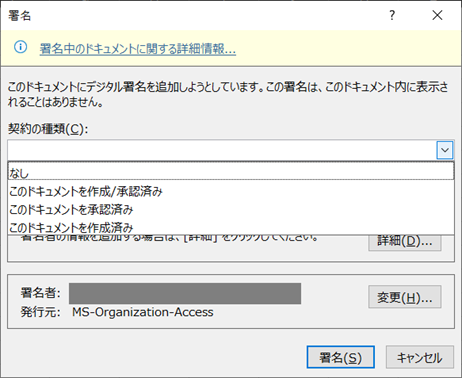
Let's recall what we've understood so far. The essence of this is that it's not like pasting an image file of a seal or signature into Word, but rather using a signature or seal to indicate "who created the document" or "who agreed/approved" it. Therefore, this function allows you to add (invisible) electronic data that indicates "I created this document," "I approved it," or "I created and approved it."
There are various cloud services
Most situations requiring electronic signatures involve the exchange of documents between organizations, such as contracts and purchase orders. In such cases, the exchange is often conducted over the Internet, making it easier to use cloud services related to electronic signatures.
There are currently many electronic signature services available, but at the time of writing, the most commonly used service in Japan is "CloudSign" provided by Bengo4.com, while "DocuSign" provided by DocuSign is widely used worldwide.
But business doesn't revolve around e-signatures
You research the products and services of these companies, decide which one to adopt for your company, and then say, "We've decided to adopt this one, so please use this service from now on." That's basically how adoption works, but in reality, things get more complicated because on-site operations don't revolve around e-signatures.
This text begins with a story about the struggles of a workplace trying to go paperless. Let's say you want everyone in a paper-filled workplace to start using IT, and finally, kintone is being used effectively. It's confusing when you're told to start using IT, primarily with the electronic signature service "Sign Something."
First of all, each workplace has its own business processes, and IT utilization is based on those processes. It is often important to consider how to use electronic signature services while taking these individual circumstances into account. Furthermore, the use of electronic signatures should be devised based on the business processes involved, such as at what stage in each workplace's business flow and in what form it would be most convenient and effective to implement them.
When dealing with contracts, each business partner's circumstances are different. Company A and Company B may use different electronic signature services. There may be times when the standard electronic signatures used differ depending on the country, region, or industry, making it difficult to do anything about it.
Other requirements, such as compliance with legal regulations, must also be considered (e.g., the Electronic Bookkeeping Act).
As I write this, there is a lot of public discussion about how to respond to the Electronic Bookkeeping Act, a law that allows financial books and documents, which previously required most of them to be stored on paper, to be stored electronically.
Have you ever wondered why accounting people still rely on paper, even with all the advances in IT? The reason is that due to legal reasons, it is difficult to store data electronically, and they have no choice but to store it on paper. Companies need to leave evidence to the tax office and accounting audits that they are properly handling financial matters, and while it is difficult to commit fraud with signatures and seals on paper documents, there are some questionable aspects to electronic data.
However, as we are now in the digital age, new laws have been put in place that assume that electronic data will be used in the future, and the tax office has now decided that as long as the rules set out in the Electronic Bookkeeping Act are followed, it is okay for people to switch to storing data electronically.
For companies, legal matters don't just involve tax-related matters. Each department has its own set of important requirements to adhere to: the accounting department must be mindful of financial matters, the marketing department must be mindful of laws related to personal information protection, and the manufacturing and design departments must comply with product safety standards. Electronic signatures naturally play an important role in each of these departments, but the tasks each department must fulfill will likely differ.
Electronic signatures play an active role in "connecting" technology
There are many cloud services for electronic signatures, and each department has different IT circumstances and uses different cloud services. You may want to use a different electronic signature service for each business partner. Each department may have legal requirements, and naturally, these circumstances must be taken into consideration. Then, you need to consider in which parts of your business flow electronic signatures will be most effective.
This may seem like a difficult situation. Moreover, we are living in an age of change and uncertainty. As business changes, the things that IT needs to do also change rapidly. To properly respond to these changes, you would need highly skilled engineers to create a detailed system in-house, which may seem difficult to do in-house.
However, even if there are no highly skilled IT engineers, there are ways to successfully utilize IT, including electronic signatures, by having the workplace itself utilize IT."EAI "or" ETL"," iPaaS" called "DataSpider" and "HULFT SquareThese are technologies that connect things. By utilizing this, you can smoothly and efficiently implement IT that utilizes electronic signatures, taking into consideration various circumstances.
Can be used with GUI only
Unlike regular programming, there is no need to write code. By placing icons on the GUI and configuring settings, you can achieve integration processing with a wide variety of systems, data, and cloud services.
Being able to develop using a GUI is also an advantage
No-code development using only a GUI may seem like a simple compromise compared to full-scale programming. However, being able to develop using only a GUI allows on-site personnel to take the initiative and work on the project themselves.
The people who understand the business best are the people on the front lines, and it can be said that having these "people who know best" themselves be able to steadily create what needs to be achieved in terms of cloud adoption and utilization, data utilization, and business automation is superior to a situation where development cannot be carried out without explaining things to engineers and asking them for help every time something needs to be done.
Full-scale processing can be implemented
There are many products that claim to allow development using only a GUI, but some people may have a negative impression of such products as being too simple.
It's true that tools that advertise themselves as easy to use often lead to problems like "it's easy to create things, but you can only do simple things," "when I tried to execute a full-scale process, it couldn't process and crashed," or "it didn't have the high reliability or stable operation capacity to support business operations, which caused a lot of trouble."
"DataSpider" and "HULFT Square" are easy to use, but they also allow you to create processes at the same level as full-scale programming, and have the same high processing power as full-scale programming, as they are internally converted to Java and executed, and have a proven track record of supporting corporate IT for many years. They combine the benefits of "GUI only" with full-scale capabilities.
No need to operate in-house as it is iPaaS
DataSpider can be operated securely on a system under your own management. With HULFT Square, a cloud service (iPaaS), this "connecting" technology itself can be used as a cloud service without the need for in-house operation, eliminating the hassle of in-house implementation and system operation.
Related keywords (for further understanding)
- EAI
- It is a concept of "connecting" systems by data integration, and is a means of freely connecting various data and systems. It is a concept that has been used since long before the cloud era as a way to effectively utilize IT.
- ETL
- In the recent trend of actively working on data utilization, the majority of the work is not the data analysis itself, but rather the collection and preprocessing of data scattered around, from on-premise to cloud. This is a means to carry out such processing efficiently.
- iPaaS
- A cloud service that "connects" various clouds with external systems and data simply by operating on a GUI is called iPaaS.
Are you interested in "iPaaS" and "connecting" technologies?
Try out our products that allow you to freely connect various data and systems, from on-premise IT systems to cloud services, and make successful use of IT.
The ultimate "connecting" tool: data integration software "DataSpider" and data integration platform "HULFT Square"
"DataSpider," data integration tool developed and sold by our company, is a "connecting" tool with a long history of success. "HULFT Square," a data integration platform, is a "connecting" cloud service developed using DataSpider technology.
Another feature is that development can be done using only the GUI (no code) without writing code like in regular programming, so business staff who have a good understanding of their company's business can take the initiative to use it.
Try outDataSpider/ HULFT Square 's "connecting" technology:
There are many simple collaboration tools on the market, but this tool can be used with just a GUI, is easy enough for even non-programmers to use, and has "high development productivity" and "full-fledged performance that can serve as the foundation for business (professional use)."
It can smoothly solve the problem of "connecting disparate systems and data" that is hindering successful IT utilization. We offer a free trial version and online seminars where you can try it out for free, so we hope you will give it a try.
Why not try a PoC to see if "HULFT Square" can transform your business?
Why not try verifying how "connecting" can be utilized in your business, the feasibility of solving problems using data integration, and the benefits that can be obtained?
- I want to automate data integration with SaaS, but I want to confirm the feasibility of doing so.
- We want to move forward with data utilization, but we have issues with system integration
- I want to consider data integration platform to achieve DX.
Glossary Column List
Alphanumeric characters and symbols
- The Cliff of 2025
- 5G
- AI
- API [Detailed version]
- API Infrastructure and API Management [Detailed Version]
- BCP
- BI
- BPR
- CCPA (California Consumer Privacy Act) [Detailed Version]
- Chain-of-Thought Prompting [Detailed Version]
- ChatGPT (Chat Generative Pre-trained Transformer) [Detailed version]
- CRM
- CX
- D2C
- DBaaS
- DevOps
- DWH [Detailed version]
- DX certified
- DX stocks
- DX Report
- EAI [Detailed version]
- EDI
- EDINET [Detailed version]
- ERP
- ETL [Detailed version]
- Excel Linkage [Detailed version]
- Few-shot prompting / Few-shot learning [detailed version]
- FIPS140 [Detailed version]
- FTP
- GDPR (EU General Data Protection Regulation) [Detailed version]
- Generated Knowledge Prompting (Detailed Version)
- GIGA School Initiative
- GUI
- IaaS [Detailed version]
- IoT
- iPaaS [Detailed version]
- MaaS
- MDM
- MFT (Managed File Transfer) [Detailed version]
- MJ+ (standard administrative characters) [Detailed version]
- NFT
- NoSQL [Detailed version]
- OCR
- PaaS [Detailed version]
- PCI DSS [Detailed version]
- PoC
- REST API (Representational State Transfer API) [Detailed version]
- RFID
- RPA
- SaaS (Software as a Service) [Detailed version]
- SaaS Integration [Detailed Version]
- SDGs
- Self-translate prompting / "Think in English, then answer in Japanese" [Detailed version]
- SFA
- SOC (System and Organization Controls) [Detailed version]
- Society 5.0
- STEM education
- The Flipped Interaction Pattern (Please ask if you have any questions) [Detailed version]
- UI
- UX
- VUCA
- Web3
- XaaS (SaaS, PaaS, IaaS, etc.) [Detailed version]
- XML
- ZStandard (lossless data compression algorithm) [detailed version]
A row
- Avatar
- Crypto assets
- Ethereum
- Elastic (elasticity/stretchability) [detailed version]
- Autoscale
- Open data (detailed version)
- On-premise [Detailed version]
Ka row
- Carbon Neutral
- Virtualization
- Government Cloud [Detailed Version]
- availability
- completeness
- Machine Learning [Detailed Version]
- mission-critical system, core system
- confidentiality
- Cashless payment
- Symmetric key cryptography / DES / AES (Advanced Encryption Standard) [Detailed version]
- Business automation
- Cloud
- Cloud Migration
- Cloud Native [Detailed version]
- Cloud First
- Cloud Collaboration [Detailed Version]
- Retrieval Augmented Generation (RAG) [Detailed version]
- In-Context Learning (ICL) [Detailed version]
- Container [Detailed version]
- Container Orchestration [Detailed Version]
Sa row
- Serverless (FaaS) [Detailed version]
- Siloization [Detailed version]
- Subscription
- Supply Chain Management
- Singularity
- Single Sign-On (SSO) [Detailed version]
- Scalable (scale up/scale down) [Detailed version]
- Scale out
- Scale in
- Smart City
- Smart Factory
- Small start (detailed version)
- Generative AI (Detailed version)
- Self-service BI (IT self-service) [Detailed version]
- Loose coupling [detailed version]
Ta row
- Large Language Model (LLM) [Detailed version]
- Deep Learning
- Data Migration
- Data Catalog
- Data Utilization
- Data Governance
- Data Management
- Data Scientist
- Data-driven
- Data analysis
- Database
- Data Mart
- Data Mining
- Data Modeling
- Data Lineage
- Data Lake [Detailed version]
- data integration / data integration platform [Detailed Version]
- Digitization
- Digitalization
- Digital Twin
- Digital Disruption
- Digital Transformation
- Deadlock [Detailed version]
- Telework
- Transfer learning (detailed version)
- Electronic Payment
- Electronic Signature [Detailed Version]
Na row
Ha row
- Hybrid Cloud
- Batch Processing
- Unstructured Data
- Big Data
- File Linkage [Detailed version]
- Fine Tuning [Detailed Version]
- Private Cloud
- Blockchain
- Prompt template [detailed version]
- Vectorization/Embedding [Detailed version]
- Vector database (detailed version)
Ma row
- Marketplace
- migration
- Microservices (Detailed Version)
- Managed Services [Detailed Version]
- Multi-tenant
- Middleware
- Metadata
- Metaverse
Ya row
Ra row
- Leapfrogging (detailed version)
- quantum computer
- Route Optimization Solution
- Legacy System/Legacy Integration [Detailed Version]
- Low-code development (detailed version)
- Role-Play Prompting [Detailed Version]
