

MJ+ (standard administrative characters)
"MJ+ (Administrative Affairs Standard Characters)"
This glossary explains various keywords that will help you understand the mindset necessary for data utilization and successful DX.
This time, we will take a look at the data issues that need to be resolved in digital government initiatives and the difficulties of tackling digitalization.
What is MJ+ (Administrative Standard Characters)?
MJ+ (Standard Characters for Administrative Affairs) is a character set that the Digital Agency is working to standardize and develop so that it can be commonly used in the IT systems of government ministries and agencies and local governments.
In the IT systems of Japanese public institutions, there was no standardized, unified character set for handling Japanese data, due to the large number of kanji characters used in personal names, etc. Therefore, efforts are underway to develop a common character set (a list of character shapes such as kanji) from the data used in the existing IT systems of public institutions, and to unify the character sets that were disparate in each system.
Why did MJ+ (Standard Characters for Administrative Affairs) become necessary?
Currently, the Digital Agency is working to "improve the IT systems of Japan's public institutions." A well-known example is the initiative to "digitize what is not yet digitized," such as paper-based administrative procedures (such as abolishing seals), but similarly, efforts are being made to "improve existing IT systems into better IT systems."
An example of the latter initiative is, "Even though we are in the age of cloud computing, the IT systems of Japanese public institutions are not yet fully utilizing it, so let's move towards cloud computing." In addition to cloud computing, there are many other things that need to be done for the IT systems of public institutions, and MJ+ (Administrative Standard Characters) is an initiative being undertaken to solve the serious problem that "there was (in fact) no common foundation for handling kanji across public institutions."
Over 2 million kanji characters in personal names
It may be hard to understand what is meant by saying that there is no infrastructure for handling kanji. When you go to city hall, you normally see printed materials in Japanese, and we use Japanese on our computers and smartphones every day, so it may seem like there are no problems using Japanese on the computer itself. While this is certainly true for everyday use of Japanese, there is a tricky problem with the city hall system. This is the difficult challenge of having to accurately handle kanji in names due to legal requirements.
Computers have only recently become available, and for many years information management in public institutions was still done on a paper-based, handwritten basis. Implementing IT in public institutions meant digitizing handwritten analog information. The problem was that the shapes of kanji characters used in names, which had been written by hand, needed to be respected when implementing IT.
The computers we use every day have about 10,000 Japanese characters stored in them, and we can use these 10,000 common characters to communicate with other computers and smartphones. While 10,000 characters is by no means a small number, it is far from sufficient to meet the need for "accurate handling of kanji characters in names."
Because ordinary Japanese processing capabilities cannot process the kanji used in names required by public institutions, each system in public institutions has been gradually increasing the number of kanji that it can handle, improving its "ability to process kanji used in names." As a result, if you (simply) add up the number of kanji used in names registered in the various IT systems of public institutions, the total number exceeds 2 million.
Not only is there an overwhelming number of characters, but the same kanji for names is registered multiple times, and the characters are registered separately in each system, creating a situation fraught with problems. MJ+ (and its predecessor, MJ) is an initiative aimed at solving this problem by creating a unified character set across government systems.
The history of "making kanji computer-friendly"
Now, I wrote that the number of kanji characters that each system can handle has been gradually increased, but even if we wanted to add a certain kanji character to our smartphones, we couldn't do that. How did they increase the number? Or, you might wonder, why didn't they standardize all the kanji characters from the beginning to avoid this kind of confusion?
Considering the history of how computers have been able to handle kanji, it is easy to understand that there were various circumstances that made this necessary. And while there is a lot of talk these days about the need to move forward with digitization efforts, this may also be something to consider as an example of the difficulties faced in "general efforts to digitize things that have not yet been digitized."
The earliest "computer characters"
Characters are figures written on paper, while computers can essentially only process numbers. The reason we can now use Japanese on computers without any inconvenience is because of the many hard-working efforts that have been made to create an environment that allows Japanese to be used in an environment that can only process numbers.
To enable computers to handle characters, it is necessary to organize and list the "figures drawn on paper" that can be drawn freely. It is also necessary to establish how to link these figures (character shapes) with numerical values on a computer (encoding), and to prepare various peripheral software that processes character strings according to these rules.
Furthermore, early computers were very weak, with very limited data volume and processing power that they could handle, and were therefore of no practical use unless they took into account the realistic limitations of such hardware capabilities.
An example of such a code in the earliest days of computers, "ASCII code," looks like this:
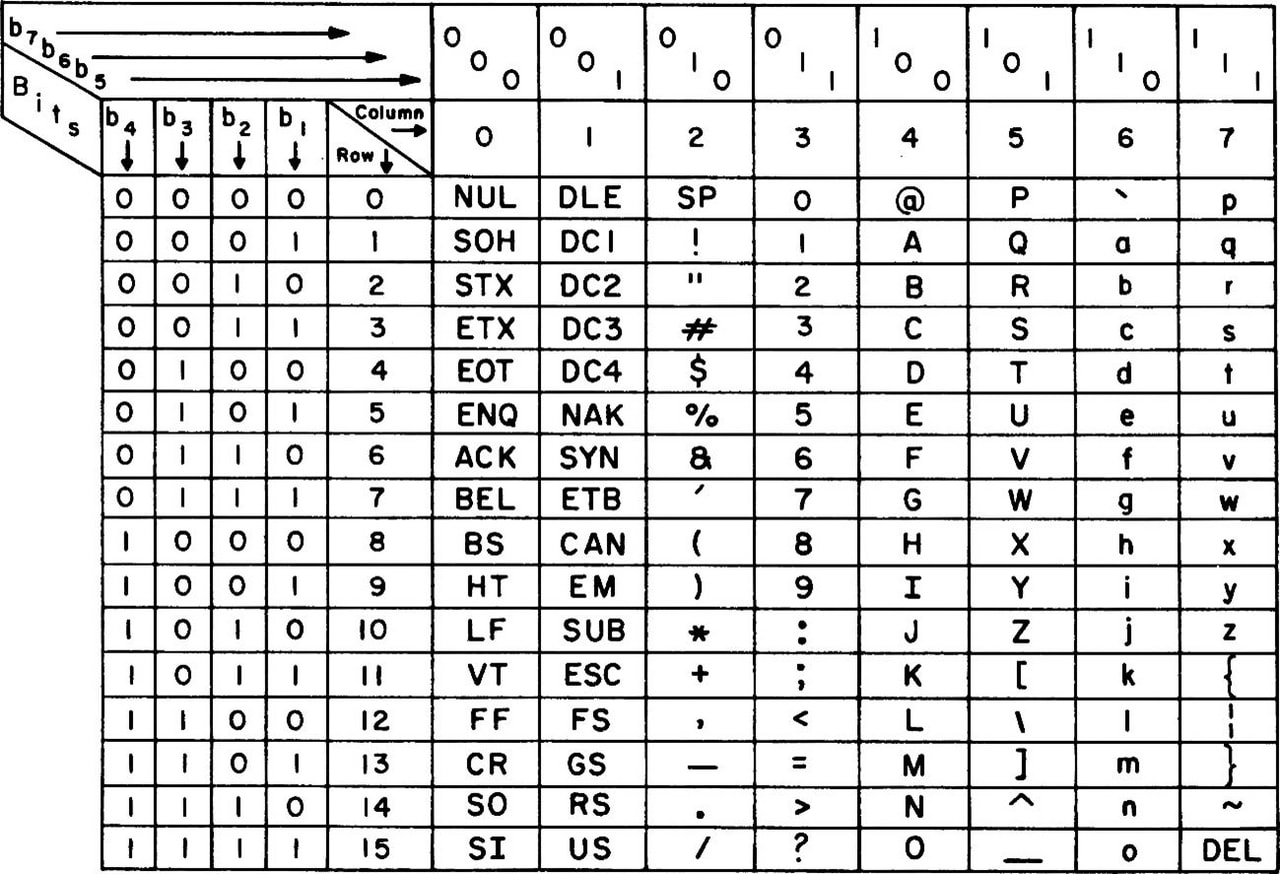
In those days, computers were still very expensive, so it was necessary to save data in units of one bit, and each character was reduced to 7 bits, resulting in 128 different characters. Also, the first 32 characters were control codes for screen control, not for character display.
The creator has his or her own intention, and if there are not enough characters for the purpose, it cannot be used.
Although the ASCII code was created a long time ago, in the 1960s, it contains some "symbol characters that are still familiar to us today." Because the ASCII code is the basis for the character codes currently in use, the "characters selected" there are still in use today. For example, the reason we use the "@ (at sign)" today is probably largely because this character was included in the ASCII code.
On the other hand, ASCII codes are chosen to suit the needs of English-speaking people, and are inconvenient for people in other countries due to a lack of characters. For example, other European countries may need alphabets with symbols (such as Ä, ß, and Ç) found in French and German, or the upside-down question mark symbol (¿) in Spanish, rather than symbol characters like the @ sign. Furthermore, for Japanese people, there are no characters unique to Japan at all.
If 8 bits are used per character, up to 256 characters can be used, so characters needed for the circumstances of each country can be added to the additional 128 characters. With 128 characters, the inconvenience for people in European countries can be temporarily resolved, and in Japan it is now possible to display only katakana (or katakana + hiragana, depending on the environment).
Be able to use kanji on a computer (first level kanji)
As computer capabilities improved, efforts began to be made to "be able to process and display kanji." Just as ASCII codes were created by selecting characters, it was necessary to select and decide on a "list of kanji to display." Furthermore, because the processing power of computers at the time was limited, it was necessary to keep the number of characters to a minimum, and it was also necessary to increase the effectiveness and practicality of a small number of characters.
Therefore, experts gathered in Japan to research the kanji characters that are frequently used by Japanese people, and standardization work was carried out by the Japanese Industrial Standards (JIS). The first step was to support the 2,965 "JIS Level 1 Kanji" characters that were established as a result. For example, the "PC-8801 series," an 8-bit personal computer that was widely used in Japan in the 1980s, was compatible with Level 1 Kanji.
As for the feeling of actually using Level 1 Kanji, I remember it being something like, "Unfortunately, sometimes the kanji I wanted to use couldn't be displayed and I had to change the expression, but basically it didn't cause any major problems when typing sentences in Japanese. In other words, the 2,965 characters were carefully considered and narrowed down, and it was already possible to "write Japanese on a computer" quite reliably. It was a huge improvement from the time when only katakana was available."
The environment in which kanji characters were used for a long time afterwards (Level 2 Kanji characters + Shift-JIS)
As computers entered the 16-bit era, environments supporting up to the "JIS Level 2 Kanji" standardized at the same time as the JIS Level 1 Kanji became widely used. In addition to the 2,965 characters in the Level 1 Kanji, environments that could use an additional 3,390 characters became widespread.
The PC-9801 series, a personal computer that was widely used in Japan during the 16-bit era, was compatible with "JIS Level 2 Kanji," and the combination with "Shift-JIS," which allows for a mix of half-width and full-width kanji characters to be recorded as data using two bytes, became widely used in Japan.
Second-level kanji + Shift-JIS was also adopted for iMode on mobile phones, and continued to be widely used even in the Windows era, so I think you will still see Japanese data in Shift-JIS today.
However, sometimes it was not possible to enter a person's name.
With the second level of kanji, there are fewer problems with not being able to find the kanji you want to use in general use of Japanese (which is why they have continued to be used for such a long time).
However, when it came to kanji for names, there were occasional cases where "necessary kanji were not available." A famous example is the case where the name of former SMAP member Tsuyoshi Kusanagi could not be typed in the second level, so he had to write it as "Kusanagi Tsuyoshi." Some people may remember this, as names could not be typed in kanji on mobile phones at the time. Furthermore, because Kusanagi is a name that is relatively common in places like Akita, it is thought that a kanji that should have been included in the second level was omitted due to a mistake during the selection process.
In addition, the so-called "髙﨑" with a high ladder character and the "?田" with a horizontal bar of different lengths above and below were not included, so they were entered as the normal "Takasaki" or "Yoshida." Or perhaps there was a sense that since it was a computer, it couldn't be helped to use kanji for names.
"External characters"
Especially in the 16-bit era, there was a process called "external character registration" that was carried out when "the necessary kanji characters were not available." For example, if a business partner had a name "Takasaki" from Hashidaka and you wanted to display the correct characters in the output to avoid being rude, you would "add the kanji characters to the system yourself."
- I want to type "Takasaki" but all that comes up is "Takasaki"
- So let's register external characters.
- Add "髙" to your computer as an external character
In other words, the "external characters" were the ones I added to my machine environment as my "own kanji." Incidentally, on the PC-98, kanji fonts were simply 16x16 dots, so I was able to register them simply by typing the dots on the external character registration screen.
However, with this approach, the characters will only be "characters limited to your own machine environment," and you will have simply created your own "personal characters," so any text data that uses them will also become "personal data."
This response would leave you speechless if you were to think about it today. However, back then, there was no internet, and most processing was completed on your own computer, so as long as you could display and print it in your own machine environment (it was common back then to just print it out for the other party and submit it on paper), there was often no practical problem. So, if you didn't have enough kanji, you could somehow manage by "registering them as external characters."
"iMode emoji" is also in the external character area
As an aside, the original "iMode emoji," which are now common around the world, were also implemented as a kind of external characters. Docomo occupied the end of the external character area (originally a private area) of Shift-JIS and used it as an emoji area. In other words, it was a "my-own" character at the carrier level. So, if you registered an external character with the same shape in the iMode emoji position on your PC, you could use Docomo emoji (although the characters were not colored).
Kanji issues in public institutions again
The use of text data in this format of "second-level kanji + Shift-JIS (+ external characters)" began in the 1990s, and I believe it remained mainstream until the late 2010s when Unicode became mainstream.
In 2000, during the Windows era, the "JIS Level 3 Kanji (1,259 characters)" and "JIS Level 4 Kanji (2,436 characters)" were added, standardizing over 10,000 kanji characters, including non-kanji characters. With these additions, it seems that most of the "well-known kanji characters for names that cannot be typed" were also added, and it became possible to type, for example, "Kusanagi," "Takasaki," and "?ta." Furthermore, with the spread of Unicode, an environment in which many of these characters could actually be used began to be established. This is the "environment we currently use" (JIS X 0213:2004).
If there are "not enough characters," "external character registration" has been carried out.
However, 10,000 characters did not cover all the kanji for personal names. Therefore, a similar approach was taken in the IT systems of public institutions, just as when computers ran out of kanji, they would register external characters (although the IT environment was different from that of computers, the fundamental problem of a lack of characters was the same).
In other words, when entering data from paper documents, if it becomes necessary to enter kanji characters for names that are not included in the standard characters, the solution has been to register "external characters." In this way, many kanji characters for names have been added and used. Furthermore, because external characters are registered separately in each system, "custom characters" that can only be processed in each environment are registered.
The "2 million characters" that the Digital Agency is trying to organize is the total number of "extraneous characters" that have been registered in various systems in this way and have increased in number.
2011 initiative: MJ (Text Information Platform)
In such a situation, there are many inefficiencies, such as the inability to even move data smoothly between systems, so efforts have already been made to solve the problem by standardizing characters. Specifically, efforts were made to organize and standardize the characters used in the "IT system related to family registers" and the "IT system for the basic resident register," which are systems that need to correctly handle kanji in personal names (i.e., the main source of the problem).
In 2011, the "MJ (Character Information Infrastructure)" was created, which included approximately 60,000 characters, including the already standardized "JIS Level 1 to Level 4 Kanji characters," as well as organized characters from the family register system and characters from the Basic Resident Register Network.
The characters that have been developed are now available on Unicode, and a font for displaying them on screen (IPAmj Mincho font) has also been developed, making it possible to display 60,000 MJ characters on a regular computer by installing the font.
It was a groundbreaking initiative, but unfortunately, much time has passed since then, and the reality is that we are no longer able to rely solely on MJ characters. Even in the family register system and the Resident Registration Network, non-Japanese characters continue to be used and registered.
MJ+ (standard administrative characters)
The Digital Agency, which was launched in 2021, is once again working on "MJ+ (Standard Characters for Administrative Affairs)" in an attempt to finally resolve the confusion. Based on the MJ characters, the agency aims to confirm, organize, and add missing characters to create a "common character set."
For the time being, approximately 10,000 characters have been added to the MJ characters, bringing the total to approximately 70,000, and the font has also been improved, but there are still difficult situations, and it seems that this does not mean that everything has been solved.
- Cannot be operated with a single font file:
Because the number of characters is so large, it is no longer possible to store all characters in a single font file. Even OpenType, which can handle a large number of characters, has a limit of approximately 60,000. This makes it necessary to split the font into multiple files. - It is now necessary to switch font files for each kanji:
The need for multiple font files means that the computer will treat them as separate fonts. This means that "processing to switch the display font for each kanji character to be displayed is necessary." This behavior is impossible for general applications, making it difficult to use with software other than that modified for MJ+. - It's still unclear whether we can eliminate external characters:
Considering that MJ characters were not able to eliminate external characters, the goal is to finally eliminate external characters this time, but it is still too early to tell whether they will be able to eliminate external characters this time and whether they will no longer need to add characters. In other words, it seems that we cannot rule out the possibility that external characters will not be eliminated or that further changes will be made to MJ+.
Is it really necessary to use so many characters?
Another point that needs to be considered is whether the "vast amount of kanji" that is the premise of such an initiative is really necessary.
For example, it seems there are over 100 registered variations of the character "hemi" in Watanabe, but I think it's debatable whether we really need that many variations. Among the registered character forms, there are surely meaningless variations that arose from typographical errors. Even if it's too rough to standardize everything to just one type of "Watanabe," it's already easy to type "Watanabe," "Watanabe," and "Watanabe" on a regular computer with 10,000 characters.
We have already reached a point where "it cannot fit into a single font file," making it difficult to use MJ+ in general IT systems, and its practicality is in doubt. Even when it comes to a situation where even specialized applications are required, and it is extremely costly just to use it, it seems like a matter for public debate as to whether it is necessary to maintain all the variations of kanji for names.
For example, if the government were to establish standard kanji to be used in public institutions (for example, up to "JIS Level 4 Kanji" or "MJ characters") and prohibit the use of any other kanji in the IT systems of public institutions, the problem would be solved at once.
However, the loss of writing is an irreversible loss of culture.
However, the "character shapes" that have been passed down through handwriting are also part of Japanese culture. If government agencies were to take drastic steps to "standardize," the diversity of kanji for personal names would be lost and would not be passed on to future generations. Furthermore, there are people who feel a sense of identity in the unique kanji they use for their personal names, and for these people, this could become an issue of individual rights and dignity.
Or, if we take the idea of "we should just organize and reduce the number of kanji" a step further, it could lead to the idea that overlap with kanji from outside Japan (such as China and Taiwan) is pointless and that we should unify them. In reality, there are smartphone apps that display kanji in a Chinese-like font even though they are used in Japanese. When using such apps, don't you think, "This is a bit much?" If so, then we too feel a sense of identity in our "unique kanji shapes."
However, whether all 2 million external characters (or all 70,000 characters in MJ+) should be preserved as they are is another matter. With this in mind, we need to consider how we should preserve Japanese kanji.
Alternatively, this question is not one that has a technically correct answer, but rather a question of "how should we think about how kanji should be preserved for the future?", and it is one that can have a variety of possible conclusions.
Technical issues such as data entry and data integration also arise.
In addition to the issue of "which characters to select and keep," which we have discussed so far, there are other issues that must be addressed in order to enable IT systems to handle many kanji characters used in names.
More than just increasing the number of characters is needed
For example, the name "Watanabe" has over 100 variations, such as "Watanabe" and "Watanabe," but these should not simply be registered as separate kanji characters, but as variations of the same character "端." If each character were to be a separate character, it would be difficult to search for someone with the surname "Watanabe" by kanji.
Technically, Unicode already has a feature that allows you to switch the display of "the same kanji but with variations in character shape" (Variation Selector, or IVS: Kanji Variation Sequence), and this feature has been implemented and is available in some applications.
In other words, although the technical foundation is in place, it is still up to humans to decide which kanji to register and what variations to register. There may be cases where kanji for names are unclear about related kanji, or where a kanji cannot be uniquely identified.
A function to search for characters from a large number of kanji characters (such as a dedicated UI) is required.
It is also necessary to create a system environment that allows for realistic data entry and other data-related operations, even when there can be a large number of variations for the same kanji.
For example, if we were to simply use the kanji conversion function we normally use, when we input "Watanabe," more than 100 candidates would appear, making it unrealistic for us to use. We need to develop a UI that allows us to easily select the kanji we need even when there are a large number of kanji for names, and that can efficiently select the character with the intended shape from a large number of kanji for names that only differ slightly in shape. Similar considerations should be required for processes other than data entry (such as searches).
data integration with external systems
Furthermore, a major issue is how to data integration with external systems.
We are entering an era where public services will also be used as digital services, so it will be inevitable to realize various forms of "data integration processing with external systems." Unlike in the past, it is no longer possible to say, "It's okay if we can't integrate digital data because we print it out and hand it over."
Moreover, it is unlikely that the majority of IT systems in Japan will be able to use MJ+ in the future. Even if public institutions' systems become compatible, it is unlikely that many private IT systems, or the computers and smartphones used by the general public, will become compatible. Therefore, it is expected that incompatible environments will continue to be widely used throughout Japan.
If data is sent as is to an external system that cannot use MJ+, there is a possibility that the kanji characters will not be displayed as intended. When data integration, it is necessary to take into consideration the individual circumstances of environments that do not support MJ+. Furthermore, since there are still systems in use in Japan that have been in operation for decades, there is a need to integrate data integration with environments (such as mainframes) that are different from ordinary PCs and smartphones.
In other words, it is necessary to establish data integration process that enables appropriate data conversion and data transfer between the environment using MJ+ and the wide variety of external environments.
⇒Data data integration / data integration platform | Glossary
Problems with data integration within the public sector's IT systems
These kinds of "data integration problems" also occur between IT systems within public institutions. Just because MJ+ is released does not mean that all IT systems and existing data will be compatible from that day onwards.
For the time being, there will likely be a mixture of systems that are not yet compatible and systems that are only partially compatible. Data will likely continue to be a mixture of uncompatible data and data that is only partially compatible and is still being migrated. Similarly, it will be necessary to develop data integration methods that are tailored to the other party's environment.
The process of adapting to MJ+ itself is also a data integration issue
Furthermore, the very process of implementing MJ+ compatibility involves converting data from the old environment into data that is compatible with MJ+, so it can also be said to be a data integration issue.
As we have already discussed, it is unclear whether the issue of kanji in names will finally be resolved in MJ+. If new changes are made to MJ+ in the future, it may be necessary to adjust data integration processing to match the compatibility situation, taking into account which version of MJ+ the IT system (or data) is compatible with.
In addition to the issue of kanji in names, there are other issues that need to be addressed to make data integration more effective.
In order to further advance the use of IT in the world in the future, it will be necessary to realize data utilization across IT systems, and as such, data integration will become increasingly important. MJ+ can be seen as an effort to resolve a major obstacle when data integration data including kanji characters in personal names across IT systems.
In other words, the "problem of kanji in names" that we have discussed so far is just one issue in data integration. There are other differences in the environments and circumstances of IT systems, and it is necessary to create an environment that allows systems to smoothly integrate with each other while taking these into account.
data integration can easily become complicated and confusing
data integration is often developed individually as needed, but as the use of IT progresses, the number of integration processes can increase without you realizing it, and before you know it, you may find yourself in a situation where a large number of integration processes are running that are out of control.In other words, creating data integration itself can make it difficult to maintain data integration.
Furthermore, when working on data integration with a wide range of external systems, it is no longer possible to develop data integration in an orderly manner with a thorough understanding of the circumstances of each IT system and business field in advance. After actually trying to integrate, you may find that there are differences in data formats or ways of thinking that need to be absorbed, and new business initiatives may require changes to data integration, so it is also desirable to be able to quickly and flexibly redesign the integration process.
Furthermore, if a large number of integration processes are created and each is continually modified individually, it can become difficult to understand how they are all integrated. In other words, while it is necessary to continue to improve data integration processes, this can make it difficult to understand the overall data integration.
It will be necessary to develop data integration platform
In other words, this is the same kind of problem that led to the need to develop MJ+ as a result of individual efforts to develop an environment for using kanji for personal names. Just as a common platform is needed for kanji for personal names, a "data integration platform" may be needed to ensure smooth data integration as a whole.
Just as the inability to establish a common character base through MJ+ would hinder the use of IT in public institutions, the inability to effectively implement data integration would also hinder the successful use of IT. So how can we implement data integration platform? You may think that it requires technical skills and is a difficult topic for you.
"Connecting" technology that enables data integration practically and effectively
However, there is a way to efficiently develop and realize such data integration needs using only a GUI."EAI "or" ETL"," iPaaS These are technologies that connect data, such as DataSpider, HULFT Square, and DataMagic.By utilizing this, automatic data linkage processing can be achieved smoothly and efficiently.
Can be used with GUI only
Unlike regular programming, there is no need to write code. By placing and configuring icons on the GUI, you can achieve integration with a wide variety of systems, data, and cloud services.
Being able to develop using a GUI is also an advantage
No-code development using only a GUI may seem like a simple compromise compared to full-scale programming. However, being able to develop using only a GUI allows on-site personnel to proactively work on cloud integration themselves.
The people who understand the business best are the people on the front lines. If they can take into account what kind of considerations are needed for data conversion when data integration and then rapidly create what is needed, that would be superior to a situation where they have to explain things to engineers and ask for help every time something needs to be done.
Full-scale processing can be implemented
There are many products that claim to allow development using only a GUI, but some people may have a negative impression of such products as being too simple.
It is true that things like "it's easy to make, but it can only do simple things," "when I tried to execute a full-scale process it couldn't process and crashed," or "it didn't have the high reliability or stable operating capacity to support business operations, which caused problems" tend to occur.
"DataSpider" and "HULFT Square" are easy to use, but also allow you to create processes at the same level as full-scale programming. They have the same high processing power as full-scale programming, as they are internally converted to Java and executed, and have a long history of supporting corporate IT. They combine the benefits of "GUI only" with the proven track record and full-scale capabilities for professional use.
What is necessary for a "data infrastructure" to successfully utilize data?
Of course, the ability to connect to a wide variety of data sources is necessary, and high processing power is also required as large amounts of data may need to be processed.However, trial and error is often essential when utilizing data, so it is also necessary to be able to create or recreate data integration flexibly and quickly at the on-site level.
Generally speaking, if you want high performance and advanced processing, the tool will tend to be difficult to program and use, while if you want ease of use in the field, the tool will tend to be easy to use but have low processing power and can only perform simple processing.This dilemma may be seen as a trade-off where you have to accept one or the other.
In addition, they must have advanced access capabilities to a wide variety of data sources, especially legacy IT systems such as mainframes and non-modern data sources such as on-site Excel, as well as the ability to access the latest IT systems such as the cloud.
There are many methods that meet just one of these conditions, but to successfully utilize data, all of them must be met. However, there are not many methods for achieving data integration that are both usable in the field and have the high performance and reliability of a professional tool.
No need to operate in-house as it is iPaaS
DataSpider allows you to operate your system securely under your own management.iPaaS) HULFT SquareThis "connecting" technology itself can be used as a cloud service without the need for in-house operation, eliminating the hassle of in-house implementation and system operation.
Related keywords (for further understanding)
- EAI
- It is a concept of "connecting" systems by data integration, and is a means of freely connecting various data and systems. It is a concept that has been used since long before the cloud era as a way to effectively utilize IT.
- ETL
- In the recent trend of actively working on data utilization, the majority of the work is not the data analysis itself, but rather the collection and preprocessing of data scattered around, from on-premise to cloud. This is a means to carry out such processing efficiently.
- iPaaS
- A cloud service that "connects" various clouds with external systems and data simply by operating on a GUI is called iPaaS.
DataSpider trial version and free hands-on
"DataSpider," data integration tool developed and sold by our company, also has ETL functionality and is data integration tool with a proven track record.
Unlike regular programming, development can be done using only the GUI (no-code), without writing any code, and it offers "high development productivity," "full-fledged performance that can serve as the foundation for business (professional use)," and "ease of use that can be used by those in the field (even non-programmers can use it)."
It can smoothly solve the problem of "connecting disparate systems and data," which is hindering not only data utilization but also the successful utilization of various IT technologies such as cloud computing.
We regularly hold free trial versions and hands-on sessions where you can try out the software for free, so we hope you will give it a try.
Glossary Column List
Alphanumeric characters and symbols
- The Cliff of 2025
- 5G
- AI
- API [Detailed version]
- API Infrastructure and API Management [Detailed Version]
- BCP
- BI
- BPR
- CCPA (California Consumer Privacy Act) [Detailed Version]
- Chain-of-Thought Prompting [Detailed Version]
- ChatGPT (Chat Generative Pre-trained Transformer) [Detailed version]
- CRM
- CX
- D2C
- DBaaS
- DevOps
- DWH [Detailed version]
- DX certified
- DX stocks
- DX Report
- EAI [Detailed version]
- EDI
- EDINET [Detailed version]
- ERP
- ETL [Detailed version]
- Excel Linkage [Detailed version]
- Few-shot prompting / Few-shot learning [detailed version]
- FIPS140 [Detailed version]
- FTP
- GDPR (EU General Data Protection Regulation) [Detailed version]
- Generated Knowledge Prompting (Detailed Version)
- GIGA School Initiative
- GUI
- IaaS [Detailed version]
- IoT
- iPaaS [Detailed version]
- MaaS
- MDM
- MFT (Managed File Transfer) [Detailed version]
- MJ+ (standard administrative characters) [Detailed version]
- NFT
- NoSQL [Detailed version]
- OCR
- PaaS [Detailed version]
- PCI DSS [Detailed version]
- PoC
- REST API (Representational State Transfer API) [Detailed version]
- RFID
- RPA
- SaaS (Software as a Service) [Detailed version]
- SaaS Integration [Detailed Version]
- SDGs
- Self-translate prompting / "Think in English, then answer in Japanese" [Detailed version]
- SFA
- SOC (System and Organization Controls) [Detailed version]
- Society 5.0
- STEM education
- The Flipped Interaction Pattern (Please ask if you have any questions) [Detailed version]
- UI
- UX
- VUCA
- Web3
- XaaS (SaaS, PaaS, IaaS, etc.) [Detailed version]
- XML
- ZStandard (lossless data compression algorithm) [detailed version]
A row
- Avatar
- Crypto assets
- Ethereum
- Elastic (elasticity/stretchability) [detailed version]
- Autoscale
- Open data (detailed version)
- On-premise [Detailed version]
Ka row
- Carbon Neutral
- Virtualization
- Government Cloud [Detailed Version]
- availability
- completeness
- Machine Learning [Detailed Version]
- mission-critical system, core system
- confidentiality
- Cashless payment
- Symmetric key cryptography / DES / AES (Advanced Encryption Standard) [Detailed version]
- Business automation
- Cloud
- Cloud Migration
- Cloud Native [Detailed version]
- Cloud First
- Cloud Collaboration [Detailed Version]
- Retrieval Augmented Generation (RAG) [Detailed version]
- In-Context Learning (ICL) [Detailed version]
- Container [Detailed version]
- Container Orchestration [Detailed Version]
Sa row
- Serverless (FaaS) [Detailed version]
- Siloization [Detailed version]
- Subscription
- Supply Chain Management
- Singularity
- Single Sign-On (SSO) [Detailed version]
- Scalable (scale up/scale down) [Detailed version]
- Scale out
- Scale in
- Smart City
- Smart Factory
- Small start (detailed version)
- Generative AI (Detailed version)
- Self-service BI (IT self-service) [Detailed version]
- Loose coupling [detailed version]
Ta row
- Large Language Model (LLM) [Detailed version]
- Deep Learning
- Data Migration
- Data Catalog
- Data Utilization
- Data Governance
- Data Management
- Data Scientist
- Data-driven
- Data analysis
- Database
- Data Mart
- Data Mining
- Data Modeling
- Data Lineage
- Data Lake [Detailed version]
- data integration / data integration platform [Detailed Version]
- Digitization
- Digitalization
- Digital Twin
- Digital Disruption
- Digital Transformation
- Deadlock [Detailed version]
- Telework
- Transfer learning (detailed version)
- Electronic Payment
- Electronic Signature [Detailed Version]
Na row
Ha row
- Hybrid Cloud
- Batch Processing
- Unstructured Data
- Big Data
- File Linkage [Detailed version]
- Fine Tuning [Detailed Version]
- Private Cloud
- Blockchain
- Prompt template [detailed version]
- Vectorization/Embedding [Detailed version]
- Vector database (detailed version)
Ma row
- Marketplace
- migration
- Microservices (Detailed Version)
- Managed Services [Detailed Version]
- Multi-tenant
- Middleware
- Metadata
- Metaverse
Ya row
Ra row
- Leapfrogging (detailed version)
- quantum computer
- Route Optimization Solution
- Legacy System/Legacy Integration [Detailed Version]
- Low-code development (detailed version)
- Role-Play Prompting [Detailed Version]
